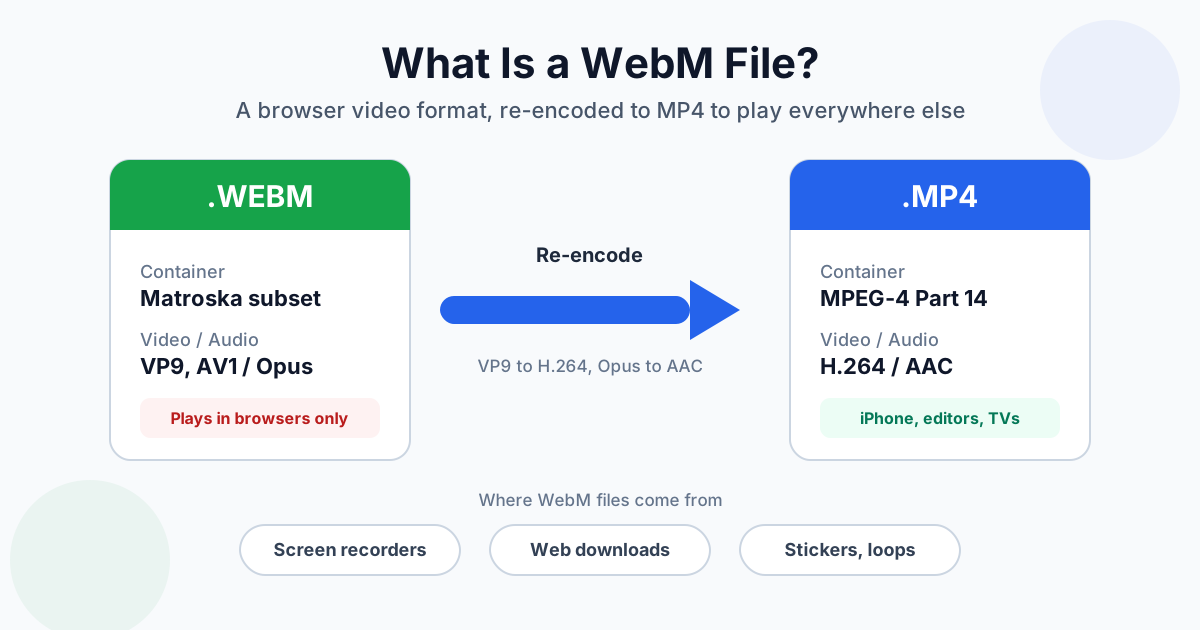
A WebM file is a video in Google's open web format: VP8, VP9 or AV1 video with Opus or Vorbis audio, packed in a container based on Matroska (MKV). Chrome, Firefox and Edge play it without trouble, but iPhone Photos, QuickTime, iMovie and many video editors won't take it. If a .webm won't open where you need it, re-encode it to MP4 with H.264 video. Renaming the file doesn't work.
The quickest way is the WebM to MP4 converter. The rest of this guide covers where WebM files come from, why they misbehave outside the browser, and what the conversion does to size and quality. We measured that on real files.
What Is a WebM File?
WebM is a container. It isn't a codec. Think of it as a box that holds a video track and an audio track, plus timing information. Google launched it in 2010 as a royalty-free format for HTML5 video, and it's been a browser format first ever since.
What can be inside:
| Part | Options in WebM | What you'll usually find |
|---|---|---|
| Video | VP8, VP9, AV1 | VP9 in recordings and downloads, VP8 in older files |
| Audio | Vorbis, Opus | Opus |
| Subtitles | WebVTT text | Rarely used |
| Container | Matroska subset | Always |
Because WebM is a stripped-down Matroska, a lot of MKV tools open it. The limits are deliberate, though. You can't put H.264 or AAC in a WebM, which is exactly why most Apple and TV software ignores it.
Is WebM lossy? In practice, yes. VP8, VP9, AV1, Opus and Vorbis are all lossy codecs, just like H.264 and AAC in an MP4. VP9 and AV1 do have a lossless mode, but recorders and websites don't use it.
Where WebM Files Come From
If you didn't make the file on purpose, it probably came from one of these:
- Browser screen and webcam recorders. Web apps that record your screen or camera usually save whatever the browser produces, and Chrome produces WebM. When we recorded a canvas with Chrome 154's built-in recorder, the file came out as VP9 in WebM
- Downloaded web video. Video sites stream VP9 and AV1, and many download tools save those streams as .webm without converting them
- Animated stickers and short loops. Telegram's video stickers, for example, are WebM files with VP9 video
- Exports from web tools. Some online editors and GIF makers offer WebM as their smallest output
The screen-recording catch. Browser recordings are written while you record, so the file never gets a total duration. Our Chrome test recording reported a duration of "N/A" when we inspected it. In a player, that looks like a video with no length, a seek bar that doesn't work, or a clip that editors refuse to import. Its frames also had no fixed rate: each one was stamped when it arrived, between 32 and 34 ms apart.
Converting the file fixes the duration. After we ran the same recording through the converter, the MP4 reported 3.93 seconds and seeked normally.
Why WebM Won't Open on iPhone, in Premiere or in Final Cut
WebM plays well in browsers and badly almost everywhere else. Here's where it tends to fail:
| Where | What happens | Fix |
|---|---|---|
| Chrome, Firefox, Edge | Plays | Nothing to do |
| Safari | Recent versions play many WebM files | Convert if you need it in other Apple apps |
| iPhone / iPad Photos | Can't save it to the library | Convert to MP4, then save |
| QuickTime Player, iMovie, Final Cut Pro | Won't open or import it | Convert to MP4 (or MOV for Final Cut) |
| Premiere Pro | Support depends on your version, and older versions need a plugin | Convert to MP4 before importing |
| Smart TVs, USB playback | Varies by model | MP4 with H.264 is the safe bet |
| Social apps and messengers | Some accept it, many re-encode or reject it | Upload MP4 |
Premiere Pro and WebM. People search for "how to convert WebM to MP4 in Premiere Pro". The short answer is to do it before Premiere: if your version won't import the file, it can't export it either. Convert first, then import the MP4. For screen recordings, converting also gives the file its missing duration, which fixes the "file has no duration" and broken-scrubbing problems some editors show.
How to Convert WebM to MP4
- Open the WebM to MP4 converter
- Drag in one or more .webm files. Several files go into a queue and convert one after another
- Wait for the conversion. It runs on our servers over an encrypted (HTTPS) connection
- Download each MP4, or use Download all as ZIP for a batch
What you get: an MP4 with H.264 video and AAC audio at 128 kbps. Resolution and frame rate stay as they were, so a 1080p recording comes back at 1080p.
Limits: 100 MB per file without an account, 500 MB on Premium, 1 GB on Premium Plus. Conversion is free without sign-up, with a daily operation limit. Video conversions use more of that limit than document conversions: without an account it covers about five videos a day. Details are on the pricing page, and file handling is described in the privacy policy.
Desktop alternative. If you have FFmpeg installed, this line does the same job:
ffmpeg -i input.webm -c:v libx264 -crf 23 -preset medium -c:a aac -b:a 128k -movflags +faststart output.mp4
For an editor that struggles with the uneven frame timing of a browser recording, add -fps_mode cfr -r 30 to force a constant 30 fps.
Why Renaming or "Copying" Into MP4 Isn't Enough
Changing .webm to .mp4 changes the label, not the contents. Some players will still play the file because they look inside. Photos, QuickTime and TVs won't.
A step up is a remux: copy the VP9 and Opus streams into an MP4 container without re-encoding. It's possible. FFmpeg did it in 0.09 seconds on our 60-second test file, and the MP4 was the same size as the WebM. But it doesn't solve the actual problem. The video is still VP9 and the audio is still Opus, and those are exactly the codecs the software that rejected your WebM can't decode. For real compatibility, the video has to become H.264. That's a re-encode, and it's what the converter does.
Does Converting WebM to MP4 Lose Quality or Change the Size?
It's a lossy-to-lossy re-encode, so in theory a little detail is lost. At the quality setting the converter uses, you won't see it on normal footage. The file size is a different story: it can go either way.
What we measured. We made three 60-second 1080p30 test clips, encoded each one to WebM the way a browser recorder does (VP9 at a fixed 2.5 Mbps, Opus audio), then converted them to MP4 with H.264 at CRF 23 and 128 kbps AAC. The online converter targets a similar quality level, so expect the same direction on your files, not the same bytes. Machine: Intel i9-13900K.
| Test clip | WebM | MP4 | Conversion time |
|---|---|---|---|
| Slides: a still image that changes every 5 seconds | 9.9 MB | 2.4 MB | 2.9 s |
| Busy screen: an animated test pattern, constant motion | 19.7 MB | 36.3 MB | 6.2 s |
| Camera-like: the same pattern with film grain added | 22.1 MB | 58.5 MB | 7.6 s |
Why such different results? A browser recorder spends a fixed bitrate whether the screen is moving or not, so a mostly static recording is full of wasted bits, and the MP4 comes out a quarter of the size. The encoder behind the MP4 works the other way round. It targets a quality level, not a size, so busy or grainy footage gets as many bits as it needs to look right. On the busy clip, the MP4 even scored slightly lower on similarity to the original than the WebM (SSIM 0.962 vs 0.972). It was bigger and no better.
If the MP4 comes out too big, run it through Compress Video and pick a lower bitrate or resolution. For sharing a long screen recording, 720p is usually plenty.
WebM vs MP4 at a Glance
| WebM | MP4 | |
|---|---|---|
| Made by | Google (open, royalty-free) | MPEG / ISO |
| Video codecs | VP8, VP9, AV1 | H.264, H.265, AV1 |
| Audio codecs | Vorbis, Opus | AAC, MP3, others |
| Plays in browsers | Chrome, Firefox, Edge; recent Safari | All |
| Plays on phones and TVs | Inconsistent | Everywhere |
| Opens in video editors | Hit and miss | Everywhere |
| Typical use | Web streaming, browser recordings | Everything else |
If you're choosing a format for your own website, that's a different question with different answers. Video formats for the web covers browser support and <video> fallbacks. For the codec side (VP9 and AV1 against H.264 and H.265), see H.264 vs H.265 vs AV1. And if container versus codec is new to you, video formats explained has the overview.
Other Things You Might Want to Do With a WebM
- Keep only the sound. A recorded talk or a downloaded song doesn't need the picture: extract the audio as MP3
- Go the other way. Turning your own MP4 into a small web video: convert MP4 to WebM
- Put it in an open container that TVs accept. WebM to MKV gives you H.264 and AAC in Matroska, handy for a media-server library
- Share a short loop. WebM to GIF works for chat apps that only animate GIFs
- Old Windows videos too? WMV has the same "plays only in one ecosystem" problem, see how to convert WMV to MP4
Summary
WebM is a perfectly good video format that happens to live in browsers. Outside them, Apple apps, editors and TVs want H.264 in MP4, and only a re-encode gets you there. Expect the MP4 to shrink if the WebM was a mostly static screen recording and to grow if it was busy footage. Either way, the WebM to MP4 converter gives you a file that plays everywhere and knows its own length.
Related Tools
- WebM to MP4 converter: H.264 + AAC MP4 for iPhone, editors and TVs
- Video to MP3: keep just the audio track
- MP4 to WebM: make a web video from an MP4
- Compress Video: shrink the MP4 if it came out large
- WebM converter hub: every WebM conversion in one place