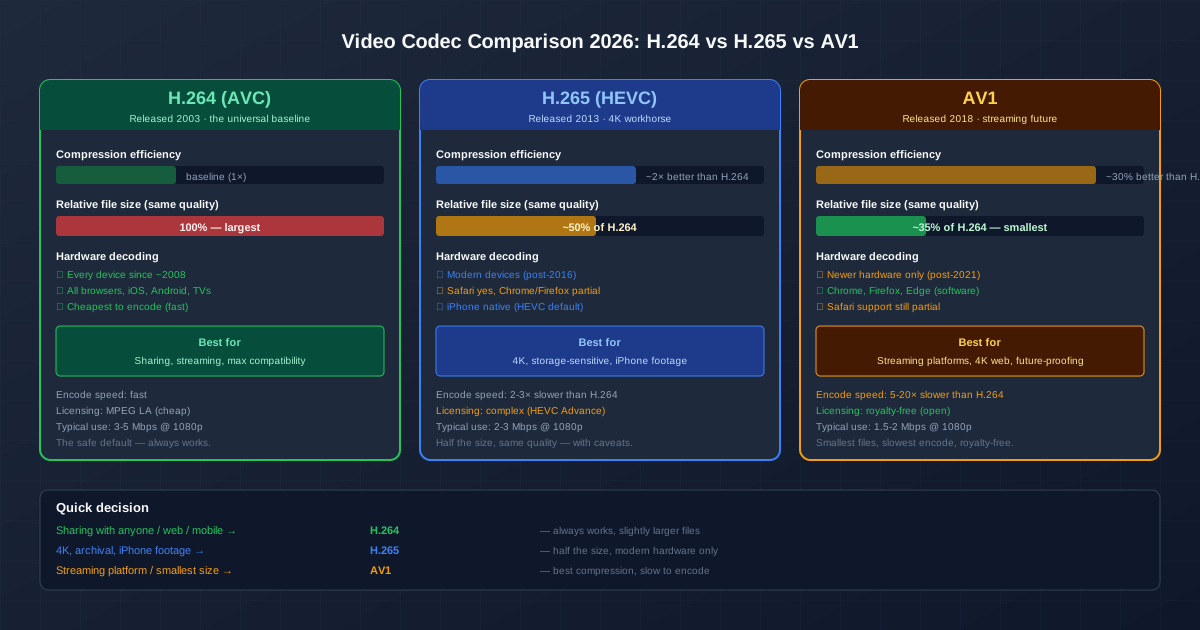
Every video file is compressed with a codec — the algorithm that decides how the raw pixels are squeezed into a manageable size. In 2026, three codecs dominate the landscape: H.264 (AVC), the universal baseline; ** H.265 (HEVC)**, the modern half-size alternative; and AV1, the royalty-free future. Picking the right one for a given file means balancing file size, compatibility, encoding speed, and licensing.
The short version: H.264 is always safe but produces the largest files. H.265 halves the file size but needs modern hardware to decode. AV1 squeezes another 30% out of H.265 and is free to use, but encoding is slow and only the newest hardware decodes it natively. Everything below explains when each trade-off is worth it.
Codec vs Container: A Quick Refresher
Before comparing codecs, separate them from containers. A container (MP4, MKV, MOV, WebM) is the wrapper that holds video, audio, subtitles, and metadata together. A codec (H.264, H.265, AV1, VP9) is the compression algorithm applied to the video stream inside.
The same H.264 video can live inside an MP4, MKV, or MOV — the codec is identical, only the wrapper differs. The container decides where a file plays; the codec decides how efficiently it is stored. For a deeper dive on the container side, see our video formats explained guide. This article focuses on the codec side.
H.264 (AVC): The Universal Baseline
Released in 2003, H.264 — also known as AVC (Advanced Video Coding) — is the codec that made web video work. Every device shipped in the last 15 years decodes it: iPhones, Android phones, Windows and Mac computers, Smart TVs, game consoles, and every modern browser. If a video needs to play anywhere, H.264 is the safest choice.
- Compression efficiency: the baseline against which newer codecs are measured. Roughly 1× efficiency.
- File size: largest of the three at equivalent quality. A 1080p clip at transparent quality runs 3-5 Mbps — about 25 MB per minute.
- Encoding speed: fast. Even older laptops encode H.264 in real time or faster with the x264 software encoder.
- Hardware decode: universal since roughly 2008. Hardware encode is also broadly available, which is why every phone can record H.264 video.
- Licensing: patented by MPEG LA, but license fees are low and broadly covered. This is a non-issue for end users.
Use H.264 when the file will be shared with people whose hardware you cannot predict, embedded in a webpage, sent by email, or played on older equipment. It is the right default for 90% of video tasks.
H.265 (HEVC): Half the Size, Modern Hardware
Released in 2013, H.265 — HEVC (High Efficiency Video Coding) — delivers roughly double the compression efficiency of H.264. A file that takes 5 Mbps in H.264 looks equivalent at 2-2.5 Mbps in H.265. For 4K video, where file sizes balloon rapidly, H.265 is what makes storage and streaming practical.
- Compression efficiency: ~2× better than H.264. A 1080p clip at transparent quality runs 2-3 Mbps.
- File size: ~50% of H.264 at equivalent quality.
- Encoding speed: 2-3× slower than H.264 with the x265 encoder. Hardware encoders (Intel QuickSync, Apple Silicon) are much faster.
- Hardware decode: present on most devices from 2016 onward. iPhones default to HEVC recording since iOS 11.
- Browser support: Safari yes; Chrome and Firefox only on certain OS configurations (Windows needs the paid HEVC Video Extensions).
- Licensing: complex and more expensive than H.264, due to the HEVC Advance patent pool. This slowed browser adoption.
Use H.265 when file size matters more than universal compatibility: 4K recording, archival storage, iPhone footage destined for Apple devices, internal video libraries. For files going to the web or to unknown recipients, fall back to H.264.
AV1: Royalty-Free, Smallest, Slowest
Released in 2018 by the Alliance for Open Media (Google, Netflix, Amazon, Mozilla, and others), AV1 was designed to be both more efficient than H.265 and free of patent licensing fees. It delivers roughly 30% better compression than H.265 at equivalent quality, making it the most efficient mainstream codec available.
- Compression efficiency: ~30% better than H.265, ~2.6× better than H.264. A 1080p clip at transparent quality runs 1.5-2 Mbps.
- File size: the smallest of the three — roughly 35% of the H.264 equivalent.
- Encoding speed: 5-20× slower than H.264 in software. This is AV1's main practical weakness. Hardware AV1 encoders are arriving in the latest GPUs (Nvidia RTX 40-series, AMD RDNA3, Intel Arc) and dramatically close the gap.
- Hardware decode: only on newer hardware (post-2021). Software decode works in Chrome, Firefox, and Edge on modern CPUs.
- Browser support: Chrome, Firefox, Edge, and recent Safari. Coverage is improving rapidly.
- Licensing: royalty-free. This is AV1's strategic advantage and the reason large platforms adopted it for streaming.
Use AV1 when you operate a streaming platform, need the smallest possible files for bandwidth-constrained delivery, or want to future-proof archival video. For one-off sharing today, the slow encode and uneven hardware support usually make H.264 or H.265 the more practical choice.
Side-by-Side Comparison
| Property | H.264 (AVC) | H.265 (HEVC) | AV1 |
|---|---|---|---|
| Released | 2003 | 2013 | 2018 |
| Relative compression | 1× (baseline) | ~2× better | ~2.6× better |
| 1080p transparent bitrate | 3-5 Mbps | 2-3 Mbps | 1.5-2 Mbps |
| Encode speed | Fast | 2-3× slower | 5-20× slower |
| Hardware decode | Universal | Modern (post-2016) | Newest (post-2021) |
| Browser support | All | Safari + partial | Chrome, Firefox, Edge |
| Licensing | MPEG LA (cheap) | Complex (expensive) | Royalty-free |
Picking a Codec by Use Case
| Your goal | Recommended codec | Why |
|---|---|---|
| Share with anyone, unknown device | H.264 | Plays everywhere; compatibility beats size |
| Embed in a webpage (HTML5 video) | H.264 (or H.264 + AV1 fallback) | Universal browser decode |
| 4K recording or archival | H.265 | Half the size; modern hardware decodes it |
| iPhone footage for Apple devices | H.265 (HEVC) | Native record + playback in Apple ecosystem |
| Streaming platform (many viewers) | AV1 (with H.264 fallback) | Lowest bandwidth at scale, royalty-free |
| Email attachment (tiny clip) | H.264 at low bitrate | Fast encode, plays anywhere |
| Editing in a professional NLE | ProRes / DNxHD (not these three) | Editing codecs optimise for random access, not size |
Bitrate Targets Per Codec (1080p)
When you re-encode, the codec and bitrate together decide file size and quality.
These are reasonable starting points for 1080p video; adjust based on content (high motion needs more bitrate than talking-head footage):
| Content type | H.264 | H.265 | AV1 |
|---|---|---|---|
| Talking head (low motion) | 2-3 Mbps | 1-1.5 Mbps | 0.7-1 Mbps |
| General video (mixed motion) | 4-5 Mbps | 2-2.5 Mbps | 1.5-2 Mbps |
| High motion (sports, action) | 6-8 Mbps | 3-4 Mbps | 2-3 Mbps |
| Film / archival (visually lossless) | 10-12 Mbps | 5-6 Mbps | 3.5-4.5 Mbps |
| These are software-encoder guidelines (x264, x265, libaom-av1). Hardware encoders like Apple Silicon's VideoToolbox or Intel QuickSync may need slightly higher bitrates for the same quality. The full walkthrough of bitrate selection lives in our video compression for web guide. |
Why AV1 Is Winning the Platform War
For individual users, AV1's slow encoding is a real downside. For large streaming platforms, the calculation flips: a video is encoded once but streamed millions of times. A 30% reduction in bitrate at the CDN level is worth billions in bandwidth savings, and the royalty-free licence removes a recurring legal cost. That is why YouTube, Netflix, Twitch, and Vimeo have all moved to AV1 for delivery where the client supports it.
For an individual producing a video today, H.264 remains the right default.
Streaming services can afford to encode AV1 once on server farms; you usually cannot.
What About VP9?
Google's VP9 sits between H.265 and AV1 in compression efficiency and is also royalty-free. It is the codec YouTube defaults to for Chrome and Firefox playback, and it is the standard video codec inside WebM. For most non-platform uses, VP9 has been superseded by AV1 — but it remains relevant for web video because of its broad browser support. If you serve video through an HTML5 <video> tag, a common pattern is WebM (VP9 or AV1) with an MP4 (H.264) fallback.
Converting Between Codecs
To switch codecs on an existing file, you must re-encode — there is no lossless path between H.264, H.265, and AV1. The most flexible tool is FFmpeg:
# H.264 → H.265 (halve the size)\nffmpeg -i input.mp4 -c:v libx265 -crf 23 -c:a copy output_h265.mp4\n\n# H.264 → AV1 (smallest, slowest)\nffmpeg -i input.mp4 -c:v libaom-av1 -crf 30 -b:v 0 -c:a copy output_av1.mp4
The -crf (constant rate factor) value controls quality: lower means higher quality and larger files. For H.265, CRF 20-23 covers most use cases. For AV1, CRF 28-32 is typical. The -c:a copy flag copies the audio stream without re-encoding, preserving its quality. For a no-install alternative, use an online video converter .
Note that converting codecs always loses some quality — re-encoding twice (H.264 → H.265 → AV1, say) compounds the loss. Re-encode from the highest-quality source you have, not from an already-compressed file.
Quick Summary
- H.264 — universal compatibility, largest files, fastest encode. The right default for almost everything.
- H.265 — ~50% smaller files than H.264, modern hardware required. Right for 4K, archival, iPhone footage.
- AV1 — another 30% smaller than H.265, royalty-free, but slow to encode. Right for streaming platforms and future-proofing.
- Container vs codec. Container (MP4, MKV, WebM) decides compatibility; codec decides efficiency. They are independent choices.
- Re-encoding loses quality. Always re-encode from the highest-quality source, not from an already-compressed file.
- Browser support matters for web video. H.264 works everywhere; AV1 and VP9 work in Chrome/Firefox/Edge; H.265 is Safari-friendly but patchy elsewhere.