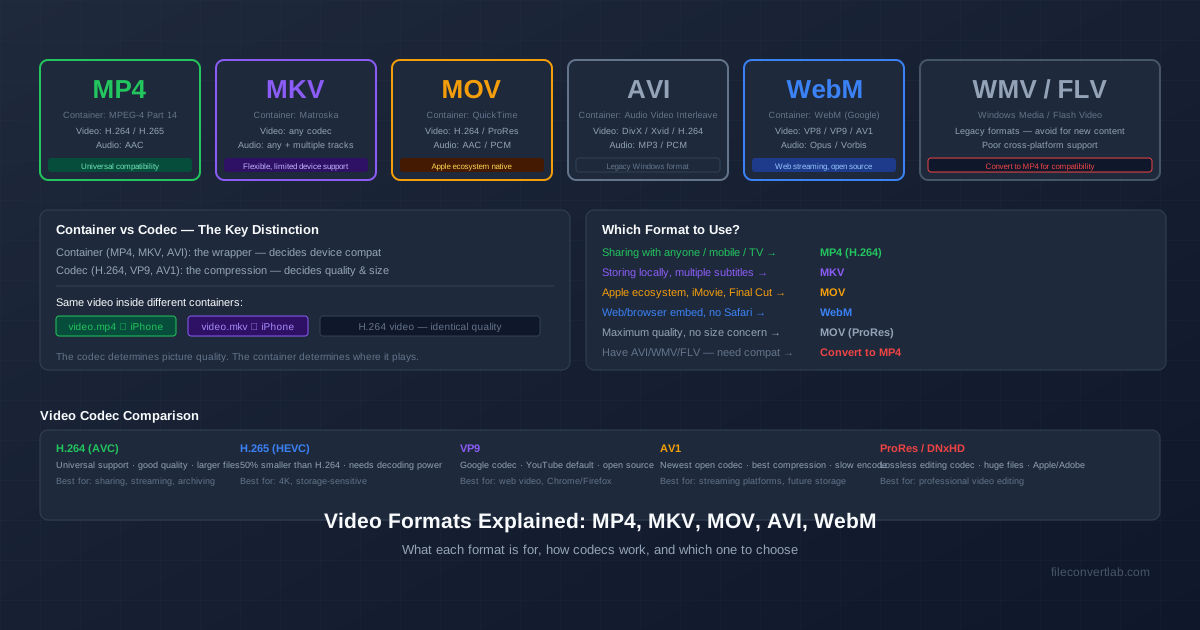
A video file is two things stacked together: a container (the .mp4, .mov or .mkv in the file name) and a codec (the compression inside, such as H.264 or HEVC). The container decides which apps will open the file; the codec decides quality, size and whether the device can actually decode the picture. Once you know which of the two is causing a problem, every "which video format should I use?" question gets easy.
Quick answer if you're in a hurry: MP4 with H.264 video and AAC audio plays on every phone, computer, TV and browser. When in doubt, convert to that — for example with the video converter.
Container vs Codec: The Difference That Explains Everything
Think of the container as a box and the codec as the way the contents were packed. MP4, MOV, MKV, AVI, WMV and WebM are boxes. H.264, H.265 (HEVC), VP9, AV1, AAC and MP3 are packing methods.
A box can hold several streams at once:
- Video — usually one stream (H.264, HEVC, VP9, AV1…)
- Audio — one or more tracks (AAC, MP3, AC3, Opus…), for example several languages
- Subtitles — text or image tracks, if the container supports them
- Metadata — chapters, creation date, rotation, cover art
The same H.264 video can sit in an MP4, a MOV or an MKV, and it looks identical in all three. But an iPhone will open the MP4 and refuse the MKV, because Apple supports the MP4 box and not the Matroska one. That's why a file can "not play" even though the video inside it is perfectly standard.
The codec side — which one compresses best, which one your hardware decodes, what H.265 and AV1 buy you — is a topic of its own. The H.264 vs H.265 vs AV1 comparison covers it in depth.
How to Convert File Types of Videos: Remux or Re-Encode
"Converting" a video means one of two very different operations:
- Remux (container swap) — the video and audio streams are copied untouched into a new box. It takes seconds and loses nothing, but only works when the new container accepts the existing codecs
- Re-encode (transcode) — the video is decoded and compressed again, usually as H.264. It takes longer, loses a little quality, and works for any source
We tried both on a 60-second 640×480 AVI with Xvid video and MP3 audio, on an Intel i9-13900K desktop. Copying the streams into MP4 took 0.04 seconds; re-encoding to H.264 took 1.6 seconds and shrank the file from 16.1 MB to 4.9 MB. A 720p WMV, by contrast, couldn't be remuxed at all — MP4 has no slot for Windows Media Video, so the tool refused with "codec not currently supported in container".
Remuxing is great when the codec is already modern. But a remuxed Xvid-in-MP4 still won't play on devices that don't decode Xvid, so for old files a re-encode to H.264 is the reliable route. Our converters to MP4, MOV and MKV re-encode to H.264 video and AAC audio for exactly that reason: the result plays everywhere, whatever was inside the original.
How to Check Which Format and Codec a Video Uses
The file extension only tells you the container, and sometimes not even that. To see the codec:
- VLC (any OS) — open the file, then Tools → Codec Information (Window → Media Information on a Mac). It lists every stream and its codec
- Mac Finder — select the file and press Cmd+I; "More Info" shows the codecs for formats macOS understands
- Windows — right-click → Properties → Details shows resolution, frame rate and bitrate but not always the codec; the free MediaInfo app shows everything
Not sure what a file even is? The file format identifier checks the first bytes of the file in your browser and recognises MP4/MOV, MKV/WebM, AVI and FLV whatever the extension says.
MP4 — The Universal Default
MP4 (MPEG-4 Part 14) is the format everything plays: iPhone, Android, Windows, Mac, smart TVs, consoles, every browser and every upload site.
- Usual contents: H.264 or H.265 video, AAC audio
- Holds: multiple audio tracks, text subtitles, chapters
- Use it for: sharing, uploading, phones and TVs — the default answer
The reasons not to use MP4 are niche: you need features it handles poorly (many subtitle formats, lossless audio), or an editing app wants something else.
MOV — Apple's QuickTime Format
MOV is the QuickTime container, and MP4 was built on its design, so the two are close relatives. iPhones record .MOV files — HEVC video by default, or H.264 if you set the camera to "Most Compatible". Final Cut Pro and professional cameras also use MOV for ProRes, a large editing codec.
- Usual contents: HEVC, H.264 or ProRes video; AAC or PCM audio
- Use it for: Apple editing workflows
- Watch out for: HEVC MOVs from iPhones stutter or won't open on older Windows PCs
For sharing outside Apple devices, convert MOV to MP4. The MOV to MP4 guide explains how.
MKV — The Flexible Matroska Container
MKV is an open container that accepts nearly any codec and any number of audio and subtitle tracks. That's why films with several languages and subtitle options are so often MKV.
- Usual contents: H.264, HEVC or AV1 video; AAC, AC3, DTS or FLAC audio; SRT or PGS subtitles
- Use it for: a personal library played in VLC, Plex or Kodi
- Watch out for: iPhones, many TVs and most editing apps won't open it
When MKV is the problem, see how to convert MKV to MP4 or go straight to the MKV to MP4 converter. For a feature-by-feature look at the two, read MKV vs MP4.
AVI — Microsoft's 1992 Container
AVI (Audio Video Interleave) was the Windows video format of the 1990s and 2000s: camcorder clips, DivX and Xvid downloads, old screen recordings.
- Usual contents: Xvid, DivX or older codecs; MP3, AC3 or PCM audio
- Use it for: almost nothing new — keep it only for legacy software and hardware
- Watch out for: no sound or no picture on phones and TVs, because the codec inside is unsupported
The fix is covered step by step in how to convert AVI to MP4. If old gear really needs AVI, the reverse is in MP4 to AVI.
WMV — Windows Media Video
WMV is Microsoft's own codec family (WMV9 or VC-1 in most files) inside the ASF container, usually with WMA audio. It came from Windows Movie Maker and Windows Media Player, and it plays natively on Windows only — Macs, iPhones, Android galleries and browsers don't open it.
WMV can't be remuxed into MP4; it always needs a re-encode. The WMV to MP4 converter does that in one step.
WebM — Google's Open Web Format
WebM is an open, royalty-free container based on Matroska, created by Google for web video. It carries VP8, VP9 or AV1 video with Vorbis or Opus audio. You'll mostly run into it as browser downloads and screen recordings.
Chrome, Firefox and Edge play it, but Apple's Photos, QuickTime and iMovie don't, and many editors won't import it. To use a WebM elsewhere, convert WebM to MP4.
FLV and Other Legacy Formats
- FLV — Flash Video, the format of early YouTube. Adobe ended Flash Player at the end of 2020, so almost nothing plays FLV natively any more; convert FLV to MP4
- 3GP — video from pre-smartphone mobile phones, at tiny resolutions
- MTS / M2TS — AVCHD camcorder files: H.264 inside an MPEG transport stream, which most current apps read
Which Video Format to Use
| Your situation | Format | Why |
|---|---|---|
| Sharing, uploading, phones, TVs | MP4 (H.264 + AAC) | Plays everywhere |
| Smaller files for modern devices | MP4 (H.265) | Less space at similar quality, but older devices can't decode it |
| Editing on a Mac | MOV | Native to Final Cut Pro and iMovie |
| Library with several audio or subtitle tracks | MKV | Holds every track in one file |
| Legacy AVI, WMV or FLV files | Convert to MP4 | Old codecs fail on modern devices |
| Short silent loop for chat | GIF or MP4 | See how to convert video to GIF |
Embedding video on a website is a separate decision — browser support, <video> fallbacks, AV1 and WebM. That's covered in video formats for the web.
Summary
The extension is the box, the codec is what's inside, and most "won't play" problems come from a codec the device can't decode. When you don't know what the other person has, MP4 with H.264 and AAC is the safe answer — the video converter gets any file into that shape.
Related Tools
- Video converter — every video conversion in one place
- MKV to MP4 — Matroska files for iPhone and TV
- MOV to MP4 — iPhone videos for Windows and Android
- AVI to MP4 — old AVI files with sound and picture on modern devices
- WebM to MP4 — browser recordings for editors and Apple devices
- Compress Video — make any video smaller