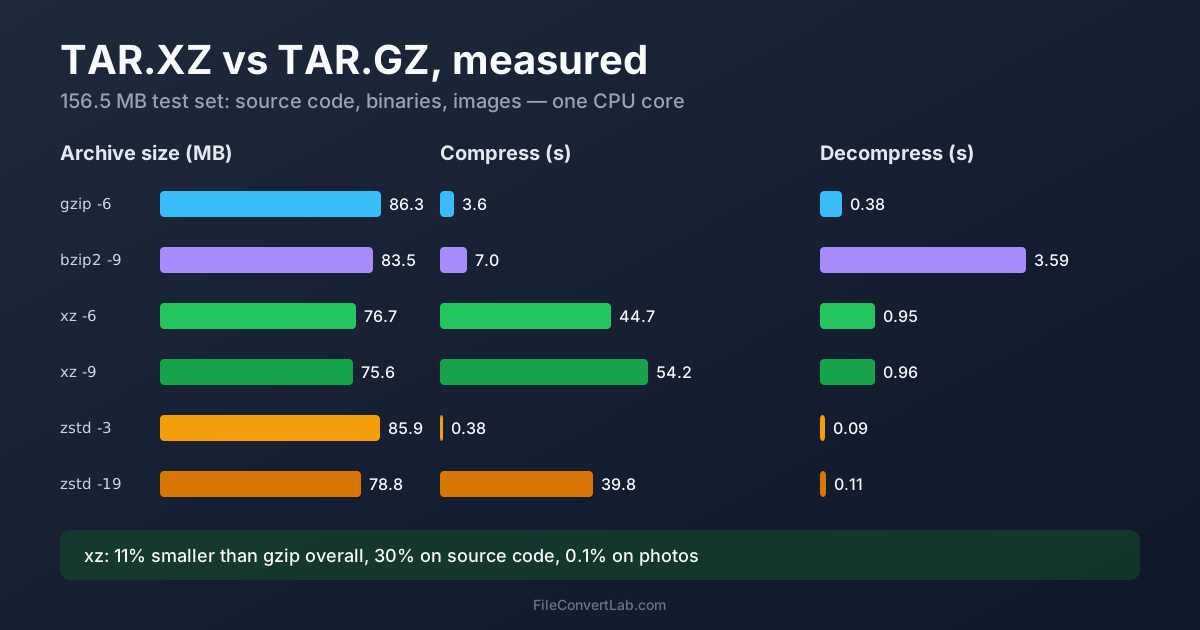
tar.xz makes smaller files than tar.gz; tar.gz is much faster to create and a little faster to open. On our 156 MB mixed test set, xz at its default level came out 11% smaller than gzip — and 30% smaller on the source-code part alone — but took 45 seconds to compress on one core against gzip's 3.6. Unpacking took 0.95 seconds versus 0.38. Pick tar.xz for files you publish once and people download many times; pick tar.gz when speed or compatibility matters more than the last few megabytes.
Just need to open one? The TAR.XZ extractor unpacks .tar.xz and .txz files and hands you a ZIP. The rest of this page is the measurement: size, time and memory for gzip, xz, bzip2 and Zstandard on the same files.
How We Tested tar.xz vs tar.gz
One test set, built to look like a real software archive — 955 files, 156.5 MB as a plain .tar:
- Source code: the Python 3.14 standard library, 711 files, 43.1 MB
- Binaries: 223 shared libraries from a Linux system, 63.4 MB
- Images: 21 desktop wallpapers (9 JPEG, 12 PNG), 50.0 MB
Machine: Intel Core i9-13900K, Linux. Tools: GNU tar 1.35, gzip 1.14, bzip2 1.0.8, xz 5.8.3, zstd 1.5.7. We compressed the .tar stream (so tar's own time isn't included), decompressed to nowhere, and took the best of three runs. "Memory" is the peak resident memory of the compressor. Unless a row says otherwise, everything ran on one CPU core, which is what most people get when they don't ask for threads — with one big exception, covered below.
TAR.XZ vs TAR.GZ vs TAR.BZ2 vs TAR.ZST: Measured
| Format and level | Size | % of original | Compress | Decompress | Memory to compress / decompress |
|---|---|---|---|---|---|
tar.gz, gzip -6 (default) | 86.3 MB | 55.1% | 3.6 s | 0.38 s | 4 MB / 3 MB |
tar.gz, gzip -9 | 86.0 MB | 55.0% | 14.3 s | 0.37 s | 4 MB / 4 MB |
tar.bz2, bzip2 -9 (default) | 83.5 MB | 53.3% | 7.0 s | 3.59 s | 9 MB / 5 MB |
tar.xz, xz -6 (default) | 76.7 MB | 49.0% | 44.7 s | 0.95 s | 96 MB / 10 MB |
tar.xz, xz -9 | 75.6 MB | 48.3% | 54.2 s | 0.96 s | 689 MB / 67 MB |
tar.zst, zstd -3 (default) | 85.9 MB | 54.9% | 0.38 s | 0.09 s | 55 MB / 7 MB |
tar.zst, zstd -19 | 78.8 MB | 50.4% | 39.8 s | 0.11 s | 270 MB / 13 MB |
What jumps out:
- xz wins on size at every level, but the whole-archive gain over gzip is 11–12%, not the "30–50%" you often read
- gzip -9 is almost pointless: four times slower than the default for a 0.3% smaller file
- Zstandard at its default is gzip-sized, ten times faster to compress and four times faster to unpack; at level 19 it gets within 3% of xz while decompressing nine times faster
- bzip2 loses everywhere: bigger than xz, and the slowest to decompress by far
Why the Gain Depends on What's Inside
Here's the same comparison split by content, sizes in MB:
| Content | Original | gzip -6 | bzip2 -9 | xz -6 | xz -9 | zstd -19 | xz -6 vs gzip |
|---|---|---|---|---|---|---|---|
| Source code | 43.1 | 11.8 | 10.3 | 8.3 | 7.6 | 9.0 | 30% smaller |
| Binaries | 63.4 | 24.9 | 23.6 | 18.9 | 18.6 | 20.3 | 24% smaller |
| JPEG and PNG images | 50.0 | 49.6 | 49.6 | 49.5 | 49.5 | 49.5 | 0.1% smaller |
Text and program code are where xz earns its reputation — the 30–36% advantage on source code matches the popular claim. Images, video, audio and anything already zipped don't compress further with any of these tools, so every megabyte of photos in the archive dilutes xz's lead. Before you switch a backup job from gz to xz, look at what the archive actually holds.
gz vs xz Compression Speed: Levels and Threads
Single-threaded, xz at its default level took 12 times as long as gzip to compress the set. Two things change that picture.
xz 5.8 is multithreaded by default. Running tar -cJf with no options used all 32 threads on our machine and finished in 8.5 seconds, producing a file 0.2% larger (76.8 MB), because the data is split into independent blocks. On an older xz, or with -T1, you get the 45-second figure. Older xz releases ran on one core unless told otherwise, so if your distribution's xz is old, add -T0 explicitly.
The catch is memory: the multithreaded run peaked at 863 MB. On a small VPS or a Raspberry Pi, cap it with -T2 or -T4.
Parallel gzip exists too. pigz, a drop-in gzip replacement, compressed the same set in 0.25 seconds on all cores, to a normal gzip file any system can open.
Setting levels through tar:
tar -czf backup.tar.gz folder/                    # gzip, default level
tar -cJf release.tar.xz folder/                   # xz, default level (-6)
tar -I 'xz -9 -T0' -cf release.tar.xz folder/     # xz, max level, all cores
tar -I 'zstd -19 -T0' -cf release.tar.zst folder/ # zstd, high level, all cores
tar -I pigz -cf backup.tar.gz folder/             # parallel gzip
-I (long form --use-compress-program) passes the compressor and its options.
xz vs gz Decompression Speed and Memory
For people downloading your archive, decompression is what counts — and here the differences shrink. On our set:
- zstd: 0.09–0.11 s at any level
- gzip: 0.38 s
- xz: 0.95 s at level 6 or 9 — level barely matters for unpacking speed
- bzip2: 3.59 s, nearly four times slower than xz
Memory is the one thing to watch with xz. Decompressing an xz -9 file needed 67 MB because level 9 uses a 64 MB dictionary; level 6 needed 10 MB. That's nothing on a laptop and a real limit on embedded devices and tiny containers, which is why -9 is a poor choice for firmware or anything opened on constrained hardware.
xz 5.8 can also decompress multithreaded, if the file was compressed in blocks (the default multithreaded mode makes those): our 76.8 MB file unpacked in 0.24 seconds with xz -d -T0, using 252 MB of memory. A single-threaded compressed file can't be split that way.
Why Linux Distros and the Kernel Ship .tar.xz
The trade-off above explains it. A project compresses a release once and it's downloaded thousands of times. Spending 50 seconds of CPU to save 10–30% on every download is a good deal for the publisher's bandwidth and the users' connections, and the extra second of decompression is barely noticeable. That's why kernel.org publishes kernel source as .tar.xz and many projects offer it next to, or instead of, .tar.gz.
It's also why the picture is shifting. Arch Linux moved its packages from xz to Zstandard (.pkg.tar.zst) because zstd at high levels is nearly as small and unpacks many times faster — exactly the pattern in our table.
Where does the break-even sit for a download? On our set, xz saves 9.5 MB and costs about 0.6 s more to unpack than gzip. At 100 Mbit/s, 9.5 MB takes about 0.8 s to download, so xz is slightly ahead; on a gigabit line, gzip finishes first.
When TAR.GZ Still Wins
- Speed on your side. Backups, CI artifacts, logs rotated every hour: gzip at 3.6 s (or pigz at 0.25 s) beats xz at 45 s, and the file is only 11% bigger
- Compatibility. Every Unix tool, every language's standard library and every tar program reads gzip. The tar command in the original Windows 10 release reports only gzip support in its version string — see opening tar.gz on Windows 11
- Mostly photos, video or already-compressed data. The format makes no difference, so choose the fast one
- Low-memory machines. gzip needs a few megabytes to compress and decompress
Is TAR.BZ2 Still Worth Using?
For new archives, no. On our set bzip2 was 9% bigger than xz and took 3.8 times as long to decompress, and zstd at level 19 beat it on both size and speed. It was the "smaller than gzip" choice before xz existed, which is why you still meet .tar.bz2 on older mirrors. Opening them is no problem — the TAR.BZ2 extractor or tar -xf handles them — just don't create new ones.
Which to Choose: Backups vs Downloads vs Sharing
| Situation | Choose | Why |
|---|---|---|
| Software release, dataset or source tarball for download | tar.xz (-6 or -9) | Smallest, fine to unpack everywhere modern |
| Nightly backup of code and documents | tar.zst (-3 to -19) or tar.gz via pigz | Fast to create, fast to restore |
| Backup of photos and video | tar (no compression) or tar.gz | Compression saves under 1% |
| Sending to someone on Windows or an unknown system | tar.gz, or a ZIP | Opens everywhere without extra tools |
| Archive for a small device or container | tar.gz or tar.xz -6 | Low decompression memory |
| Long-term archive where size matters | tar.xz | Mature format, smallest output |
What the extensions mean, and where .txz and .tzst fit, is covered in TAR file extensions explained. How these compare with ZIP and 7Z is in 7Z vs ZIP.
Converting Between tar.gz and tar.xz
You don't need to unpack by hand. On Linux or macOS, recompress in one pipe:
gzip -dc archive.tar.gz | xz -6 -T0 > archive.tar.xz
xz -dc archive.tar.xz | gzip -6 > archive.tar.gz
Without a terminal, the TAR.GZ to TAR.XZ converter and the TAR.XZ to TAR.GZ converter do the same online. Converting only changes the compression layer; the files, folders and tar metadata stay as they were. Commands for unpacking any of these formats are in how to extract a tar.gz file.
Summary
tar.xz vs tar.gz comes down to where the time goes: xz spends far more CPU to make files 11% smaller on a mixed archive and about 30% smaller on text and code, while gzip creates archives in seconds that open anywhere. For downloads published once, xz; for backups and anything frequent, gzip or Zstandard. To open a .tar.xz without a terminal, use the TAR.XZ extractor.
Related Tools
- Extract TAR.XZ online — .tar.xz and .txz to ZIP
- Extract TAR.GZ online — .tar.gz and .tgz to ZIP
- Extract TAR.BZ2 online — .tar.bz2 and .tbz2 to ZIP
- TAR.GZ to TAR.XZ — recompress for a smaller download
- TAR.XZ to TAR.GZ — recompress for compatibility and speed