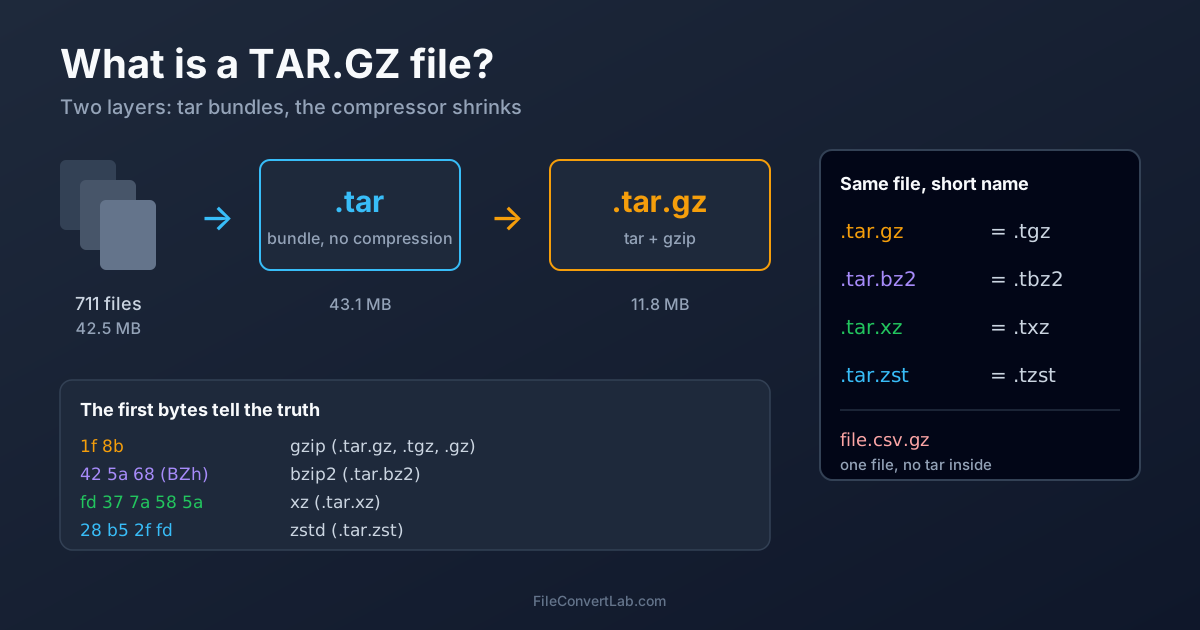
A tar.gz file is two things stacked together: a .tar archive that bundles many files and folders into one, and .gz (gzip) compression that shrinks that bundle. The name lists them in the order they were applied — first tar, then gzip. Every other extension in the family works the same way: .tar.bz2 and .tar.xz are the same tar bundle with a different compressor, and short forms like .tgz are just the double extension squeezed into one.
If you only need the contents, the TAR.GZ extractor unpacks .tar.gz and .tgz files and gives you a ZIP. The rest of this page decodes every extension you're likely to meet, and shows how to tell what a file really is when its name lies.
TAR vs TAR.GZ: Archive vs Compression
The two halves do different jobs, and that's the whole point of the double extension.
- tar (from "tape archive") glues files end to end, each with a 512-byte header holding its name, size, permissions, owner and timestamp. It doesn't compress anything.
- gzip takes one stream of bytes and makes it smaller. It doesn't know about files — it can't hold a folder, only one blob.
Put them together and you get a compressed folder. We measured what each layer does on a real folder — the Python 3.14 standard library, 711 files, 42.5 MB — using GNU tar 1.35 and gzip 1.14 on Linux:
| Step | Result | Size |
|---|---|---|
| Original folder | 711 files | 42.5 MB |
tar -cf | one .tar file | 43.1 MB (1.4% larger: headers and padding) |
gzip on the tar | one .tar.gz file | 11.8 MB |
So a .tar on its own is no smaller than the files inside — it's slightly bigger. If someone sends you a .tar and it's the same size as the folder, nothing is wrong.
Why Linux Uses Two Extensions Instead of One Format
ZIP does archiving and compression in one format, and compresses each file separately. The Unix approach splits the jobs into two small tools that can be swapped independently. That has two practical effects.
The compressor is interchangeable. When better compressors appeared — bzip2, then xz, then zstd — nobody had to redesign the archive format. The tar layer stayed the same; only the second extension changed.
Compression sees all files as one stream. Because gzip runs over the whole tar, similar files can share compression. On our test folder the .tar.gz came out at 11.8 MB, while a ZIP of the same folder at the same compression level (zip -6) was 12.2 MB. That's a modest 3.4% edge, not a reason to switch formats — the real reason Linux keeps tar is that it records Unix permissions, owners and symlinks, which ZIP doesn't handle reliably.
The price of this design: there's no index. To find one file, a program has to decompress the stream up to that file — see how to extract a tar.gz file for what that means in practice.
Every TAR Extension Decoded
| Extension | Short form | What's inside | Typical source |
|---|---|---|---|
.tar | — | tar archive, no compression | backups, intermediate files, Docker image layers |
.tar.gz | .tgz | tar + gzip | source code releases, GitHub downloads, general use |
.tar.bz2 | .tbz2, .tbz, .tb2 | tar + bzip2 | older software releases, legacy mirrors |
.tar.xz | .txz | tar + xz (LZMA2) | Linux kernel source on kernel.org, many distro packages |
.tar.zst | .tzst | tar + Zstandard | Arch Linux packages (.pkg.tar.zst), newer backup tools |
.tar.Z | .taz | tar + old Unix compress | very old archives |
.tar.lz, .tar.lzma | .tlz | tar + lzip or legacy LZMA | niche, some GNU projects |
The three you'll meet most often have online extractors: TAR.GZ, TAR.XZ and TAR.BZ2.
What Is a .tgz File?
A .tgz is a .tar.gz with a shorter name — byte for byte the same format. The short form dates back to systems like MS-DOS that allowed only three characters after the dot. We checked: our py.tar.gz copied to py.tgz has identical bytes, and every tool treats the two the same. Rename one to the other freely.
The same goes for .txz (= .tar.xz), .tbz2 (= .tar.bz2) and .tzst (= .tar.zst).
What Is a .tar.bz2 File?
tar compressed with bzip2. For years it was the "smaller than gzip" option for software downloads. xz has largely replaced it for new releases, but plenty of older archives still use it. It opens with the same tools as tar.gz.
What Is a .tar.xz File?
tar compressed with xz, which uses LZMA2 — the same family of compression as 7Z. It's the common choice where download size matters most: kernel.org publishes Linux kernel source as .tar.xz, and many distributions use it for source packages. How it compares with gzip in size and speed is a question of its own; the short version is that xz is smaller and slower.
What Is a .tar.zst File?
tar compressed with Zstandard, a newer compressor designed to decompress very fast. Arch Linux switched its packages to .pkg.tar.zst, and backup tools increasingly default to it. Support is the thinnest of the family: recent Linux and Windows 11 handle it, older tools may not.
A .gz File Without .tar
A file named report.csv.gz or access.log.gz is one file, compressed — there's no tar inside and no folder structure. Decompressing it gives you back report.csv. This is common for log files, database dumps and datasets.
gzip even remembers the original name. Our LICENSE.txt.gz reports, via file, that it was "LICENSE.txt", original size 13,804 bytes, compressed to 4,317.
That's why tar refuses such files with This does not look like a tar archive: there's nothing to untar. Use gunzip report.csv.gz instead, or double-click it on a Mac. The same applies to lone .bz2, .xz and .zst files.
How to Tell What an Archive Really Is
Extensions are labels, and labels can be wrong: a server may decompress a download on the fly, or a broken link may save an HTML error page under the archive's name. Each format starts with a fixed signature, and the file command reads it. Here's what it printed for the same tar compressed six ways:
| File | First bytes (hex) | file says |
|---|---|---|
py.tar | ustar at byte 257 | POSIX tar archive (GNU) |
py.tar.gz | 1f 8b | gzip compressed data, was "py.tar" |
py.tgz | 1f 8b | gzip compressed data, was "py.tar" |
py.tar.bz2 | 42 5a 68 ("BZh") | bzip2 compressed data |
py.tar.xz | fd 37 7a 58 5a 00 | XZ compressed data |
py.tar.zst | 28 b5 2f fd | Zstandard compressed data |
If you're not on Linux or macOS, the file format identifier reads the first bytes of the file in your browser and recognises the gzip, bzip2 and xz signatures — enough to catch a mislabelled .tar.gz, .tar.bz2 or .tar.xz. An HTML page posing as an archive matches none of them, which tells you the download went wrong. It doesn't look as far as byte 257, so a plain .tar won't be named.
Good news if the label is wrong: modern tar checks these signatures itself. In our test, tar -xf unpacked all four compressed variants correctly even after we renamed them to mystery.bin.
Which Program Opens Each Extension
| Extension | Linux | macOS | Windows |
|---|---|---|---|
.tar, .tar.gz, .tgz | tar, any archive manager | Archive Utility (double-click), tar | tar in Command Prompt; File Explorer on current Windows 11; 7-Zip |
.tar.bz2, .tbz2 | tar, any archive manager | Archive Utility, tar | as above |
.tar.xz, .txz | tar (needs xz, installed almost everywhere) | tar in Terminal | as above |
.tar.zst, .tzst | tar with zstd installed | zstd from Homebrew, then tar | File Explorer on current Windows 11 |
.gz alone | gunzip | double-click, gunzip | 7-Zip |
Microsoft's list of formats File Explorer reads — added to Windows 11 in the October 2023 update — covers .tar, .tar.gz, .tgz, .tar.bz2, .tbz2, .tar.xz, .txz, .tar.zst and .tzst, but not a lone .gz.
Anywhere else — a Chromebook, a phone, a machine where you can't install software — the online extractors cover the three common types, and for moving between formats the archive converter repackages TAR.GZ, TAR.BZ2, TAR.XZ, ZIP and 7Z into each other.
Summary
A tar.gz file is a tar bundle compressed with gzip; .tgz is the same file with a shorter name, and .tar.bz2, .tar.xz and .tar.zst just swap the compressor. A .gz without .tar is a single compressed file, not an archive. When the name and the contents disagree, file or the first bytes tell the truth — and to get at the contents without a terminal, use the TAR.GZ extractor.
Related Tools
- Extract TAR.GZ online — .tar.gz and .tgz
- Extract TAR.XZ online — .tar.xz and .txz
- Extract TAR.BZ2 online — .tar.bz2 and .tbz2
- Archive converter — switch between TAR.GZ, TAR.XZ, TAR.BZ2, ZIP and 7Z
- File format identifier — check what a file really is