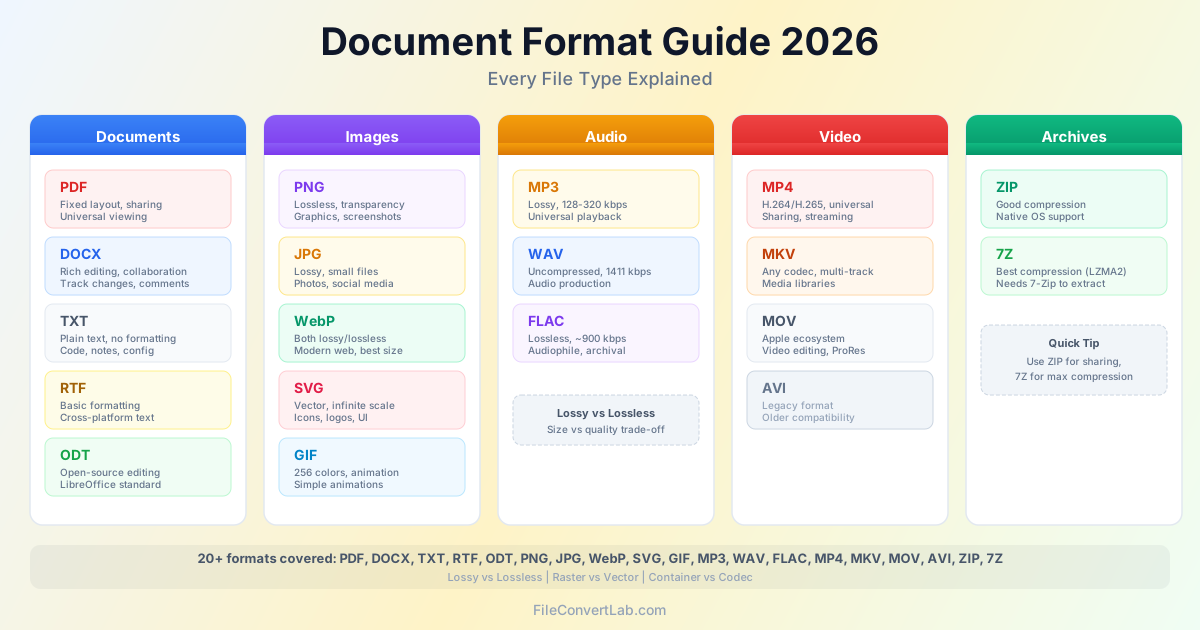
Understanding file formats saves you time and avoids compatibility headaches. Whether you are sharing a report, uploading photos, or sending a video, picking the right format determines file size, quality, and whether the recipient can actually open it. This file format guide covers the most common document formats, image types, audio codecs, and video containers you will encounter in 2026.
Document Formats
Document file types handle text, layout, and structured content. The five formats below cover nearly every document workflow — from drafting to final distribution.
| Format | Type | Editable | Layout Preserved | Best For |
|---|---|---|---|---|
| Fixed layout | Limited | Excellent | Sharing, printing, archiving | |
| DOCX | Rich text | Full | Variable | Writing, collaboration |
| TXT | Plain text | Full | None | Code, notes, data exchange |
| RTF | Basic formatting | Full | Basic | Cross-platform text with formatting |
| ODT | Rich text | Full | Good | Open-source word processing |
PDF: The Universal Sharing Format
PDF (Portable Document Format) locks your document layout so it looks identical on every device. Fonts, images, margins, and page breaks stay exactly where you placed them. Use PDF for contracts, invoices, resumes, and anything where appearance must be consistent.
The trade-off: PDFs are hard to edit. If you receive a PDF and need to make changes, convert it to Word format first, edit in a word processor, then export back to PDF.
DOCX: The Editing Standard
DOCX is Microsoft Word's format, but it opens in Google Docs, LibreOffice, and most word processors. It supports rich formatting, track changes, comments, headers, footers, and embedded images. Use DOCX during the creation and review phases — then convert to PDF for final distribution.
TXT, RTF, and ODT
TXT files contain pure text with no formatting — they open everywhere and are ideal for code, configuration files, and quick notes. RTF adds basic formatting (bold, italic, fonts) that works across platforms without needing specific software. ODT is the open-source alternative to DOCX, used by LibreOffice and compatible with most word processors.
When to Use Each Document Format
- Sending a finished report or contract: PDF
- Collaborating on a draft with colleagues: DOCX
- Writing code or simple notes: TXT
- Sharing formatted text with unknown software: RTF
- Working in LibreOffice or open-source tools: ODT
Image Formats
Image file types fall into two categories: raster (pixel-based) and vector (math-based). Raster images have a fixed resolution, while vectors scale to any size without quality loss.
| Format | Compression | Transparency | Animation | Best For |
|---|---|---|---|---|
| PNG | Lossless | Yes | No | Graphics, logos, screenshots |
| JPG | Lossy | No | No | Photographs |
| WebP | Both | Yes | Yes | Modern web content |
| SVG | Vector (XML) | Yes | Yes | Icons, logos, illustrations |
| GIF | Lossless (256 colors) | Binary only | Yes | Simple animations |
PNG vs JPG: The Core Decision
JPG uses lossy compression that works brilliantly for photographs — a high-quality JPG photo is 5-10 times smaller than the same image as PNG with no visible difference. PNG uses lossless compression that preserves every pixel, making it ideal for graphics with sharp edges, text overlays, and transparency.
The rule is simple: photographs go in JPG, everything else goes in PNG. Need to convert between them? Use our PNG to JPG converter to reduce file size, or convert the other way when you need transparency support.
WebP and SVG: Modern Alternatives
WebP combines the best of PNG and JPG — it supports both lossy and lossless compression, transparency, and animation, all at 25-35% smaller file sizes. Over 95% of browsers support WebP in 2026, making it the top choice for web performance.
SVG is fundamentally different: it stores images as mathematical instructions rather than pixels. An SVG logo scales from a favicon to a billboard without losing sharpness. Use SVG for icons, logos, and illustrations on the web.
GIF: Limited but Alive
GIF supports only 256 colors, which makes it poor for photographs but acceptable for simple animations and memes. For higher-quality animations, WebP and MP4 are better alternatives. GIF persists because of its universal support and cultural ubiquity.
Image Format Recommendations
- Website photos: WebP with JPG fallback
- Logos and icons: SVG (vector) or PNG (raster)
- Screenshots: PNG
- Social media uploads: JPG (platforms re-compress anyway)
- Archival: PNG or TIFF (lossless preservation) Browse all options in our image conversion tools .
Audio Formats
Audio formats balance file size against sound quality. The difference between lossy and lossless audio matters most to listeners with high-end equipment — for everyday use, compressed formats sound excellent.
| Format | Compression | Typical Bitrate | File Size (4 min) | Best For |
|---|---|---|---|---|
| MP3 | Lossy | 128-320 kbps | 4-10 MB | Music, podcasts, universal playback |
| WAV | Uncompressed | 1411 kbps | ~40 MB | Audio editing, production |
| FLAC | Lossless | ~900 kbps | ~25 MB | Audiophile listening, archival |
MP3: The Universal Standard
MP3 plays on every device made in the last 25 years. At 320 kbps, MP3 sounds excellent — most people cannot tell it apart from uncompressed audio in blind tests. At 128 kbps, file sizes drop significantly with noticeable but acceptable quality loss. MP3 is the practical choice for music libraries, podcast distribution, and sharing audio files.
WAV: Uncompressed Quality
WAV stores raw audio data without any compression. This makes WAV files large (about 10 MB per minute) but perfect for audio editing. Every edit, effect, and mix should happen in WAV or another uncompressed format.
Convert to MP3 or FLAC only as the final export step.
FLAC: Lossless Compression
FLAC compresses audio to about 60% of WAV size without losing a single bit of quality. It is the standard for audiophile music collections and archival. If you have the storage space and care about audio fidelity, FLAC is the best format for keeping your music library.
Audio Format Recommendations
- Everyday listening and sharing: MP3 at 256-320 kbps
- Audio production and editing: WAV
- Archival and audiophile collections: FLAC
- Streaming platforms: handled automatically by the service Convert between audio formats with our audio conversion tools .
Video Formats
Video formats are the most complex category because they involve both a container (the file format) and a codec (the compression method). The container holds video, audio, and subtitle streams together, while the codec determines compression efficiency and quality.
| Format | Type | Codec Support | Subtitles | Best For |
|---|---|---|---|---|
| MP4 | Container | H.264, H.265, AV1 | Basic | Universal sharing, streaming |
| MKV | Container | Almost any codec | Multiple tracks | Media libraries, multi-audio/subtitle |
| MOV | Container | H.264, ProRes | Basic | Apple ecosystem, video editing |
| AVI | Container | Various (legacy) | Limited | Legacy compatibility |
MP4: The Safe Choice
MP4 is the most widely supported video format. It plays natively on Windows, macOS, iOS, Android, and every major browser. Social media platforms, messaging apps, and video hosting services all accept MP4.
When you need a video to work everywhere, MP4 with H.264 video and AAC audio is the combination to use.
MKV: The Flexible Container
MKV (Matroska) supports virtually any codec and can hold multiple audio tracks, subtitle streams, and chapter markers in a single file. This makes it popular for media libraries where you want multiple languages or subtitle options. The trade-off is that some devices and platforms cannot play MKV directly — converting to MP4 solves compatibility issues.
MOV and AVI: Platform-Specific Formats
MOV is Apple's video container, commonly used by iPhones, iPads, and Final Cut Pro. It works seamlessly in the Apple ecosystem but may need conversion for Windows or Android users. AVI is a legacy Microsoft format — still encountered in older files but rarely used for new recordings.
Video Format Recommendations
- Sharing with anyone: MP4 (H.264)
- Personal media library: MKV for flexibility
- Apple devices and editing: MOV
- Maximum compression quality: MP4 (H.265 or AV1) Explore our video conversion tools to convert between formats.
Archive Formats
Archives bundle multiple files into one compressed package. The two formats you will encounter most are ZIP and 7Z.
| Format | Compression | Native OS Support | Encryption | Best For |
|---|---|---|---|---|
| ZIP | Good | Windows, macOS, Linux | AES-256 | Universal file sharing |
| 7Z | Excellent | Requires 7-Zip | AES-256 | Maximum compression |
| ZIP is the universal default — every modern operating system opens ZIP files without extra software. Choose ZIP when sending files to others. |
7Z achieves 10-30% better compression using the LZMA2 algorithm, making it worthwhile for large backups or when storage space is limited. The recipient will need 7-Zip or a compatible tool to extract 7Z files.
Lossless vs Lossy: The Fundamental Trade-Off
Every file format makes a choice between file size and data preservation.
Understanding this trade-off helps you pick the right format every time.
- Lossless formats (PNG, FLAC, WAV, ZIP) preserve every bit of original data. You can compress and decompress indefinitely without any degradation. Files are larger.
- Lossy formats (JPG, MP3, MP4) permanently discard data that human senses are less likely to notice. Files are dramatically smaller. Quality loss is usually imperceptible at high settings but accumulates with repeated compression.
The practical advice: use lossy formats for consumption (sharing, streaming, uploading) and lossless formats for production (editing, archiving, mastering). Always keep your original lossless files and create lossy copies for distribution.
Quick Reference: What Format Should I Use?
| Task | Recommended Format | Why |
|---|---|---|
| Send a finished report | Layout stays consistent | |
| Collaborate on a document | DOCX | Full editing and track changes |
| Upload photos to a website | WebP / JPG | Small files, fast loading |
| Save a logo for the web | SVG | Scales to any size |
| Share music with a friend | MP3 | Universal playback, small files |
| Archive a music collection | FLAC | Lossless quality preservation |
| Send a video to anyone | MP4 | Plays on every device |
| Bundle files for download | ZIP | Opens without extra software |
Converting Between Formats
When you need to change file types, here are the most common conversions and when they make sense:
- PDF to Word — Edit a document you received as PDF
- PNG to JPG — Reduce image file size for sharing or uploading
- PDF conversions — Convert PDFs to and from various document formats
- Image conversions — Convert between all image formats
- Video conversions — Change video containers and codecs
- Audio conversions — Switch between audio formats
Related Articles
- PNG vs JPG vs WebP: Image Format Comparison — Deep dive into choosing the right image format
- FLAC vs MP3: Audio Quality Comparison — Detailed comparison of lossless and lossy audio
- MKV vs MP4: Video Container Comparison — When to use each video format
- PDF vs Word vs Excel: Document Format Comparison — Focused comparison of the three main office formats
Conclusion
Picking the right file format comes down to three questions: who will open this file, do they need to edit it, and how important is file size?
For documents, default to PDF for sharing and DOCX for editing. For images, use WebP or JPG for photos and PNG or SVG for graphics. For audio, MP3 handles everyday needs while FLAC preserves quality. For video, MP4 works everywhere.
When in doubt, choose the format with the widest compatibility — PDF for documents, JPG for images, MP3 for audio, MP4 for video, and ZIP for archives. You can always convert later if you need a different format.