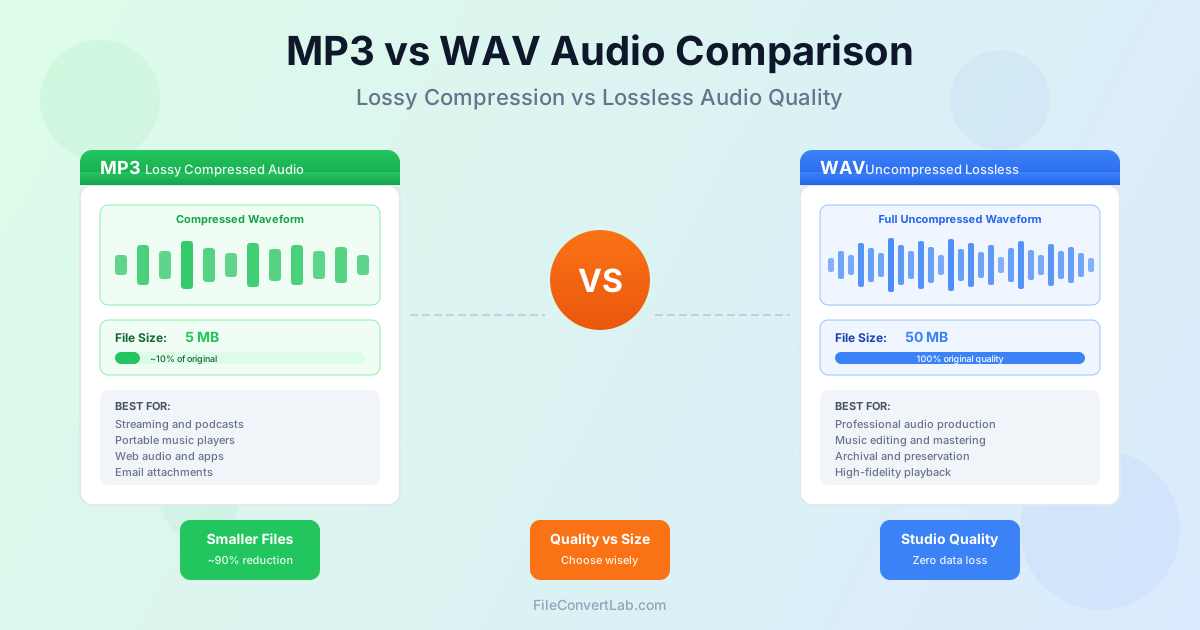
Choosing between MP3 and WAV is one of the most fundamental decisions in digital audio. These two formats represent opposite ends of the audio quality spectrum: MP3 prioritizes small file sizes through lossy compression, while WAV preserves every bit of the original recording without any data loss. This guide explains the technical differences, quality implications, and practical use cases for each format to help you make the right choice for your audio files.
Quick comparison table
| Feature | MP3 | WAV |
|---|---|---|
| Full name | MPEG Audio Layer III | Waveform Audio File Format |
| File extension | .mp3 | .wav |
| Compression type | Lossy | Uncompressed (lossless) |
| File size, 3-min stereo song | About 2.9 MB at 128 kbps, 7.2 MB at 320 kbps | About 31.8 MB at CD quality |
| Audio quality | Good to excellent (bitrate dependent) | Perfect (original quality) |
| Sample rate support | Up to 48 kHz | Up to 192 kHz and beyond |
| Bit depth support | N/A (encoded) | 8, 16, 24, 32-bit |
| Metadata support | ID3 tags (excellent) | Limited (RIFF INFO chunks) |
| Best for | Streaming, portable devices | Professional audio, editing |
Understanding lossy vs lossless compression
The fundamental difference between MP3 and WAV lies in how they handle audio data. This distinction affects everything from file size to audio quality to how the formats can be used in different workflows.
Lossy compression (used by MP3) permanently removes audio data that the encoder determines is less important or inaudible to human ears. This psychoacoustic model exploits limitations in human hearing to achieve dramatic file size reductions. Once data is removed during MP3 encoding, it cannot be recovered.
Converting an MP3 back to WAV does not restore the lost information.
Lossless/uncompressed (used by WAV) preserves every sample of the original audio exactly as recorded. WAV files contain raw PCM (Pulse Code Modulation) audio data with no compression whatsoever.
This means 100% of the original audio information is retained, but at the cost of much larger file sizes.
Think of it like photocopying a document: WAV is like keeping the original, while MP3 is like making a photocopy. The photocopy might look nearly identical, but some fine details are lost in the process, and making copies of copies continues to degrade quality.
What is MP3?
MP3 (MPEG Audio Layer III) revolutionized digital audio when it was standardized in 1993. Developed by the Fraunhofer Society in Germany, MP3 made it practical to store and share music digitally by reducing file sizes to about 10% of the original without obviously degrading sound quality for most listeners.
The MP3 format uses a sophisticated psychoacoustic model to analyze audio and determine which sounds can be discarded with minimal perceptual impact. It exploits phenomena like auditory masking, where louder sounds make quieter sounds inaudible, and removes frequencies that fall outside typical human hearing range or that would be masked by other sounds.
MP3 strengths
- Dramatically smaller files — Typically 90% smaller than equivalent WAV files.
- Universal compatibility — Plays on virtually every device and platform.
- Excellent metadata support — ID3 tags store artist, album, artwork, and more.
- Streaming friendly — Low bandwidth requirements for online playback.
- Adjustable quality — Variable bitrates let you choose size vs quality tradeoff.
- Mature technology — Decades of optimization and widespread tool support.
MP3 limitations
- Permanent quality loss that cannot be recovered.
- Artifacts audible at lower bitrates (especially in complex passages).
- Not suitable for professional editing or mastering.
- Re-encoding degrades quality further with each generation.
- Limited to 48 kHz sample rate (sufficient for most uses).
What is WAV?
WAV (Waveform Audio File Format) was developed by Microsoft and IBM in 1991 as the standard audio format for Windows. It stores audio as raw, uncompressed PCM (Pulse Code Modulation) data, making it the digital equivalent of the original analog recording without any quality compromise.
WAV files contain audio samples exactly as they were captured during recording or conversion. Every sample at every point in time is preserved with full precision. This makes WAV the format of choice for professional audio work where quality cannot be compromised and where files may be processed multiple times.
WAV strengths
- Perfect quality — Bit-for-bit identical to the original recording.
- Professional standard — Universal format in recording studios worldwide.
- High resolution support — Up to 32-bit depth and 192+ kHz sample rates.
- No generation loss — Can be edited and saved repeatedly without degradation.
- Simple format — Easy to process with any audio software.
- Instant encoding/decoding — No complex compression algorithms to run.
WAV limitations
- Very large file sizes (about 10 MB per minute at CD quality).
- Impractical for streaming or mobile use.
- Limited metadata support compared to MP3.
- Original file size limit of 4 GB (extended formats exist).
- Storage and bandwidth intensive for large libraries.
Audio quality comparison
The quality difference between MP3 and WAV depends heavily on the MP3 bitrate and the complexity of the source material. In controlled listening tests, the differences range from imperceptible to obvious depending on these factors.
Can you hear the difference?
For most listeners with typical playback equipment, a well-encoded 256-320 kbps MP3 is very hard to tell from the WAV original. If you want to know for your own ears and headphones, try a blind ABX test: play both versions without knowing which is which and see whether you can pick the MP3 more often than chance.
However, differences become more apparent in specific scenarios:
- Complex passages — Orchestral music with many simultaneous instruments.
- High frequencies — Cymbals, hi-hats, and other bright sounds.
- Low bitrates — MP3s encoded at 128 kbps or below.
- High-end equipment — Studio monitors and audiophile headphones.
- Critical listening — When specifically listening for artifacts.
For casual listening through smartphone speakers, Bluetooth headphones, or in noisy environments, the difference is essentially zero. The playback environment typically masks any subtle differences between formats.
MP3 bitrate quality tiers
MP3 quality varies significantly based on the bitrate used during encoding:
- 320 kbps — Highest quality MP3. Virtually transparent for most listeners.
- 256 kbps — Excellent quality. Hard to tell from the original for most music.
- 192 kbps — Good quality. Suitable for most casual listening.
- 128 kbps — Acceptable quality. Artifacts may be audible on good equipment.
- Below 128 kbps — Noticeable quality loss. Only for speech or low-priority content.
Variable Bit Rate (VBR) encoding often provides better quality than Constant Bit Rate (CBR) at the same average file size by allocating more bits to complex passages and fewer to simple ones.
File size comparison
File size is where the formats differ most dramatically. The same audio content requires vastly different storage space depending on the format chosen.
For a typical 3-minute stereo song at CD quality (44.1 kHz, 16-bit):
- WAV — About 31.8 MB (1,411 kbps × 180 seconds)
- MP3 320 kbps — About 7.2 MB
- MP3 256 kbps — About 5.8 MB
- MP3 128 kbps — About 2.9 MB For a music library of 1,000 songs, the storage requirements would be approximately:
- WAV — About 32 GB
- MP3 320 kbps — About 7.2 GB
- MP3 128 kbps — About 2.9 GB
This 4-11x difference explains why MP3 became the dominant format for consumer music distribution. Streaming services, portable devices, and limited storage all benefit enormously from the compression.
Sample rate and bit depth
These technical specifications determine the theoretical quality ceiling of an audio file.
Sample rate
Sample rate indicates how many times per second the audio signal is measured. CD quality is 44.1 kHz (44,100 samples per second). Higher sample rates can capture frequencies above the standard human hearing range of 20 Hz to 20 kHz.
- 44.1 kHz — CD standard. Captures frequencies up to ~22 kHz.
- 48 kHz — Video/broadcast standard. Captures up to ~24 kHz.
- 96 kHz — High-resolution audio. Used in professional production.
- 192 kHz — Studio mastering. Maximum detail for archival.
MP3 supports up to 48 kHz sample rate, which is sufficient for all audible frequencies. WAV supports sample rates well beyond this, which matters for professional applications where audio may be time-stretched, pitch-shifted, or otherwise processed.
Bit depth
Bit depth determines the dynamic range (difference between quietest and loudest sounds) that can be captured. Higher bit depth means more precise amplitude measurements.
- 16-bit — CD standard. 96 dB dynamic range. Sufficient for final delivery.
- 24-bit — Professional standard. 144 dB range. Preferred for recording and mixing.
- 32-bit float — Maximum headroom. Used during audio processing.
WAV supports all bit depths natively. MP3 encodes audio at whatever bit depth is optimal for the bitrate, so this specification does not directly apply to compressed formats.
When to use MP3
MP3 remains the best choice when file size and compatibility matter more than theoretical perfection:
- Music streaming and downloads — All streaming services use compressed formats.
- Portable music players — Limited storage makes compression essential.
- Podcast distribution — File size directly affects hosting costs and download times.
- Email attachments — Stay within attachment size limits.
- Web audio — Faster loading times and lower bandwidth usage.
- Large music libraries — When storage space is limited.
- Background music — Quality differences inaudible in ambient contexts.
- Voice recordings — Speech compresses very efficiently with minimal artifacts.
For distribution to end listeners, 256-320 kbps MP3 provides excellent quality that satisfies the vast majority of listeners while keeping files manageable.
When to use WAV
WAV is essential when audio quality must not be compromised at any point in the workflow:
- Music recording — Always capture original recordings in lossless format.
- Audio editing and mixing — Preserve quality through multiple processing steps.
- Mastering — Final production stage requires full quality source files.
- Sound design — Effects and manipulation benefit from full audio data.
- Archival storage — Preserve original quality for future use.
- Professional delivery — Many clients and platforms require lossless masters.
- DJ performance — Professional DJs often prefer lossless for club systems.
- Video production — Audio for video should be edited in lossless formats.
The general rule is: record and edit in WAV (or another lossless format), then export to MP3 only at the final distribution stage if file size matters. Never edit MP3 files and re-save as MP3, as this compounds quality loss.
Converting between MP3 and WAV
Understanding what happens during conversion is crucial for making informed decisions about your audio files.
WAV to MP3 conversion
Converting WAV to MP3 applies lossy compression and permanently removes audio data. This is a one-way process. The quality of the resulting MP3 depends on the bitrate and encoder settings chosen during conversion.
For best results when converting to MP3:
- Use 256-320 kbps for music distribution.
- Use VBR (Variable Bit Rate) encoding when possible.
- Use a well-maintained encoder in a current audio app rather than an old one.
- Keep the original WAV file if you might need it later.
Ready to convert? Our WAV to MP3 converter encodes at a fixed 192 kbps — fine for listening, podcasts and sharing. For a 256-320 kbps distribution master, export from your audio editor instead.
MP3 to WAV conversion
Converting MP3 to WAV does NOT restore lost quality. The conversion simply wraps the existing audio data (with all its compression artifacts) in an uncompressed container. The file will be much larger, but it will not sound any better than the MP3.
However, MP3 to WAV conversion is still useful in specific situations:
- When software requires WAV format input.
- For compatibility with certain audio equipment.
- Before applying audio processing (to prevent double compression).
- When burning audio CDs (which require uncompressed audio).
Need to convert MP3 to WAV for compatibility? Use our MP3 to WAV converter.
Other audio formats to consider
While MP3 and WAV represent the two extremes, other formats offer interesting middle grounds:
- FLAC — Lossless compression. Perfect quality in a noticeably smaller file than WAV; how much smaller depends on the music.
- AAC — Better lossy compression than MP3. Used by Apple and YouTube.
- OGG Vorbis — Open-source lossy format. Similar quality to AAC.
- ALAC — Apple Lossless. Like FLAC but for Apple ecosystem.
- AIFF — Apple equivalent of WAV. Uncompressed, same quality.
For archiving, FLAC offers the best of both worlds: perfect quality preservation with significant file size reduction. Explore our audio converter for conversions between all major audio formats.
The bottom line: which format wins?
Neither format is universally better. MP3 and WAV serve different purposes:
- Use MP3 for distribution, streaming, portable devices, and anywhere file size matters.
- Use WAV for recording, editing, professional production, and archival.
Many audio professionals maintain both: WAV masters for editing and archival, with MP3 versions for sharing and playback. With modern storage being relatively inexpensive, there is no reason not to keep lossless originals while using MP3 for convenience.
The key insight is that MP3 quality at higher bitrates is excellent for listening purposes.
The difference only matters when you need to preserve every detail of the original recording for editing or when you are archiving audio for potential future use where technology may enable better compression or processing.