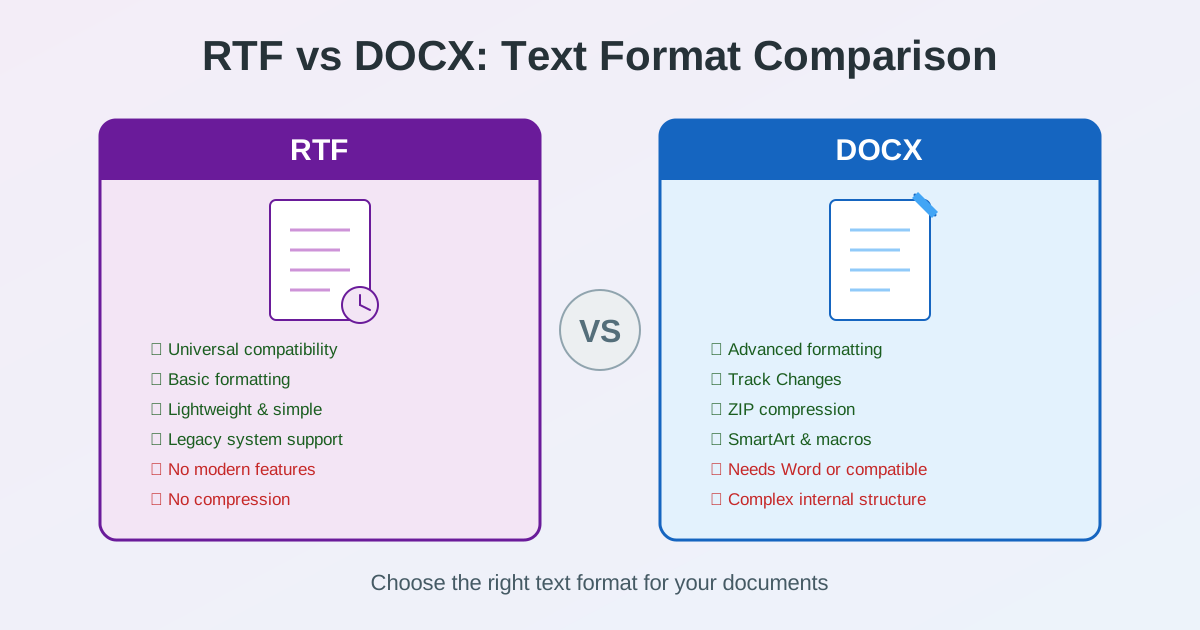
RTF and DOCX are both text document formats that store formatted content, but they come from different eras and serve different purposes. RTF format dates back to 1987 and prioritizes universal compatibility. DOCX arrived in 2007 and focuses on modern features and efficiency.
Choosing between RTF vs DOCX affects file size, formatting capabilities, software compatibility, and how well your documents travel between systems. This guide breaks down the practical differences so you can pick the right format every time.
Quick Comparison Table
| Feature | RTF | DOCX |
|---|---|---|
| Created | 1987 (Microsoft) | 2007 (Microsoft / ISO) |
| Internal structure | Plain-text control codes | ZIP-compressed XML |
| Formatting | Basic (fonts, bold, italic, tables) | Advanced (styles, themes, SmartArt) |
| File size | Large (no compression) | Smaller (ZIP compression) |
| Compatibility | Nearly universal | Modern apps only |
| Track Changes | Not supported | Full support |
| Macros | Not supported | VBA macros |
| Images | Basic embedding | Advanced (charts, SmartArt, SVG) |
| Security | No built-in protection | Password protection, restrict editing |
| Standard | Microsoft specification | ISO/IEC 29500 |
What Is an RTF File?
Rich Text Format (RTF) is a document file format created by Microsoft in 1987. It was designed as a universal exchange format that any word processor could read and write. Unlike proprietary formats, RTF stores formatting instructions as readable plain-text control codes — sequences like \b for bold and \fs24 for 12-point font size.
The RTF format supports basic formatting: fonts, bold, italic, underline, text colors, paragraph alignment, tables, and embedded images. It was the default format for WordPad on Windows for decades and is recognized by virtually every word processor ever made — Microsoft Word, LibreOffice, Google Docs, Apple Pages, and countless others.
RTF compatibility is its greatest strength. An RTF file created in 1995 opens perfectly in 2026 software. The format does not depend on specific software versions, operating systems, or installed fonts to render correctly. This makes RTF a reliable choice when you need a document to work everywhere without any dependencies. Explore all RTF conversion tools to work with this format.
What Is a DOCX File?
DOCX is the modern document format introduced by Microsoft with Office 2007. It stands for Document Open XML and is based on the Office Open XML standard (ISO/IEC 29500). Unlike RTF, a DOCX file is actually a ZIP archive containing XML files that describe the document's text, styles, images, relationships, and metadata.
DOCX supports everything RTF does and much more: advanced typography, themes and style sets, Track Changes for collaborative editing, SmartArt diagrams, embedded charts, mathematical equations, VBA macros, content controls, and structured document properties. It is the default format for Microsoft Word and is well supported by Google Docs, LibreOffice Writer, and Apple Pages.
Because DOCX uses ZIP compression internally, files are significantly smaller than equivalent RTF documents. A 1MB RTF file typically becomes 200-400KB as DOCX. Browse the Word conversion tools for all DOCX-related conversions.
Formatting and Features: RTF vs DOCX
The difference between RTF and DOCX in formatting capabilities is substantial. RTF handles the basics well but hits a ceiling quickly.
What RTF Can Do
- Text formatting: bold, italic, underline, strikethrough, superscript, subscript
- Fonts: font family, size, and color
- Paragraphs: alignment (left, center, right, justify), indentation, line spacing
- Tables: basic tables with borders and cell formatting
- Images: embedded bitmap and metafile images
- Lists: numbered and bulleted lists
- Headers and footers: basic page header and footer content
What DOCX Adds
- Track Changes: full revision tracking with author, date, and change type
- Comments: threaded comments with replies
- Styles and themes: reusable formatting definitions, document-wide themes
- SmartArt and charts: vector diagrams and data-driven charts
- Mathematical equations: OMML equation editor support
- Content controls: structured form fields, dropdowns, date pickers
- Macros: VBA automation (in .docm files)
- Advanced table features: nested tables, merged cells, table styles
- Drawing canvas: shapes, WordArt, text effects, 3D formatting
- Document protection: password protection, editing restrictions
Bottom line: If your document uses only basic formatting — text, fonts, simple tables — RTF handles it fine. The moment you need Track Changes, styles, charts, or any modern Word feature, DOCX is the only option.
File Size and Performance
File size is one of the most noticeable practical differences between RTF and DOCX.
Why RTF Files Are Larger
RTF encodes everything as plain-text control codes with no compression. A simple bold word like hello becomes {\b hello} in the file. Font tables, color definitions, and style specifications are written out verbosely at the beginning of every RTF file — often taking up more space than the actual document content. Images are stored as hexadecimal strings, which doubles their size compared to the original binary data.
Why DOCX Files Are Smaller
DOCX uses ZIP compression to package its XML files and media. Text content compresses extremely well because XML has repetitive structure. Images are stored in their native binary format (PNG, JPEG) inside the ZIP rather than being hex-encoded. The result is typically 50-75% smaller than the same document in RTF format.
Real-world example: A 10-page report with two images — RTF: ~2.5MB, DOCX: ~600KB.
For email attachments and cloud storage, DOCX saves significant space. If you need to reduce document sizes further, consider converting to PDF and using PDF compression.
Compatibility and Software Support
RTF compatibility is legendary. DOCX compatibility is excellent but not as universal.
RTF: Works Almost Everywhere
RTF files open in virtually any application that handles text: Microsoft Word, LibreOffice, Google Docs, Apple Pages, WordPad, TextEdit (macOS), and thousands of other text editors and word processors. Even minimal text editors on embedded systems or legacy operating systems can typically parse RTF. Email clients like Outlook use RTF internally for rich text messages.
This universal RTF compatibility makes it the safest format when you do not know what software the recipient uses — especially in government, legal, and healthcare environments where legacy systems are common.
DOCX: Modern Compatibility
DOCX is supported by all major modern word processors: Microsoft Word (2007+), Google Docs, LibreOffice Writer, Apple Pages, WPS Office, and OnlyOffice. Web browsers cannot natively display DOCX files (unlike RTF, which some browsers can render). Older software from before 2007 may not handle DOCX at all without plugins or updates.
For most modern workflows, DOCX compatibility is not an issue. But if you need to share documents with users on very old systems or highly restricted environments, RTF may be safer.
RTF vs DOC vs DOCX: Three Generations
Understanding all three Microsoft document formats helps put RTF and DOCX in context.
| Aspect | RTF | DOC | DOCX |
|---|---|---|---|
| Era | 1987 | 1997 | 2007 |
| Format type | Plain-text codes | Binary | ZIP + XML |
| File size | Large | Medium | Small |
| Features | Basic | Advanced | Most advanced |
| Cross-platform | Excellent | Poor | Good |
| Open standard | Published spec | Proprietary | ISO standard |
| Current status | Legacy but active | Deprecated | Current standard |
DOC (the binary Word format from 1997-2003) has been effectively replaced by DOCX. RTF remains relevant as a lightweight interchange format. DOCX is the current standard for serious document work. For more on DOCX and PDF differences, see our DOCX vs PDF comparison.
When to Use RTF Format
Despite its age, there are genuine scenarios where RTF is the better choice:
Maximum Compatibility
When sending documents to recipients whose software you cannot predict — government agencies, international partners, or organizations with legacy IT infrastructure — RTF format ensures the file will open. It is the lowest common denominator of formatted documents.
Legal and Regulatory Documents
Some legal systems and regulatory bodies accept or require RTF for document submissions. The format's simplicity and long track record make it a trusted choice in contexts where format stability matters more than modern features.
Email Composition
Microsoft Outlook uses RTF as one of its message formats. RTF-formatted emails preserve basic formatting without the security concerns associated with HTML emails. For internal corporate communication, RTF email offers a middle ground between plain text and HTML.
Simple Formatted Text Exchange
When you need to share text with basic formatting (bold, fonts, tables) but without the complexity of DOCX, RTF is a lightweight option. The format is human-readable in a text editor, which makes it useful for automated document generation in older systems.
When to Use DOCX Format
For most modern document workflows, DOCX is the default choice:
- Collaborative editing: Track Changes and comments are essential for team document review
- Professional documents: reports, proposals, and presentations need advanced formatting and styles
- Templates: DOCX supports reusable styles, themes, and content controls for standardized documents
- Complex layouts: multi-column layouts, nested tables, embedded charts, and mathematical equations
- Automation: VBA macros for repetitive tasks, mail merge for personalized documents
- File size matters: ZIP compression makes DOCX 50-75% smaller than equivalent RTF
- Security: password protection and editing restrictions protect sensitive content If you receive a PDF that you need to edit, converting to DOCX format gives you full editing capabilities in Word, Google Docs, or LibreOffice.
Converting Between RTF and DOCX
Converting between RTF and DOCX is straightforward because both formats store similar types of content — text, formatting, tables, and images.
RTF to DOCX Conversion
Converting RTF to DOCX modernizes your documents: file sizes shrink, and you gain access to Track Changes, styles, themes, and other DOCX-only features. All text, formatting, tables, and images transfer cleanly because DOCX supports everything RTF can represent.
Use the RTF to DOCX converter to upgrade your RTF files to the modern Word format with preserved formatting.
DOCX to RTF Conversion
Converting DOCX to RTF sacrifices advanced features for compatibility. Track Changes, comments, SmartArt, charts, and macros are lost. Basic text formatting, tables, and images are preserved.
This conversion makes sense when the recipient needs an RTF file or when maximum compatibility is more important than advanced features.
Use the DOCX to RTF converter when you need to share documents with legacy systems or RTF-only workflows.
Practical Decision Guide
| Situation | Recommended | Why |
|---|---|---|
| Writing a report in Word | DOCX | Styles, Track Changes, smaller file |
| Sending to unknown software | RTF | Opens in virtually any application |
| Legal document submission | RTF or PDF | Check recipient requirements |
| Team collaboration | DOCX | Track Changes and comments |
| Email with basic formatting | RTF | Built-in Outlook format, compatible |
| Automated document generation | RTF | Simple to generate programmatically |
| Archiving important documents | DOCX + PDF | DOCX for editability, PDF for fixed layout |
| Resume or cover letter | DOCX | Modern formatting, ATS-compatible |
Related Tools
- RTF to DOCX Converter — Upgrade RTF files to modern Word format with preserved formatting
- DOCX to RTF Converter — Convert Word documents to universally compatible RTF
- RTF Conversion Hub — All RTF conversion tools in one place
- Word Conversion Tools — Convert DOCX to other formats and back
- PDF to Word Converter — Convert PDF to editable DOCX with layout preservation
- PDF Compressor — Reduce PDF file size for email and web
Conclusion
RTF and DOCX serve complementary roles. RTF format remains valuable when universal compatibility, simplicity, and legacy system support matter most. DOCX is the clear choice for modern document work — it offers better features, smaller files, and strong cross-platform support across current applications. Most users should default to DOCX for everyday documents and reserve RTF for situations where compatibility with older or unknown systems is the priority.
When you need to switch between formats, use the RTF to DOCX converter or the DOCX to RTF converter to move your documents between formats while preserving content and formatting.