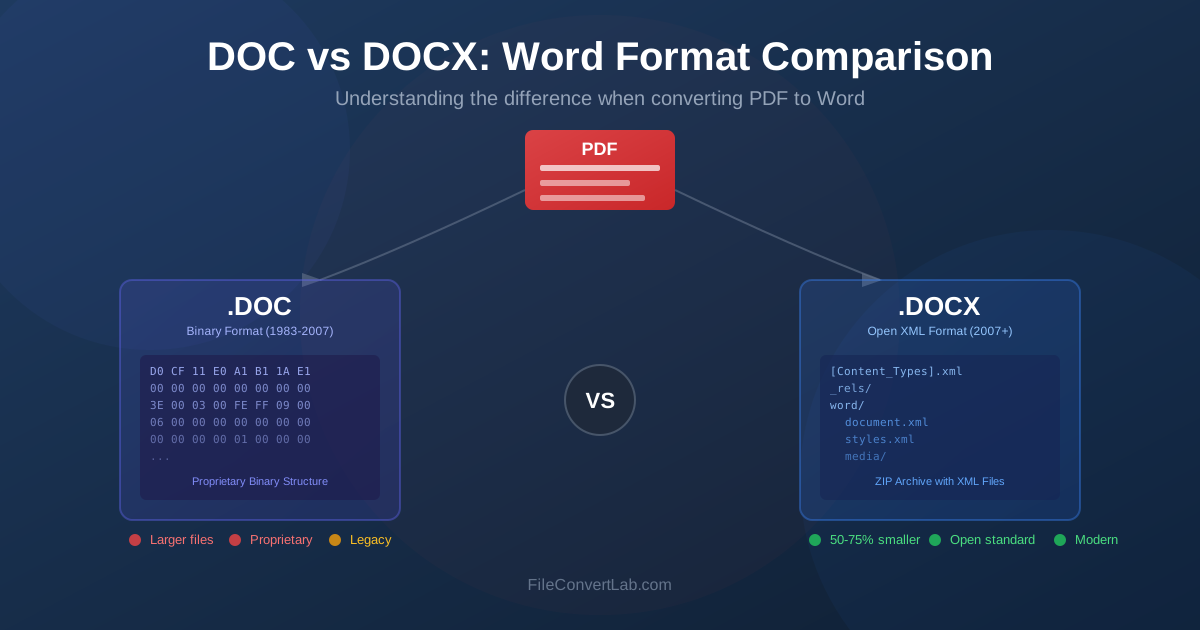
When converting PDF to Word, you face a choice: DOC or DOCX? These two Microsoft Word formats look similar but work differently under the hood. Understanding their differences helps you choose the right output format for your needs, avoid compatibility issues, and get better conversion results. This guide explains the history, technical differences, and practical implications of both formats.
History of Word Formats
Microsoft Word has used different file formats throughout its history, each representing the technology and needs of its era.
The DOC Era (1983-2007)
The DOC format originated with Microsoft Word in 1983. Over two decades, it evolved through multiple versions, each adding features while maintaining backward compatibility. By Word 2003, DOC had become a complex binary format that stored everything from text and formatting to embedded objects and macros in a single proprietary structure.
DOC files use Binary Interchange File Format (BIFF), a Microsoft-proprietary structure that only Microsoft fully documented. This made it difficult for other software to read and write DOC files accurately, leading to compatibility issues when opening Word documents in other applications.
The DOCX Revolution (2007-Present)
Microsoft introduced DOCX with Office 2007 as part of the Office Open XML (OOXML) standard. Unlike DOC, DOCX is based on open standards and uses a fundamentally different architecture. The format was designed for interoperability, smaller file sizes, and better data recovery.
OOXML became an international standard (ISO/IEC 29500) in 2008, meaning its specification is publicly available.
This openness allows any software developer to implement DOCX support without reverse-engineering or licensing from Microsoft.
DOC Format Explained
Understanding DOC's structure explains why it behaves the way it does and why certain conversion challenges exist.
Binary Structure
DOC files store data in a binary format called Compound File Binary Format (CFBF), also known as OLE (Object Linking and Embedding) format. Think of it as a mini file system within a file: the document contains multiple "streams" of binary data for different components.
- WordDocument stream: Contains the main text and formatting
- Table stream: Stores document structure information
- Data stream: Holds embedded objects and images
- Summary streams: Contain document metadata This binary structure means you cannot simply open a DOC file in a text editor to see its contents. The data is encoded in ways that require specialized software to interpret.
DOC Capabilities
Despite its age, DOC supports extensive formatting features:
- Rich text formatting (fonts, sizes, colors, styles)
- Tables with merged cells and nested tables
- Images, charts, and embedded objects
- Headers, footers, and page numbers
- Track changes and comments
- VBA macros for automation
- Forms with fillable fields
DOC Limitations
The binary format creates several practical issues:
- Corruption vulnerability: Binary files are more susceptible to data corruption, and recovery is often impossible
- Larger file sizes: Binary encoding is less efficient than compressed XML
- Limited interoperability: Other applications struggle to read DOC files accurately
- Security concerns: Macros in DOC files have been a major vector for malware
- No partial recovery: If part of a DOC file corrupts, the entire document may become unreadable
DOCX Format Explained
DOCX takes a completely different approach to storing document data, solving many problems inherent in the DOC format.
XML-Based Architecture
A DOCX file is actually a ZIP archive containing multiple XML files and folders. You can verify this yourself:
rename any .docx file to .zip and extract it. Inside you'll find a structured collection of XML documents and resources:
- [Content_Types].xml: Declares the content types in the package
- _rels/: Relationship files linking components together
- word/document.xml: The main document content
- word/styles.xml: Style definitions
- word/media/: Images and other media files
- docProps/: Document properties and metadata Because XML is plain text, you can open these files in any text editor and read the markup directly. This transparency makes debugging, automated processing, and third-party tool development much easier.
DOCX Advantages
The modern architecture provides significant benefits:
- Smaller files: ZIP compression typically reduces file size by 50-75% compared to DOC
- Better recovery: If one component corrupts, others may still be readable
- Interoperability: Open standards mean better compatibility across applications
- Programmable: XML structure makes automated document generation and modification easier
- Future-proof: Open standards ensure long-term accessibility
- Separation of concerns: Content, styles, and media are stored separately
Modern Word Features in DOCX
DOCX supports features unavailable in DOC:
- SmartArt: Diagrams and visual lists with automatic formatting
- Content controls: Modern form fields with better usability
- Improved equations: Native equation editing with OMML
- Better charts: Excel-linked charts with more options
- Themes: Coordinated color and font schemes
- Bibliography: Built-in citation management
Key Differences at a Glance
Here's a side-by-side comparison of the two formats:
| Feature | DOC | DOCX |
|---|---|---|
| File structure | Binary (OLE/CFBF) | ZIP archive with XML |
| Introduced | 1983 (evolved through 2003) | 2007 |
| Standard | Proprietary | ISO/IEC 29500 (OOXML) |
| Typical file size | Larger | 50-75% smaller |
| Data recovery | Difficult | Partial recovery possible |
| Cross-platform support | Limited | Excellent |
| Macro support | Yes (.doc) | Separate format (.docm) |
| Modern Word features | Limited | Full support |
Compatibility Guide
Choosing between DOC and DOCX often comes down to what software your recipients use.
Microsoft Word Compatibility
- Word 2007 and later: Native DOCX support, can save as DOC
- Word 2003: Requires Microsoft Office Compatibility Pack for DOCX
- Word 2000/XP: DOC only; Compatibility Pack works but with limitations
- Word 97 and earlier: DOC only; may not read newer DOC versions
Other Applications
Major alternatives handle both formats, but DOCX generally works better:
- LibreOffice/OpenOffice: Good DOCX support; DOC support varies
- Google Docs: Imports and exports both; better DOCX fidelity
- Apple Pages: Supports both; DOCX preferred for compatibility
- WPS Office: Excellent support for both formats
- Online viewers: Most support DOCX better than DOC
When DOC Is Still Needed
Despite DOCX advantages, DOC format remains necessary in some situations:
- Recipients use Word 2003 or earlier without Compatibility Pack
- Legacy systems or workflows require DOC format specifically
- Legal or regulatory requirements mandate specific format versions
- Automated systems only accept DOC input
- Macro functionality requires specific DOC-era features
Which Format to Choose
Use this decision guide when converting PDF to Word:
Choose DOCX When:
- You need modern Word features (SmartArt, content controls, advanced charts)
- File size matters (email attachments, storage constraints)
- You want better cross-platform compatibility
- Document will be edited collaboratively
- Long-term archival is a concern
- You're using Word 2007 or later
- Recipients use Google Docs or LibreOffice
Choose DOC When:
- Recipients specifically request DOC format
- Compatibility with Word 2003 (without updates) is required
- Legacy workflow systems require DOC
- Document contains macros that must remain in the file
- Regulatory compliance mandates DOC format
Default Recommendation
For most users, DOCX is the better default choice. It offers smaller files, better compatibility with modern software, improved data integrity, and access to all current Word features. Only choose DOC when you have a specific requirement for it.
How PDF Converters Handle Both Formats
When you convert PDF to Word, the converter must reconstruct document structure from the PDF's fixed layout. Both DOC and DOCX outputs face similar challenges, but there are differences:
DOCX Conversion Benefits
- Better formatting preservation: XML structure allows more precise style definitions
- Modern table handling: DOCX table model is more flexible
- Cleaner output: Modular structure produces cleaner files
- Easier post-processing: XML-based files are easier to clean up programmatically
DOC Conversion Considerations
- May have slightly different formatting results due to older format limitations
- Some modern PDF elements may not translate well to DOC structure
- File sizes will be larger for the same content
Future of Document Formats
Understanding where document formats are heading helps make long-term decisions.
DOCX Continues to Evolve
Microsoft continues developing DOCX, adding features for cloud collaboration, accessibility, and AI integration. Recent Word versions introduce capabilities like real-time co-authoring, improved accessibility features, and integration with Microsoft 365 services.
DOC in Decline
Microsoft stopped adding features to DOC with Office 2003. While the format remains readable, it's effectively frozen. New documents created in DOC format miss out on nearly 20 years of Word improvements.
PDF Remains Essential
Despite advances in Word formats, PDF remains the standard for final document distribution. When you need recipients to see exactly what you created, without editing capability, PDF is still the answer. The workflow often involves editing in Word (DOCX), then converting to PDF for distribution.
Related Resources
- PDF to Word Converter — convert PDF files to editable DOCX format
- Word to PDF Converter — convert Word documents back to PDF
- PDF to Word: Complete Guide — comprehensive conversion tutorial
- Preserving Formatting in PDF to Word — troubleshooting guide
- DOCX Format Guide — deep dive into Office Open XML
- DOCX Converter — all DOCX conversion tools