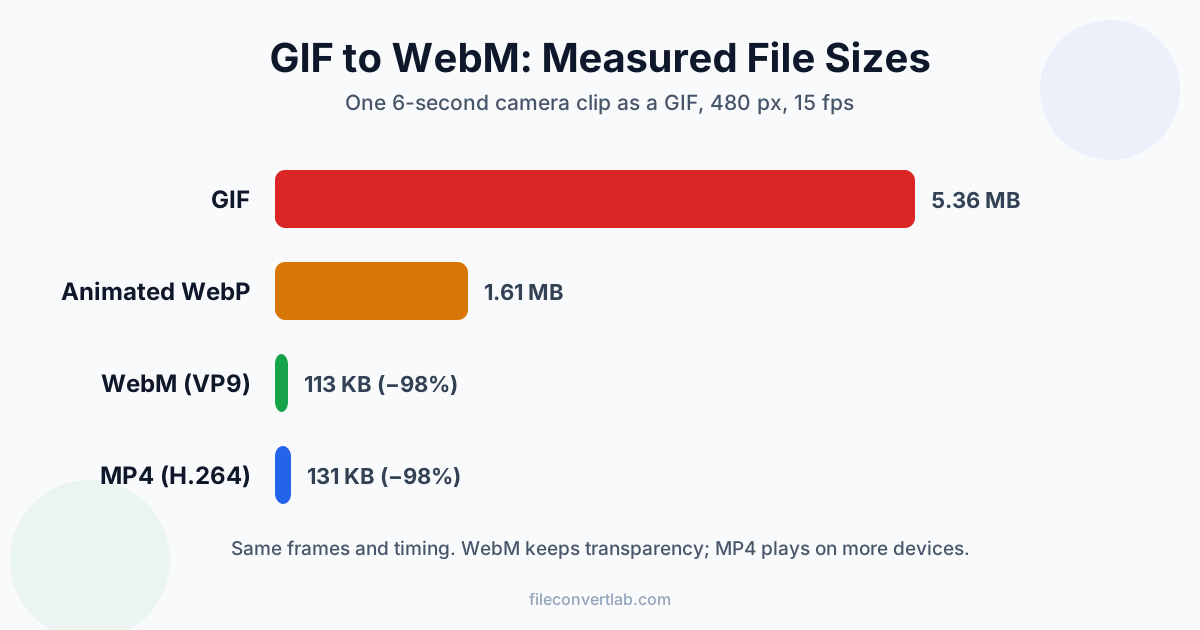
To convert a GIF to WebM, upload it to a GIF to WebM converter and download the video: it's the same animation, same frame count and timing, in a file that's usually far smaller. How much smaller depends on what's in the GIF. In our tests a 5.4 MB camera GIF became a 113 KB WebM (98% smaller), while a two-colour pixel-art GIF went the other way, from 419 KB to 1 MB.
Below: the steps, the measured sizes for WebM, MP4 and animated WebP, and the places where a WebM won't work as a GIF replacement.
How to Convert GIF to WebM in Four Steps
- Open the GIF to WebM converter
- Drop in one animated .gif (this tool takes one file at a time)
- Wait while it converts on our servers over an encrypted HTTPS connection
- Download the .webm
What you get: VP9 video in a WebM file, at the GIF's own width, height and frame rate. There's no audio track, because a GIF never has one. Transparent areas stay transparent (more on that below).
Limits: 100 MB per file. Conversion is free without sign-up, with a daily operation limit. How uploaded files are handled is described in the privacy policy.
Need MP4 instead? The GIF to MP4 converter works the same way and gives you H.264 video, which plays on more devices. Which one to pick is covered further down.
Why GIF Files Are So Big
GIF is an image format from 1987 that happens to allow several frames. Two things make it bloated for anything that looks like video:
- 256 colours per frame. Photos and footage have thousands of shades, so GIF makers fake the missing ones with dithering, a fine pattern of dots. Dither looks like noise, and noise is the hardest thing there is to compress
- Every frame is stored almost on its own. A GIF can skip pixels that didn't change, but it can't describe motion. When a camera pans, every pixel changes, and the whole frame goes in again
A video codec like VP9 or H.264 does the opposite. It stores full colour, predicts each frame from the previous ones, and only encodes the difference. That's where the big savings come from, and also why they can vanish on simple animations: flat pixel art is already cheap as a GIF.
GIF vs WebM vs MP4: What We Measured
We made three 6-second test GIFs the way most GIF makers do it: 480 px wide, 15 fps, one 256-colour palette per clip. Then we ran each GIF through our GIF to WebM, GIF to MP4 and GIF to WebP converters, with their default settings.
- Footage: a phone-style camera clip
- UI animation: a screen recording, like a product demo or a docs animation
- Pixel art: a Game of Life simulation in two colours, the kind of content GIF handles best
| Test animation (6 s, 480 px, 15 fps) | GIF | WebM | MP4 | Animated WebP |
|---|---|---|---|---|
| Footage | 5.36 MB | 113 KB (−98%) | 131 KB (−98%) | 1.61 MB (−70%) |
| UI animation | 1.49 MB | 131 KB (−91%) | 153 KB (−90%) | 851 KB (−43%) |
| Pixel art | 419 KB | 1.01 MB (+141%) | 997 KB (+138%) | 1.81 MB (+333%) |
All outputs kept all 90 frames and the 6-second length.
What the numbers say:
- "A tenth of the size" is true for footage, not for everything. The camera GIF shrank by 98% and the screen recording by 91%, while the pixel art grew by 141%. Check the result before you replace a flat animation
- WebM beat MP4 on two of three clips. At the default settings of the two converters the WebM came out about 14% smaller for footage and UI. On pixel art the two were about the same
- Animated WebP sits in between. It's an image format, so it's easier to drop into places that expect a GIF, but it saved far less than either video on footage and UI, and grew the most on pixel art. Our WebP guide covers it
WebM vs MP4 as a GIF Replacement
Both work as a "GIF" on a modern website. The differences are practical:
| WebM (VP9) | MP4 (H.264) | |
|---|---|---|
| Size in our tests | Smallest on footage and UI | About the same on pixel art |
| Transparency | Kept | Lost: transparent areas become a solid colour |
| Chrome, Firefox, Edge | Plays | Plays |
| Safari, iPhone, iPad | Recent versions play it on web pages | Plays everywhere |
| Photos apps, editors, TVs | Often rejected | Plays |
| Chat apps and social uploads | Hit and miss | Widely accepted |
Pick WebM when the animation has a transparent background, or when you're serving it on your own site and want an open format. Pick MP4 when the file has to work beyond the browser: a phone gallery, a presentation, a social upload. If you're unsure, MP4 is the safer single file. For a deeper look at the format itself, see what a WebM file is.
How to Put a WebM on a Web Page Like a GIF
A GIF autoplays and loops on its own. A video needs four attributes to behave the same way:
<video autoplay muted loop playsinline width="480" height="270">
  <source src="animation.webm" type="video/webm">
  <source src="animation.mp4" type="video/mp4">
</video>
- autoplay + muted: browsers only autoplay video without sound, so
mutedis required even though the file has no audio - loop: a video file has no built-in loop flag, unlike a GIF, so looping comes from the page
- playsinline: stops iPhones from opening the clip full screen
- Two sources: the browser takes the first one it can play. Listing WebM first and MP4 second covers every browser
Set width and height so the page doesn't jump when the video loads. Browser support tables and format choices for larger web video are in video formats for the web.
Does WebM Keep GIF Transparency?
Yes, with our converter it does. We made a GIF with a red square moving across a fully transparent background and converted it: the WebM carried an alpha channel, and the background pixels decoded as fully transparent. The MP4 from the same GIF had a solid white background, because H.264 in MP4 has no transparency.
Two caveats. GIF transparency is on or off per pixel, so soft edges were never there to begin with. And transparent WebM is best supported in Chrome, Firefox and Edge; test it in Safari before you rely on it for an overlay.
Where WebM Doesn't Work Instead of a GIF
The size savings only count if the file can play where it's going:
- Email. Most email clients won't play video in a message at all. Keep the GIF, or make it smaller with Compress Image
- Some chat apps and forums. Many animate GIFs inline but show a video as an attachment or re-encode it. Check the app before you switch
- iPhone Photos and many editors. They won't take a WebM. Use MP4 for anything that leaves the browser
- README files and wikis. Markdown image syntax animates GIFs, but a video usually needs an HTML tag or the platform's own upload feature, and many renderers strip the tag
In those places, an animated WebP or a trimmed GIF is the realistic option.
How to Convert GIF to Video With FFmpeg
If you have FFmpeg installed, these commands make a WebM and an MP4 with comparable settings:
ffmpeg -i animation.gif -c:v libvpx-vp9 -crf 30 -b:v 0 animation.webm
ffmpeg -i animation.gif -movflags +faststart -pix_fmt yuv420p -vf "scale=trunc(iw/2)*2:trunc(ih/2)*2" animation.mp4
The scale filter in the MP4 command rounds odd widths and heights down to even numbers, which H.264 requires. A 481 px GIF becomes a 480 px MP4. For a folder of GIFs, loop the command in your shell.
Common Problems
The WebM is bigger than the GIF. It happens with flat pixel animations, which GIF stores very cheaply: our two-colour pixel art grew from 419 KB to 1 MB. A two-frame blinking icon went from a 915-byte GIF to a 679-byte WebM but a 1.6 KB MP4. Compare the sizes, and keep the GIF when it wins.
The WebM won't play on my phone. Save or share the MP4 version instead. WebM is a web format first.
The animation plays once and stops. You're missing loop on the video tag, or the player you opened it in doesn't loop by default.
It looks slightly softer than the GIF. Video codecs smooth out the GIF's dither pattern. On footage that usually looks better; on pixel art with single-pixel detail, compare the two before you replace anything.
I need to go the other way. Turning a video into a GIF has its own settings for frame rate, width and palette, covered in how to convert video to GIF.
Summary
Converting a GIF to WebM keeps every frame and the timing, and the file shrinks dramatically when the GIF holds footage: 98% in our test. Flat pixel art can grow, and WebM was the smaller file on footage and UI, so choose WebM for transparency or your own site and MP4 for everything that leaves the browser. The GIF to WebM converter does the job in one upload.
Related Tools
- GIF to WebM: VP9 video with transparency kept
- GIF to MP4: H.264 video that plays on phones, TVs and editors
- GIF to WebP: animated image for places that need an image, not a video
- MP4 to GIF: the reverse direction, for email and chat
- Compress Image: make a GIF smaller when it has to stay a GIF