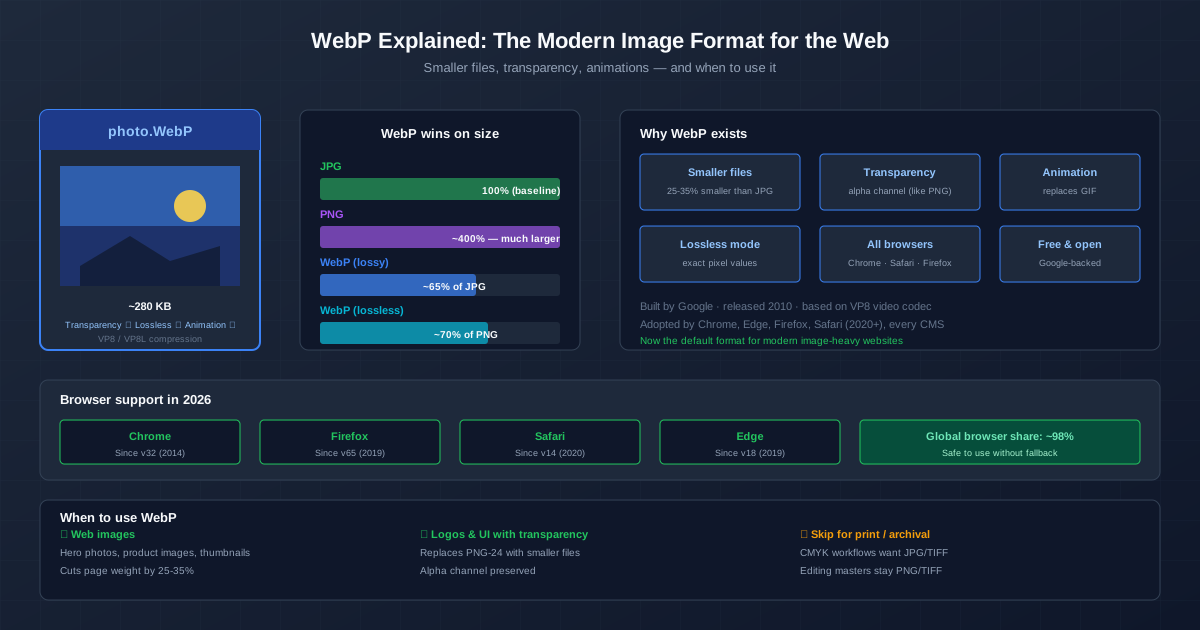
WebP is a modern image format that produces files 25-35% smaller than JPG at the same visual quality. It supports transparency (like PNG), animation (like GIF), and both lossy and lossless compression — all in a single format. Every modern browser supports it. For web images, WebP is the clear winner in 2026.
This guide covers what WebP is, how it compares to JPG and PNG, when to use each mode, and how to convert your existing images to WebP. If you want to convert now, use the image to WebP converter and accept the default quality settings.
Where WebP Comes From
Google introduced WebP in 2010, building it on the VP8 video codec — the same compression technology inside WebM video. The idea was to produce a format purpose-built for the web, replacing three older formats (JPG, PNG, GIF) with one that produced smaller files.
It took about a decade for universal browser support. Safari was the last holdout, adding WebP support in Safari 14 (September 2020). With Apple on board, WebP's global browser share reached ~98%, and CDNs and CMS platforms started serving WebP by default. By 2026, WebP is the standard image format for image-heavy sites.
How Much Smaller Is WebP?
These are real-world averages for a 1080px photograph at "visually identical" quality:
| Format | Typical file size | Relative to JPG | Notes |
|---|---|---|---|
| JPG (quality 85) | ~180 KB | 100% (baseline) | Universal compatibility |
| WebP lossy (q80) | ~120 KB | ~65% of JPG | Same visual quality, 33% smaller |
| PNG-24 | ~800 KB | ~440% of JPG | Lossless, overkill for photos |
| WebP lossless | ~560 KB | ~70% of PNG | Pixel-identical to PNG, 30% smaller |
| The savings add up. A page with 10 hero images weighing 1.8 MB in JPG is about 1.2 MB in WebP — a third of the page weight gone, with zero visible difference. |
Lossy vs Lossless: Two Modes
WebP has two compression modes that serve different purposes:
Lossy WebP (default)
Like JPG, lossy WebP discards image data the human eye struggles to see in order to shrink the file. At quality 80, the result looks identical to the source but is routinely 25-35% smaller than an equivalent-quality JPG. Use this for photographs, hero images, and any content where the photo itself is the priority.
Lossless WebP
Like PNG, lossless WebP preserves every pixel exactly — no data is thrown away.
The file is about 26% smaller than the equivalent PNG. Use this for logos (it supports transparency), screenshots, and graphics where pixel-perfect reproduction matters. If you want a lossless WebP, set the quality to 100 and enable lossless mode in your conversion tool.
Transparency (Alpha Channel)
Unlike JPG, WebP has a full alpha channel — the same kind of transparency PNG offers. You can have a logo with a transparent background, a product photo with a soft shadow that blends into any background, or a UI element with rounded corners, all in a single WebP file that is smaller than the equivalent PNG.
Both lossy and lossless WebP support alpha. Lossy WebP with transparency is unique — there is no JPG equivalent. For years, web developers had to use PNG for transparent images (large files) or JPG with a known background (kludge). WebP solves this with one file.
Animation: WebP Replaces GIF
Animated GIFs are limited to 256 colours and produce enormous files for anything longer than a few frames. Animated WebP supports 24-bit colour (millions of colours) and both lossy and lossless compression. The result: WebP animations are typically 60-80% smaller than GIFs, with vastly better colour and smoothness.
Every modern browser plays animated WebP natively, and most social and messaging platforms now accept them. For memes, short product demos, UI micro-interactions, and any case where GIF was historically used, animated WebP is the better answer.
Browser Support: Safe to Use Without Fallbacks
WebP is supported by every major browser. Chrome and Edge added it in 2014, Firefox in 2019, Safari in 2020. The combined share of browsers without WebP support is now below 2% — mostly Internet Explorer 11, whose usage has effectively ended. In 2026, you can serve WebP images to everyone without bothering with JPG/PNG fallbacks.
If you still want fallback support for any reason, the standard HTML approach is the <picture> element with a JPG or PNG <img> inside it. Most CDNs (Cloudflare, Imgix, Cloudinary) handle this automatically.
How to Convert Images to WebP
Online converter (quickest)
Drag JPG, PNG, or GIF files into the image to WebP converter . Quality defaults to 80, lossless mode is available, and batch conversion is supported. The right answer for most users.
Google cwebp (command line)
Google ships a command-line encoder called cwebp (part of the libwebp package). It is available on Linux, macOS, and Windows:
cwebp -q 80 input.jpg -o output.webp
For lossless:
cwebp -lossless input.png -o output.webp
ImageMagick
magick input.jpg -quality 80 output.webp
ImageMagick also handles batch conversion of entire folders — useful for migrating a large image library from JPG/PNG to WebP.
IrfanView / XnView MP (desktop, batch)
Both IrfanView (Windows) and XnView MP (cross-platform) support WebP export in their batch conversion modes. Add files, set WebP as the output, choose quality, and run. Both read existing WebP files as well.
When NOT to Use WebP
WebP is built for the web. Outside that context, think twice:
- Print and professional photography. Print workflows expect JPG, TIFF, or PSD files in CMYK colour space. WebP is RGB, screen-focused, and not supported by print industry software.
- Email attachments to unknown recipients. You do not know what software or operating system the other person uses. JPG is universally readable and the safe bet for email.
- Archival masters. Keep a lossless format (PNG, TIFF, the original camera RAW) for files you may edit again. WebP is a delivery format, not a master format.
- Legacy systems. If your software was last updated before 2014 (old CMS versions, enterprise tools), it probably does not read WebP. Check before converting a library.
WebP vs AVIF: The Next Generation
AVIF is a newer format (based on the AV1 video codec) that competes with WebP.
AVIF files can be even smaller — about 30% smaller than WebP lossy at the same quality — and support HDR and wide colour gamut. The catch: AVIF's browser support is newer (Safari added it in 2022, Chrome in 2020) and encoding is much slower.
For now, WebP is the safe choice for production because its encoding is fast, its browser support is universal, and the file size savings over JPG are already substantial. AVIF is the future — check back in a few years when encoding speed catches up and Safari's AVIF support matures.
Comparison With Related Formats
For a broader comparison of when each image format wins, see our PNG vs JPG vs WebP guide . For converting a specific format to WebP, use the PNG to WebP or JPG to WebP converters. For optimising images in general, including WebP usage, see the image optimisation guide .
Quick Summary
- For web images, use WebP. 25-35% smaller than JPG, visually identical, universal browser support.
- Lossy WebP (q80) for photographs. Same look, much smaller file.
- Lossless WebP for logos and screenshots. Pixel-perfect, 26% smaller than PNG.
- WebP supports transparency. Alpha channel in both modes.
- Animated WebP replaces GIF. 60-80% smaller, millions of colours.
- For email and unknown recipients, use JPG. Universal compatibility beats file size.
- For archival and editing, keep the original. WebP is a delivery format.