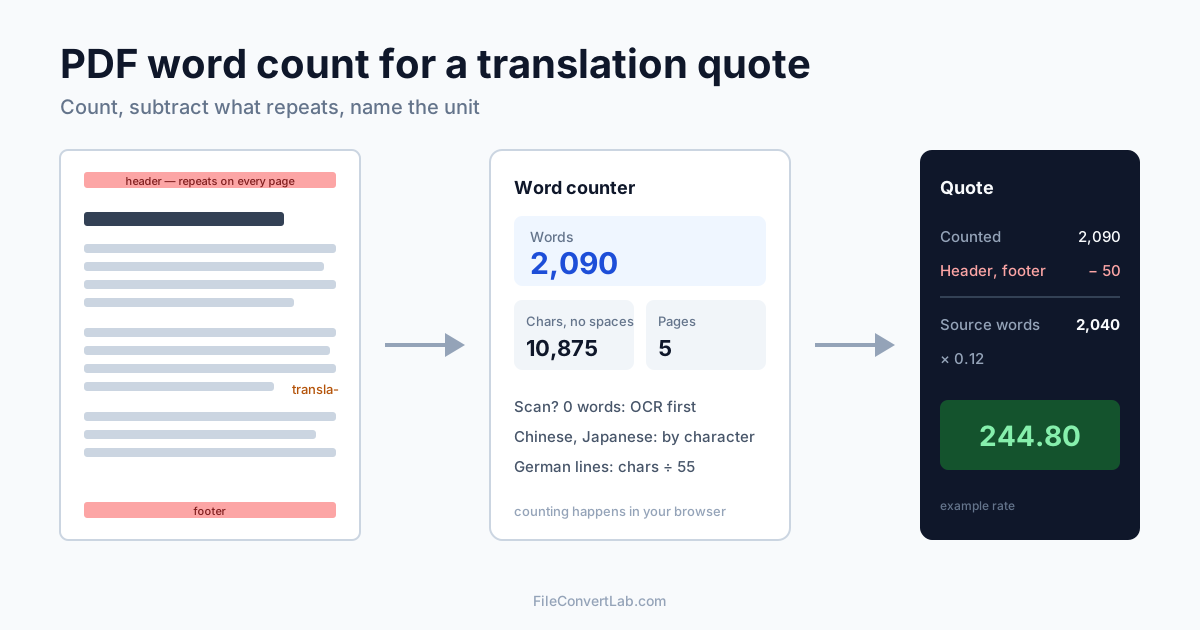
To get a PDF word count for a translation quote, drop the file into the PDF word counter: counting happens in your browser and you get words, characters with and without spaces, and pages in a few seconds. That number is right for a clean, text-based PDF. It goes wrong in four predictable places — scans, repeated headers, hyphenated line breaks and languages written without spaces — and each of them can cost you money on either side of the quote.
Below: how to get a count you can put in a quote, which unit to use for which language, and a worked example with numbers we measured on test files.
How to Count Words in a PDF for a Translation Quote
- Open the PDF word counter and drop in the source PDF.
- Read three numbers: Words, Characters (no spaces) and Pages.
- Check the result is plausible. A typical A4 or Letter page of running text holds a few hundred words. If you see 0, or 30 words for a 20-page document, the PDF is a scan (see below).
- Subtract what won't be translated — appendices already in the target language, a price table that stays in figures, a legal boilerplate page you have a translation of. If whole pages are out of scope, remove them with Delete PDF pages and count again.
- Put the unit in the quote. "2,040 source words" or "231 standard lines of 55 characters", never just "2,040".
We tested the counter on a five-page contract written as a DOCX file and exported to PDF. The DOCX body held 2,040 words and 10,520 characters without spaces; the PDF word counter reported 2,040 words and exactly the same 10,520 characters. For text-based PDFs from office software, the count matches the source.
Source Word Count vs Target Word Count
Most agencies and freelancers quote on the source text, because it's known before the work starts and both sides can verify it. Target-based billing — counting the finished translation — is still common in some markets and in court work, and it's why the language pair matters: German, for example, often runs longer than English in characters.
If a client sends a PDF and asks "how much?", count the source, state that you did, and add a line for what happens if the final document differs. Nobody argues about a number they can reproduce by dropping the same file into the same counter.
Why Your PDF Word Count Differs From a CAT Tool
Your count, the client's count in Word and a CAT tool analysis (Trados, memoQ, Phrase and similar) will rarely agree to the word. Here is where the differences come from, measured on our test files.
Headers and footers repeat on every page. We added a 10-word header and footer to the same five-page contract. Word leaves headers and footers out of its main count; the PDF has them printed on each page, so the counter reported 2,090 words — 50 more, 2.5% of the total. On a 200-page manual with a long running title, that's a noticeable slice of the invoice. Subtract header words × pages or agree that they're counted once.
Hyphenated line breaks split words in two. In a PDF, a word broken across lines as transla- / tion is two pieces of text. Our five-line test paragraph had 29 words and three such breaks; the counter reported 32. Justified legal text and narrow columns hyphenate a lot — expect a small overcount.
Repetitions are words too. Our test contract repeated one 51-word clause 40 times. The word counter says 2,040, which is true. A CAT tool would report 51 new words and 1,989 words of internal repetition, which many translators bill at a reduced rate. If the document is templated, run the CAT analysis before quoting; the PDF count is the ceiling, not the effort.
Numbers, codes and symbols. The counter counts anything containing a letter or digit as a word — 12,500, 4.2, 2026-114 — and skips stand-alone dashes and bullets. CAT tools can be set to exclude numbers, so a spreadsheet-heavy document can differ by a lot.
Text boxes, footnotes and comments. Word's quick count may leave out text boxes and footnotes, depending on its Word Count settings. The PDF counter sees everything that's printed on the page and nothing that isn't, such as comments or hidden text.
Word Count for a Scanned PDF: OCR First
A scanned PDF is a picture of text. The counter extracts real text only, so a scan shows 0 words — our image-only test page did exactly that.
To count a scan:
- Run it through OCR to a searchable PDF and pick the document's language in the language list — there are 29, including Chinese, Japanese, Korean, Arabic, Cyrillic and Greek scripts.
- Drop the searchable PDF into the word counter.
Treat the result as an estimate: recognition errors merge or split words, and stamps, handwriting and signatures add noise. For quoting that's fine — round up and say it's based on OCR. The scanned PDF to text guide covers how to get cleaner recognition, and OCR for non-Latin scripts explains what changes for Arabic, Chinese and Japanese.
Chinese, Japanese, Korean and Thai: Count Characters, Not Words
Languages without spaces between words can't be counted by splitting on spaces, which is why the industry quotes Chinese and Japanese per character.
Chinese and Japanese. The counter counts each Chinese character and each kana as one word, the way Word does. On our Chinese test PDF it reported 580 words for 580 Chinese characters; the Characters (no spaces) figure was 620, because it also includes the 40 punctuation marks. Agree with the client which of the two you're quoting — with or without punctuation — and name it in the quote.
Korean uses spaces, so it's counted by words. Our test PDF with 200 space-separated words came out at 230: in the PDF, some words were broken across line ends and digits sat in separate text runs, both of which split one word into two. Quote Korean by characters without spaces, or check the count against the source file.
Thai has no spaces between words and isn't in the counter's per-character set. On our Thai test PDF the word figure was meaningless (820 "words" for a paragraph with 30 space-separated chunks), and even the character count came out wrong because the text pulled from that PDF was fragmented. For Thai, count characters in the source Word file or a CAT tool.
Characters With and Without Spaces: Line-Based Rates
Some markets quote by character or by line rather than by word. The best-known example is German: court translators are paid under § 11 of the German Justice Remuneration Act (JVEG) per started block of 55 characters ("Anschläge"). Since 1 June 2025 the basic rate is €1.95 per 55 characters when the text is supplied in editable electronic form and €2.15 when it isn't, and the target text is normally what's counted. Many agencies in German-speaking countries use the same 55-character standard line (Normzeile) for commercial quotes.
To turn the counter's result into lines, divide Characters (with spaces) by 55. Our contract: 12,718 ÷ 55 = 231.2, so 232 started lines. One caution: when the counter joins the pieces of text on a page, it inserts a space between them, so its "with spaces" figure ran 1.3% above the source document's own count (12,718 vs 12,559). For a court-grade line count, count the finished translation in the word processor.
A Worked Translation Quote From a PDF
Our five-page English contract, going into German at an example rate:
| Step | Figure |
|---|---|
| Word counter result | 2,090 words |
| Minus header and footer (10 words × 5 pages) | − 50 |
| Minus hyphenation pieces (visible on inspection) | − 0 in this document |
| Billable source words | 2,040 |
| Example rate 0.12 per word | 244.80 |
| Same text by line: 12,718 characters with spaces, header excluded, ÷ 55 | 232 lines |
Put the method in the quote — "2,040 source words, counted from the PDF, headers excluded" — and the client can reproduce your number in a minute.
Revised Documents: Quote Only What Changed
When a client sends version 2 of a document you've already translated, don't quote the whole thing again. Compare documents shows word-level additions and deletions between two PDFs, or a PDF and a DOCX, in your browser, plus a similarity percentage. Count the changed passages, or quote the new-word delta. Better still, ask for the Word files and let your CAT tool's translation memory do it.
When the PDF Isn't the Best Source to Count
- You'll translate in Word anyway. Convert with PDF to Word and count in the document you'll actually work in; the OCR output formats guide explains when a scan should become DOCX instead of searchable PDF
- The PDF is a design file with text in outlines or images. Ask for the source (InDesign, Word, PowerPoint) — neither OCR nor any counter will give a clean figure
- It's mostly tables and numbers. Count in a CAT tool with numbers excluded
Summary
For a clean text-based PDF, the word counter's figure is the source word count — ours matched the source document exactly at 2,040 words. Before quoting, subtract repeated headers and footers, OCR scans first, and quote Chinese and Japanese by characters. Put the unit and the method in the quote, and start with the PDF word counter.
Related Tools
- PDF word counter — words, characters with and without spaces, pages
- OCR PDF to searchable PDF — make a scan countable, with a choice of 29 languages
- Compare documents — see what changed between two versions
- PDF to Word — get an editable file for your CAT tool
- Delete PDF pages — drop pages that aren't in scope before counting