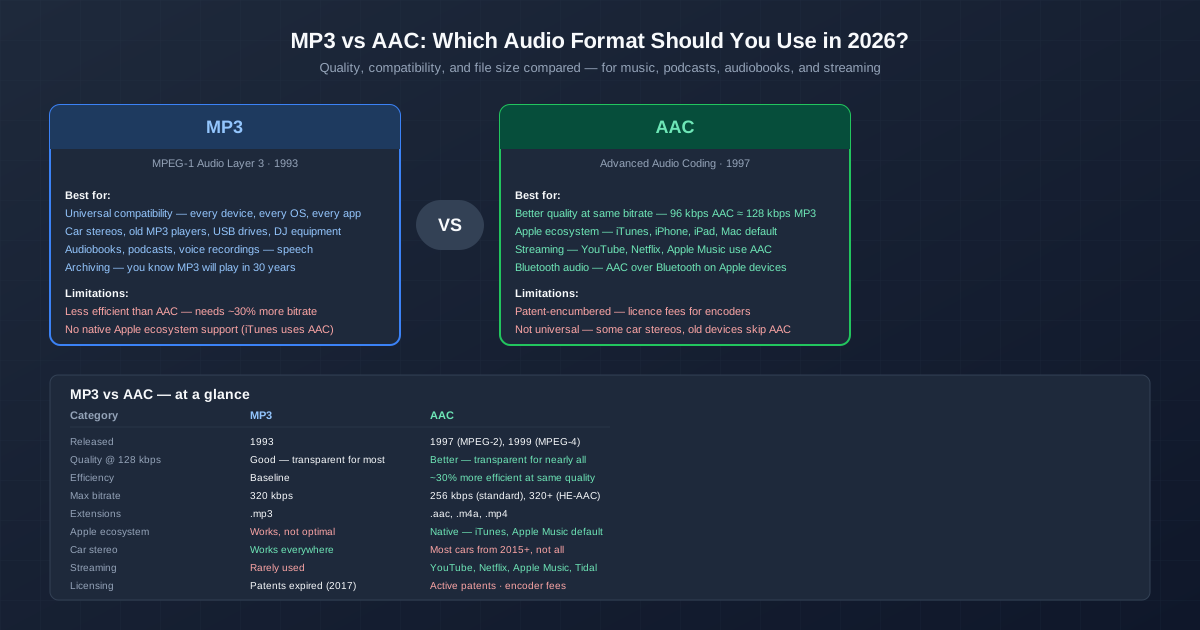
MP3 is 33 years old. AAC is 29 years old. In the world of codecs, both are ancient. Yet they remain the two most important audio formats — MP3 because it is universal, AAC because it is better. Here is the detailed comparison: what each does well, where each fails, and which one to use for your specific situation.
The short answer: use MP3 for maximum compatibility (car, old devices, sharing) and AAC for quality and the Apple ecosystem. But the full answer depends on bitrate, playback device, and whether you are archiving or streaming.
The Technical Difference in Plain Language
Both MP3 and AAC are perceptual audio codecs. They work by analysing sound and discarding frequencies the human ear cannot hear — sounds masked by louder sounds at nearby frequencies, very high frequencies most people cannot perceive, and quiet details below the noise floor of the playback environment.
AAC does this more intelligently than MP3. It was designed with a decade of additional psychoacoustic research and more CPU power to run more complex analysis. The key improvements: AAC splits the frequency spectrum into more bands (1024 vs MP3's 576), handles transient sounds (drum hits, plosives) better with Temporal Noise Shaping, uses more flexible stereo coding (Mid/Side and Intensity stereo per frequency band), and supports higher frequencies up to 96 kHz. In practice, this means AAC needs about 30% less bitrate than MP3 to achieve the same perceived quality.
Quality at Every Bitrate
| Bitrate | MP3 quality | AAC quality | Good for |
|---|---|---|---|
| 64 kbps | Noticeably compressed, metallic artefacts on music | Acceptable for speech and casual music | Audiobooks, podcasts (AAC better) |
| 96 kbps | OK for speech, music sounds thin | Good — similar to MP3 at 128 kbps | Podcasts (MP3 OK), music streaming low-quality tier |
| 128 kbps | Good — transparent for most casual listeners | Transparent for most listeners and music | General music library (AAC), MP3 minimum for music |
| 160 kbps | Very good — few can hear artefacts | Transparent for nearly all | Music on decent headphones (both) |
| 192 kbps | Transparent for most listeners | Transparent for virtually all | High-quality music library (both) |
| 256 kbps | Transparent for virtually all | Transparent — Apple Music streaming quality | Archival quality (both), iTunes Store standard |
| 320 kbps | Maximum MP3 quality | Beyond necessary for any practical use | MP3 archival, audiophile peace of mind |
Compatibility: Where MP3 Wins Decisively
MP3 is the only audio format that plays on literally everything. Every computer, phone, tablet, game console, car stereo, smart TV, Bluetooth speaker, and portable player manufactured since 2000 supports MP3. This is MP3's single biggest advantage and the reason it refuses to die.
AAC compatibility is good but not universal. Apple devices (iPhone, iPad, Mac, Apple Watch, HomePod) handle AAC natively. Android has had AAC support since version 1.0. Windows supports AAC since Windows 7. Most Bluetooth speakers and headphones support AAC. Where AAC fails: older car stereos, some budget MP3 players, certain in-flight entertainment systems, and older smart TVs. If you are making a file for someone else to play on an unknown device, MP3 is the safe choice.
File Size Comparison
Because AAC is more efficient, you can choose between smaller files or better quality:
| Scenario | MP3 size (per hour) | AAC size (per hour) | Which is more practical |
|---|---|---|---|
| Equal quality (96 kbps AAC ≈ 128 kbps MP3) | ~57 MB | ~43 MB (25% smaller) | AAC saves space for same quality |
| Equal bitrate (128 kbps) | ~57 MB | ~57 MB | AAC sounds better at same size |
| Audiobook (64 kbps, speech only) | ~28 MB | ~28 MB | Tie — speech quality is the same |
When to Use MP3
- Car stereo playback. The USB port in your car almost certainly reads MP3. AAC support is common in newer cars but not guaranteed. If you keep a USB stick of music in the car, format it as MP3.
- Sharing with other people. When you send an audio file to someone else, you do not know what device they will use. MP3 removes the guesswork.
- Podcasts. The entire podcast ecosystem runs on MP3. RSS feeds, podcast apps, and podcast directories expect MP3. AAC podcasts exist but risk compatibility issues with some players.
- Archiving for future-proof playback. MP3 patents expired in 2017. It is now a truly open format that every device for the foreseeable future will support. You can be confident an MP3 file will play in 30 years.
- DJ equipment and professional audio gear. CDJs, mixers, and samplers overwhelmingly support MP3. AAC support is growing but not universal in professional gear.
When to Use AAC
- Apple ecosystem. If you use iPhone, iPad, Mac, and Apple Music, AAC is the native format. iTunes and the Music app default to AAC. iCloud Music Library syncs AAC files seamlessly between devices.
- Better quality at the same file size. If storage is limited (phone, smartwatch), AAC gives you more music per gigabyte at the same perceived quality.
- Streaming platform content creation. If you produce audio for YouTube, Apple Music, or other streaming platforms, they will re-encode your upload. Giving them AAC means fewer lossy-to-lossy transcoding steps.
- Bluetooth audio on Apple devices. iPhones send AAC directly over Bluetooth to compatible headphones without re-encoding. MP3 is decoded and re-encoded to AAC or SBC, adding a quality penalty. With AirPods or Beats, AAC source files skip this re-encoding.
- Multi-channel and high sample rate audio. AAC supports up to 48 channels and sample rates up to 96 kHz. MP3 tops out at 2 channels and 48 kHz. For surround sound or hi-res audio distribution, AAC is the minimum viable format.
Converting Between MP3 and AAC
You can convert in either direction with tools like FFmpeg or online converters. To convert AAC to MP3 for car stereo compatibility, use the M4A to MP3 converter (M4A is AAC in an MP4 container). To convert MP3 to AAC for Apple ecosystem use, use iTunes/Music app (File → Convert → Create AAC Version) or FFmpeg with the libfdk_aac encoder for the best quality.
Important: Whenever possible, encode from the original lossless source, not from an existing MP3 or AAC file. Double lossy encoding adds artefacts.
Related Topics
For converting other audio formats to MP3 for universal playback, see OGG to MP3 — OGG Vorbis has the same compatibility problem as AAC (excellent quality, limited device support). If you have Audible audiobooks locked behind DRM, read the AAX to MP3 guide — those files contain AAC audio under the encryption. For Apple-specific audio files, use M4A to MP3 to make Apple Music files playable on non-Apple devices.
Quick Summary
- AAC is technically better — roughly 30% more efficient, better quality at the same bitrate.
- MP3 is universally compatible — plays on every device manufactured since 2000.
- For cars, sharing, and podcasts: MP3. Compatibility matters more than a small quality improvement.
- For Apple devices, streaming, and quality: AAC. Native format, better sound per megabyte, direct Bluetooth path on iPhone.
- 128 kbps AAC = 192 kbps MP3 in perceived quality. Or save 25% file size at equal quality.
- Don't convert between lossy formats if you can avoid it. Go back to the original CD, FLAC, or WAV if you have it.
- Both are good enough. Unless you are critically listening on high-end gear, either format at 192+ kbps is transparent.