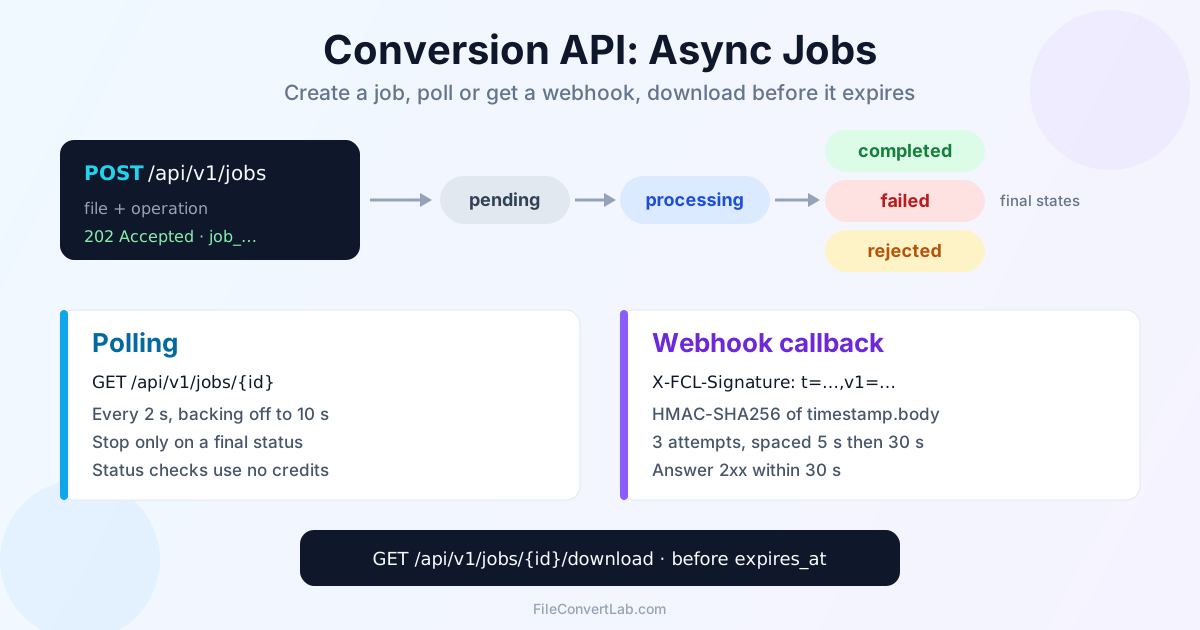
The FileConvertLab conversion API never hands the converted file back on the upload request. POST /api/v1/jobs answers 202 Accepted with a job ID and the status pending. From there you either poll GET /api/v1/jobs/{id} until the status is final, or pass a webhook_url and get a callback when the job ends. Either way, you then fetch the result from /api/v1/jobs/{id}/download within 24 hours.
Below: the real field names, statuses and headers the backend sends, with curl and a short Python webhook receiver. The endpoint reference is the conversion API documentation. If you'd rather not write HTTP code at all, the fcl CLI quickstart does all of this in one command.
Why the Conversion API Uses Async Jobs
In our test, a three-page text PDF went to Word in about 0.1 seconds, while the same file through OCR took about 6.5 seconds. Video and long scans take far longer, and HTTP connections held open that long break on proxies and mobile networks. So every conversion is a job: the upload returns at once, and estimated_duration_sec and queue_position tell you roughly how long to wait.
Create a Conversion Job with POST /api/v1/jobs
Base URL: https://fileconvertlab.com/api/v1. The request is multipart/form-data:
| Field | Required | What it is |
|---|---|---|
file | Yes | The file to convert |
operation | Yes | Operation ID, e.g. pdf-to-word, ocr-pdf-to-doc, compress-pdf |
options | No | JSON string with operation options, e.g. {"quality":60} or {"language":"de"} |
webhook_url | No | URL that receives a POST when the job reaches a final status |
webhook_secret | No | Shared secret; turns on the X-FCL-Signature header on webhooks |
Authenticate with your key in the X-API-Key header. Signed-in users create keys on the API keys page, and each key carries its plan's limits. Requests without a key run under guest limits (20 credits per minute, 50 per day), which is enough to try things out.
curl -s https://fileconvertlab.com/api/v1/jobs \
  -H "X-API-Key: $FCL_API_KEY" \
  -F "file=@report.pdf" \
  -F "operation=pdf-to-word"
The response is 202 Accepted:
{
  "id": "job_11d198f17615",
  "status": "pending",
  "operation": "pdf-to-word",
  "created_at": "2026-09-25T11:16:52.579Z",
  "estimated_duration_sec": 5,
  "queue_position": 0,
  "file": {"name": "report.pdf", "size": 2895, "mime_type": "application/pdf"}
}
Store id. Job IDs look like job_ followed by 12 hex characters. The 202 also carries X-RateLimit-Limit-Minute, X-RateLimit-Limit-Day, X-RateLimit-Remaining-Minute, X-RateLimit-Remaining-Day and X-RateLimit-Cost (credits this job used). Bad input fails right here, before any job exists: an unknown operation returns 400 INVALID_OPERATION, a wrong file type returns 400 INVALID_FILE_TYPE, and an out-of-range option returns its own code, such as INVALID_QUALITY.
Job Status Lifecycle: pending, processing, completed
GET /api/v1/jobs/{id} returns the same object as the 202, with more fields filled in as the job moves along:
| Status | Final? | Meaning |
|---|---|---|
pending | No | Accepted and queued |
processing | No | Converting |
delegated | No | Handed to a separate worker (OCR jobs showed this in our test) |
completed | Yes | Done. result holds the file details |
failed | Yes | The conversion broke. error.code and error.message say why |
rejected | Yes | The input failed validation and no conversion ran. error explains |
Loop until the status is one of the three final values, not while it equals one particular value. A loop like while status == "processing" exits on the first response, because a new job starts as pending, and it would also exit on delegated. Treat any status you don't recognise as still running.
A completed job looks like this:
{
  "id": "job_11d198f17615",
  "status": "completed",
  "operation": "pdf-to-word",
  "completed_at": "2026-09-25T11:16:52.714Z",
  "progress": 100,
  "result": {
    "download_url": "/api/v1/jobs/job_11d198f17615/download",
    "file_name": "report_20260925_111652.docx",
    "file_size": 2921,
    "expires_at": "2026-09-25T12:16:52.715Z"
  }
}
result.download_url is a path relative to the host. OCR-to-text jobs also include result.text_content with the recognised text, so you may not need the download at all. warnings shows up when the server adjusted something about the job.
How to Poll a Conversion Job: Interval and Stop Condition
Polling works even when your server isn't reachable from the internet. Three rules:
- Start short, back off. Wait 2 seconds (the interval the fcl CLI uses), then double up to about 10 seconds.
- Stop on a final status only:
completed,failedorrejected - Set a deadline. Rule of thumb: give up after a few multiples of
estimated_duration_sec(at least a minute or two) and log the job ID for a later check
Status checks don't use credits. Credits are charged only when a job is created.
API=https://fileconvertlab.com/api/v1

JOB=$(curl -s "$API/jobs" \
  -H "X-API-Key: $FCL_API_KEY" \
  -F "file=@scan.pdf" \
  -F "operation=ocr-pdf-to-doc" \
  -F 'options={"language":"en"}' | jq -r .id)

DELAY=2
while :; do
  STATUS=$(curl -s "$API/jobs/$JOB" -H "X-API-Key: $FCL_API_KEY" | jq -r .status)
  case "$STATUS" in completed|failed|rejected) break ;; esac
  sleep "$DELAY"; DELAY=$(( DELAY < 10 ? DELAY * 2 : 10 ))
done
echo "$JOB finished as $STATUS"
In our run of this loop, the OCR job printed pending, then delegated, then completed. For a document you can select text in, pdf-to-word is the cheaper operation. The OCR route is for scans, and it's what the OCR PDF to Word page runs.
Download the Result Before expires_at
curl -s -OJ "$API/jobs/$JOB/download" -H "X-API-Key: $FCL_API_KEY"
-OJ saves the file under the name from Content-Disposition, e.g. report_20260925_111652.docx.
- A result can be downloaded for 24 hours after the job completes.
result.expires_atis the exact cutoff. After that the endpoint answers 410 withFILE_EXPIRED(orFILE_NOT_FOUND/FILE_DELETEDif the file is gone). Download promptly and keep the file in your own storage - Too early? A job that isn't
completedreturns 400JOB_NOT_COMPLETED - Ownership: a job created with a key or account can only be downloaded with that same key or account, anything else gets 403
FORBIDDEN. A job created without any key can be downloaded by anyone who has its ID, so treat IDs as private
Webhooks: Get a Callback When the Job Finishes
Add webhook_url to the create request and FileConvertLab POSTs a JSON body to it when the job reaches completed, failed or rejected:
curl -s "$API/jobs" \
  -H "X-API-Key: $FCL_API_KEY" \
  -F "file=@report.pdf" \
  -F "operation=pdf-to-word" \
  -F "webhook_url=https://example.com/hooks/fcl" \
  -F "webhook_secret=$FCL_WEBHOOK_SECRET"
The body for a completed job:
{
  "event": "job.completed",
  "job_id": "job_11d198f17615",
  "status": "completed",
  "operation": "pdf-to-word",
  "result": {
    "download_url": "https://fileconvertlab.com/api/v1/jobs/job_11d198f17615/download",
    "file_name": "report_20260925_111652.docx",
    "file_size": 2921,
    "expires_at": "2026-09-25T12:16:52.715Z"
  },
  "error": null
}
The events are job.completed, job.failed and job.rejected. For the last two, result is null and error holds code and message. Here download_url is absolute, but downloading still needs your X-API-Key. It's an endpoint to call, not a public link.
Every delivery carries these headers:
| Header | Value |
|---|---|
Content-Type | application/json |
User-Agent | FileConvertLab-Webhook/1.0 |
X-FCL-Delivery-Attempt | 1, 2 or 3 |
X-FCL-Signature | t=<unix time>,v1=<hex HMAC>, only when you sent webhook_secret |
Retries: a delivery succeeds on any 2xx response within 30 seconds. Anything else (a 4xx or 5xx, a timeout, a refused connection) is retried: three attempts in total, the second about 5 seconds after the first, the third about 30 seconds after that. We pointed a test job at a URL that answers 405, and the log showed exactly that: three attempts, then the server gave up. There's no redelivery after the third attempt.
The URL must be publicly reachable. Localhost, private, loopback and link-local addresses are refused. That check happens at delivery time, so a bad URL doesn't make the create request fail: the job converts normally, and the callback just never arrives. For local development, poll instead or use a public tunnel.
Verify the X-FCL-Signature HMAC
With webhook_secret set, the signature header is t=<timestamp>,v1=<digest>, where the digest is the hex HMAC-SHA256 of <timestamp>.<raw body>, keyed with your secret. Each attempt gets a fresh timestamp and signature. To verify it:
- Read the raw request body. Don't re-serialise parsed JSON, because the bytes won't match
- Recompute the HMAC over
t + "." + bodyand compare in constant time - Reject timestamps far from your clock, e.g. more than 5 minutes off, to block replays
A minimal Flask receiver:
import hashlib, hmac, os, time
from flask import Flask, abort, request

app = Flask(__name__)
SECRET = os.environ["FCL_WEBHOOK_SECRET"].encode()

def valid_signature(raw: bytes, header: str, tolerance: int = 300) -> bool:
    try:
        parts = dict(p.split("=", 1) for p in header.split(","))
        timestamp, digest = parts["t"], parts["v1"]
        if abs(time.time() - int(timestamp)) > tolerance:
            return False
    except (KeyError, ValueError):
        return False
    expected = hmac.new(SECRET, timestamp.encode() + b"." + raw, hashlib.sha256).hexdigest()
    return hmac.compare_digest(expected, digest)

@app.post("/hooks/fcl")
def fcl_webhook():
    if not valid_signature(request.get_data(), request.headers.get("X-FCL-Signature", "")):
        abort(401)
    event = request.get_json()
    enqueue(event["job_id"])  # your queue: re-check the job, then download
    return "", 204
We tested valid_signature against a signature built the way the backend builds it: the untouched body passed, one extra byte failed.
Treat the Webhook as a Hint, Then GET the Job
Make the job endpoint your source of truth:
- Answer 2xx fast and do the work in the background. If your handler takes longer than 30 seconds, the attempt counts as failed and the same event arrives again
- Deduplicate by
job_id. A retry can arrive after you already handled a slow first attempt.X-FCL-Delivery-Attempttells you it's a retry - Re-read the job with
GET /api/v1/jobs/{id}before downloading. It confirms the status and gives you the currentexpires_at - Keep polling as a fallback for jobs whose callback never arrived. After three failed attempts nothing else is sent
Duplicate Uploads Are Deduplicated While in Flight
There's no Idempotency-Key header, but the API has built-in protection against double submits. If you POST the same file bytes with the same operation and the same options from the same client IP while an earlier job for it is still pending or processing, you get the earlier job back, with the same id and no second job. We sent the same OCR request twice in a row and got job_cfc76a203c43 both times.
What that means in practice:
- Retrying a create request after a network timeout won't start a second conversion while the first one is still running
- The duplicate request still counts against your credits, since the rate limit is checked before the dedup
- Different
optionscount as a different request and start a new job. The second request'swebhook_urlandwebhook_secretare ignored, though, because the existing job keeps its own. For a second callback target on the same conversion, wait until the first job is final
Polling or Webhooks: Which to Use
| Polling | Webhooks | |
|---|---|---|
| Needs a public endpoint | No | Yes |
| Latency after completion | Up to one polling interval | Immediate |
| Delivery guarantee | You control it | Three attempts, then nothing |
| Works in scripts and CI | Easily | Awkward |
| Best for | Batch scripts, CLIs, one-off jobs | Backend services with many concurrent jobs |
Production integrations usually use both: a webhook for speed and a slow sweep over unfinished job IDs as a safety net. For many files, create jobs back to back and track the IDs, letting the per-minute credit limit pace you. Planning that kind of work is covered in the batch file conversion guide.
Summary
The conversion API is job-based. Create with POST /api/v1/jobs, then either poll until completed, failed or rejected, or let a signed webhook tell you, and download within the 24 hours expires_at gives you. Loop on final statuses rather than on processing, verify X-FCL-Signature over the raw body, and re-read the job before you trust a callback. The full endpoint reference is in the conversion API documentation.
Related Tools
- Conversion API documentation: endpoints, operations, webhook reference
- fcl CLI reference: the same job flow from a terminal (
--async,fcl status,fcl download) - Developer resources: overview of the API and the CLI
- API keys: create and revoke keys
- OCR PDF to Word