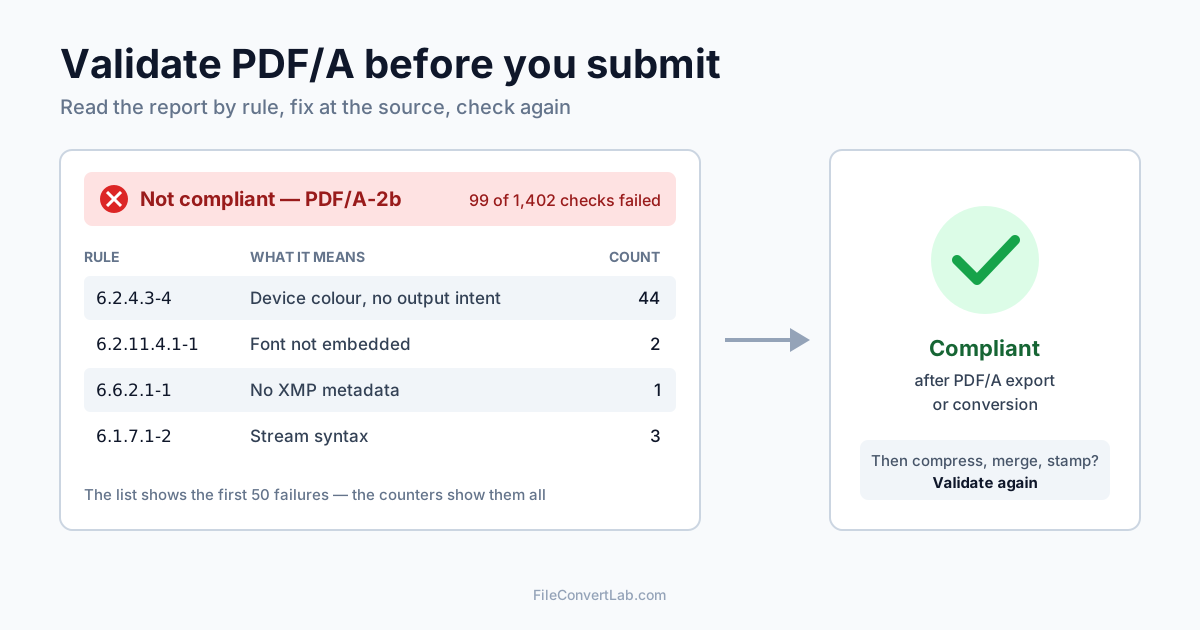
To validate a PDF/A file, upload it to a PDF/A validator, choose the part and level you were asked for — PDF/A-1b, 2b or 3b — and read the verdict: compliant, or a list of failed rules with clause numbers. A pass means the file follows ISO 19005 for that level; the "PDF/A" label in a PDF reader only means the file claims to. If it fails, fix it at the source or run it through a converter, then validate again.
Below: what validation actually checks, how to read the report, the failures we produced on real files and what fixed each one, and when a converter is the faster route.
Validator vs Converter: Which One You Need
They do opposite jobs, and it's easy to reach for the wrong one.
| PDF/A validator | PDF/A converter | |
|---|---|---|
| Input | Any PDF | Any PDF |
| Output | A report: pass or fail, rules and clauses | A new file, rewritten as PDF/A |
| Changes your file | No | Yes — embeds fonts, adds colour profile and metadata, removes forbidden content |
| Use it when | You must prove a file is PDF/A before submitting it, or you want to know why a portal rejected it | The file isn't PDF/A yet and you don't have the source document |
In practice you often use both: the PDF to PDF/A converter makes a PDF/A-1b, 2b or 3b file and checks it before you download it, and the validator confirms the file is still compliant after anything else touches it — merging, compressing, stamping, signing. If you're still deciding whether you need PDF/A at all, or which part, start with PDF/A vs PDF.
How to Validate PDF/A Online
- Open the PDF/A validator.
- Pick the version. Use the one in your submission rules: 1b, 2b or 3b. Auto reads the version the file claims in its own metadata — useful for checking a file someone says is PDF/A. For a file that doesn't claim PDF/A yet, pick the version explicitly.
- Upload the PDF. The check runs on our servers over HTTPS.
- Read the verdict and the numbers: total checks, passed, failed, and the list of failed rules.
Password-protected files can't be checked: the validator stops with "Cannot validate encrypted PDF. Please remove password protection first." That's not a technicality — PDF/A forbids encryption, so a protected file can never pass. Remove the protection with Unlock PDF (you need the password) and validate the unlocked copy.
What PDF/A Validation Checks
A validator doesn't look at the page like a person does. It walks through the file's internal objects and tests each against the rules of ISO 19005 — thousands of individual checks, even for a short document. Our 3-page test file needed 1,402 checks against PDF/A-2b; the same content after conversion needed 25,632, because embedded fonts bring many more objects to inspect.
The rules fall into a few groups:
- Fonts — every font used to draw text must be embedded
- Colour — device colours (plain RGB, CMYK, grey) need an output intent, an embedded ICC profile that says what they mean
- Metadata — an XMP metadata stream must exist, declare the PDF/A part and level, and agree with the document information (title, author, dates)
- Forbidden features — encryption, JavaScript, audio and video, external content; transparency in PDF/A-1; non-PDF/A attachments in PDF/A-2
- File syntax — low-level formatting rules most PDF writers never think about
How to Read a PDF/A Validation Report
Each failed rule comes with three things:
| Field | Example from our tests | What it tells you |
|---|---|---|
| Rule ID | 6.2.11.4.1-1 | Clause plus test number — search for it to find others with the same problem |
| Clause | 6.2.11.4.1 | The section of ISO 19005 for your part; clause numbers differ between parts |
| Description | "The font programs for all fonts used for rendering within a conforming file shall be embedded…" | The rule in the standard's own words |
Three habits save time:
- Group by rule, not by line. One missing colour profile produced 44 identical failures on our first test file. Failed checks are counted per occurrence, so 99 failures often means three or four problems.
- The report lists the first 50 failures. The counters above it show the full total. If the list is one rule repeated 50 times, fix that and run the check again to see what's behind it.
- Clause numbers depend on the part. The same font rule is
6.3.4in PDF/A-1 and6.2.11.4.1in PDF/A-2 and 3. Don't compare reports made against different parts.
Why PDF/A Validation Fails: Errors From Our Tests
We built test files the way real ones get made, checked them via the API, and then fixed them. Every message below is what the validator returned.
Fonts not embedded
A 3-page PDF from a reporting library, 3,147 bytes, using Helvetica without embedding it. Against PDF/A-2b: 99 failed checks out of 1,402, including 6.2.11.4.1-1 for Helvetica and Helvetica-Bold. Fix: embed the fonts — in Word and LibreOffice that happens automatically when you export as PDF/A; otherwise convert the file.
Device colour without an output intent
The most common failure by count. Our first file had 44 instances of 6.2.4.3-4 (DeviceGray), and a Word-style document exported to a regular PDF had 101 failures led by 6.2.4.3-2 (DeviceRGB). The page colours were fine; the file simply didn't say which colour space they belong to. Fix: an output intent with an ICC profile — PDF/A export in the source application or the converter adds one.
No XMP metadata, or metadata that disagrees
6.6.2.1-1 (no metadata stream) appeared on every regular PDF we tested. Checked against PDF/A-1b, our transparency test file also failed eight 6.7.3 rules: title, author, dates and producer in the document information had no matching XMP entries. Fix: again, a PDF/A export or conversion writes both and keeps them in sync.
Transparency in PDF/A-1
A page with a 30% transparent red box. Against PDF/A-1b: 15 failures, among them 6.4-6 — "If a ca key is present in an ExtGState object, its value shall be 1.0" — PDF/A-1 bans transparency outright. Against PDF/A-2b the transparency itself was allowed; the file failed 6.2.10-2 because, without an output intent, a page with transparency must declare a blending colour space. Fix: choose PDF/A-2b if the recipient accepts it. If they insist on 1b, the converter flattens the transparency: our converted file passed all 490 PDF/A-1b checks.
It says PDF/A but fails
We took a valid PDF/A-2b file and stamped "APPROVED" on it with a PDF editor. The file still declared PDF/A-2b in its metadata — the entry PDF readers rely on when they label a file as PDF/A. The validator found one failure: 6.2.11.4.1-1 — the editor had used a font without embedding it. This is how most "it was PDF/A when we made it" disputes start. Fix: validate after every edit, and make edits in the source before exporting.
Wrong part selected
A valid PDF/A-1b file checked as PDF/A-2b fails exactly one rule: 6.6.4-2, "The value of pdfaid:part shall be the part number of ISO 19005 to which the file conforms". The reverse gives 6.7.11-2. The content may be fine, but a portal that wants 2b will still reject a file labelled 1b. Fix: convert again to the requested part.
Attachments in PDF/A-2 and 3
We attached a spreadsheet to a valid PDF/A-2b file. Result: 2 failures of 6.8-5 — PDF/A-2 only allows attachments that are PDF/A themselves. Checked as PDF/A-3b, the attachment type was fine, but it lacked a declared relationship (AFRelationship, 6.8-3) and MIME type (6.8-1). Fix: attach source files only with software that writes PDF/A-3 associated files — e-invoicing tools do this by design.
How to Fix PDF/A Validation Errors
Best: export from the source. In Word for Windows, Save As → PDF → Options → PDF/A compliant; in LibreOffice, Export as PDF → Archive (PDF/A, ISO 19005) and pick the part. A test document we exported from the LibreOffice desktop app as PDF/A-2 passed all 13,379 checks on the first try, while its regular PDF export failed 101.
No source file? Convert. The PDF to PDF/A converter embedded fonts, added a colour profile and metadata to every regular test file we gave it, and each result passed its part: 1b, 2b and 3b from the same original. The fonts cost space: the 3,147-byte file became about 64 KB, a fixed overhead that large documents barely notice. Two limits: an encrypted file is rejected with "The PDF is password-protected. Please remove the password first using the PDF Unlock tool", and a scan stays a picture of text — run OCR to a searchable PDF first if the recipient wants text search.
Desktop alternative: Acrobat Pro's Preflight can check and fix PDF/A profiles, useful if you already have a licence.
Not a fix: Word to PDF. A regular Word to PDF conversion gives a standard PDF, not PDF/A — convert that PDF as a second step.
Re-Validate After Compressing, Merging or Signing
Every tool that rewrites a PDF can break PDF/A. We tested compression both ways:
- Compress PDF took our PDF/A-2b file from 64,408 to 45,573 bytes, and it still passed all checks
- A generic desktop compression preset that isn't PDF/A-aware got it down to 32,598 bytes — and dropped the PDF/A identification entirely. Checked as 2b: 104 failures
The same applies to merging, adding page numbers, stamping and filling forms. Make those changes before the PDF/A step, or validate after them. Digital signatures are the exception to "do it last and re-check": sign the validated PDF/A file, because any change after signing invalidates the signature.
What Archives and Tenders Ask For
The requirement is always the recipient's, and it's usually more specific than "PDF/A":
- E-invoicing formats such as ZUGFeRD and Factur-X are PDF/A-3 files with the invoice data attached as XML
- Archives and records offices publish format guidance per record type — the US National Archives, for example, maintains transfer guidance listing the formats it accepts
- Courts mostly ask for text-searchable PDF within a size cap, sometimes PDF/A; see PDF requirements for court filings
- Tenders and procurement portals state the format in the tender documents. If they say "PDF/A" without a part, ask; PDF/A-2b is the safest guess when you can't
Summary
Validate PDF/A against the exact part the recipient names, read the report by rule rather than line by line, and remember the list stops at 50. Most failures — fonts, colour, metadata — disappear with a proper PDF/A export or conversion; the rest come from edits made afterwards. Check the final file in the PDF/A validator right before you submit it.
Related Tools
- PDF/A validator — check a PDF against PDF/A-1b, 2b or 3b
- PDF to PDF/A converter — convert a regular PDF to PDF/A-1b, 2b or 3b
- Unlock PDF — remove a password you know before converting
- Compress PDF — shrink a PDF/A file and keep it compliant
- OCR to searchable PDF — add a text layer to scans