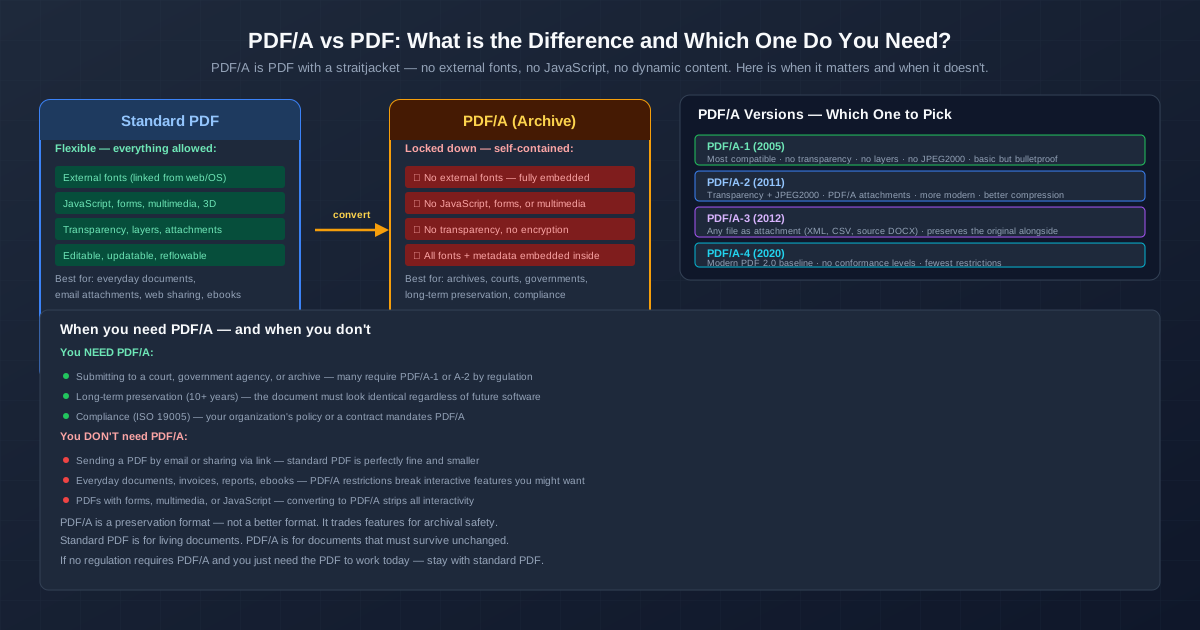
PDF/A is a stricter version of PDF, made for keeping documents readable for decades. A PDF/A file has to carry everything it needs inside itself — every font, a colour profile, its metadata — and it may not contain anything that depends on outside software or keys: no JavaScript, no audio or video, no encryption, no links to external content. A regular PDF allows all of that.
If nobody asked you for PDF/A, a regular PDF is fine. If a court, archive, tender or invoicing system asks for it, the instructions usually name the version too — and that's the part people get wrong.
PDF/A vs PDF: The Differences at a Glance
| Regular PDF | PDF/A | |
|---|---|---|
| Fonts | May reference fonts on the reader's computer | Every font used must be embedded |
| Colour | Device colours allowed as-is | Colours must be device-independent, usually via an embedded ICC profile |
| JavaScript, forms that calculate | Allowed | Forbidden |
| Audio, video, 3D | Allowed | Forbidden |
| Encryption and passwords | Allowed | Forbidden |
| External content | Allowed | Forbidden — everything must be inside the file |
| Transparency, layers | Allowed | Forbidden in PDF/A-1, allowed from PDF/A-2 |
| Attached files | Any | None in PDF/A-1, PDF/A files in PDF/A-2, any file in PDF/A-3 |
| Metadata | Optional | XMP metadata required, including the PDF/A version it claims |
| Opens in normal PDF readers | Yes | Yes — PDF/A is still a PDF |
The short way to put it: a regular PDF is built to work now. PDF/A is built so that someone opening it in 30 years with unknown software sees exactly what you saw.
What Is PDF/A?
PDF/A is an ISO standard, ISO 19005, published in parts since 2005. The "A" stands for archive. It doesn't add features to PDF — it takes them away, keeping only what can be rendered reliably without the original computer, fonts or plugins.
Each rule answers a specific long-term risk:
- Embedded fonts — the font installed on your laptop won't exist on the archivist's machine in 2050
- Colour profiles — "red" on one printer isn't "red" on another unless the file says which red it means
- No JavaScript or media — players and script engines change; a document shouldn't depend on them
- No encryption — a password that's lost, or an algorithm that's retired, makes the file unreadable
- Metadata — title, author, dates and the PDF/A version travel with the file, in a standard format
What Changes When a PDF Becomes PDF/A: A Test
We took a 3-page text PDF of 2,992 bytes that used Helvetica without embedding it — a typical lightweight PDF — and checked it against PDF/A-2b with our PDF/A validator. It failed 21 of 697 checks:
- Fonts not embedded (clause 6.2.11.4.1) — Helvetica and Helvetica-Bold were only referenced
- Device grey without an output intent (clause 6.2.4.3) — no colour profile said what the grey meant
- No XMP metadata (clause 6.6.2.1)
- Stream formatting (clause 6.1.7.1) — a low-level syntax rule most PDF writers ignore
After running it through our PDF to PDF/A converter as PDF/A-2b, the file passed all 3,650 checks. It had grown to 54,291 bytes — the embedded fonts and the colour profile account for nearly all of that. We then compressed it with Compress PDF: 49,635 bytes, and it still passed as PDF/A-2b.
Two takeaways. First, the size increase is a fixed cost of the fonts and profile, not a percentage — tiny files balloon, large image-heavy files barely notice. Second, a PDF/A file survives later processing only if the tool keeps the rules; check it again after any edit.
PDF/A Versions: PDF/A-1 vs PDF/A-2 vs PDF/A-3 vs PDF/A-4
| Version | Year | Based on | What it adds or allows | Typical reason to choose it |
|---|---|---|---|---|
| PDF/A-1 | 2005 | PDF 1.4 | Strictest: no transparency, no layers, no JPEG 2000, no attachments | The recipient names it, often older court and archive systems |
| PDF/A-2 | 2011 | PDF 1.7 | Transparency, layers, JPEG 2000, embedded PDF/A files | The default when nobody specifies a version |
| PDF/A-3 | 2012 | PDF 1.7 | Everything in A-2, plus attachments of any type | E-invoices and documents that must carry source data |
| PDF/A-4 | 2020 | PDF 2.0 | Rules updated for PDF 2.0; the b/u/a levels replaced by a base level plus variants for attachments and engineering files | A recipient that works with PDF 2.0 and asks for it |
Conformance Levels: What "b", "u" and "a" Mean
PDF/A-1, 2 and 3 come in levels, written after the number:
- b (basic) — the page looks right: fonts, colours and layout are preserved. This is what most requirements mean.
- u (Unicode) — b, plus every character maps to Unicode, so text can be searched and copied reliably. Only in PDF/A-2 and 3.
- a (accessible) — b and u, plus a tagged structure (headings, reading order, alternative text) for screen readers.
A PDF/A-2b file is not automatically searchable or accessible. If the requirement says "2u" or "2a", a "2b" file won't do.
Which PDF/A Version to Pick
- Use what the recipient names. "PDF/A-1b" means PDF/A-1b, even though newer versions exist.
- No version named? PDF/A-2b. It keeps transparency and modern image compression, and it's widely accepted.
- Need to attach the source data (an XML invoice, a spreadsheet)? PDF/A-3.
When Is PDF/A Required?
You'll run into the requirement in a few places:
- Electronic invoicing. The German ZUGFeRD and French Factur-X formats, technically identical since ZUGFeRD 2.1, are PDF/A-3 files with the invoice data embedded as XML. The PDF is what people read; the XML is what accounting software reads.
- Archives and records offices. Institutions that keep documents indefinitely often accept or prefer PDF/A for deposits. Their submission guidelines say which version.
- Courts and e-filing. Rules differ by country and by court. Some systems ask for PDF/A, others only for text-searchable PDFs within a size limit. The court's e-filing instructions are the source to follow — not a general rule.
- Tenders and regulated industries. Procurement portals, and industries with long retention periods, sometimes require PDF/A for submitted documents.
- Your own long-term archive. Nobody requires it, but if a contract or record must still open cleanly in 20 years, PDF/A is the safest PDF to keep it in.
If nothing in your instructions mentions PDF/A, ISO 19005 or "archival PDF", you don't need it.
When PDF/A Is the Wrong Choice
- Fillable or calculating forms — form scripts are forbidden, so the calculations stop working
- Confidential documents that must stay password-protected — PDF/A doesn't allow encryption, so a PDF/A file can't have an open password
- Documents with video, audio or 3D — the media has to go
- Drafts you're still editing — keep the Word file or a regular PDF as the working copy and make PDF/A from the final version
Getting a PDF/A File
There are two good routes, and one that doesn't get you there:
- Export from the source application. Word for Windows has a PDF/A option under Save As → PDF → Options ("PDF/A compliant"), and other office suites offer a PDF/A checkbox in their PDF export dialog. This gives the cleanest result, because the application still knows the fonts and structure.
- Convert an existing PDF. Our PDF to PDF/A converter produces PDF/A-1b, 2b or 3b (2b is preselected). It embeds the fonts, adds a colour profile and the metadata, removes encryption and forbidden content, and checks the result against the standard before you download it — a file that fails isn't handed over. Look through the result afterwards, since interactive elements are removed by design.
- Not our Word to PDF converter. Word to PDF produces a regular PDF. Convert that PDF to PDF/A as a second step, or export PDF/A directly from Word.
Two things to sort out first. Password-protected PDFs need the protection removed — with the password — using Unlock PDF, since encryption is forbidden. And a scanned document stays a picture of text in PDF/A: if the recipient wants searchable text, run OCR to a searchable PDF before converting.
How to Tell Whether a File Is Really PDF/A
Many PDF readers show "PDF/A" when a file claims it in its metadata. That claim is just a label — software can write it into a file that breaks the rules. The only way to know is to check the file against the standard. Our PDF/A validator runs those checks for PDF/A-1b, 2b, 3b or an auto-detected version, and lists every failed rule with its clause number.
Can You Edit a PDF/A File?
You can, but the result may no longer be PDF/A. Adding text with a font that isn't embedded, adding a transparent annotation to a PDF/A-1 file, or saving from an editor that rewrites the metadata can each break it. Check the file again after editing, or edit the source and create the PDF/A again.
Quick Summary
- PDF/A is a restricted PDF for long-term archiving — fonts and colour profile embedded, no scripts, media or encryption
- Versions: A-1 is strictest, A-2 is the usual default, A-3 allows attachments, A-4 is based on PDF 2.0
- Levels: "b" preserves appearance, "u" adds reliable text, "a" adds accessibility tags
- Required when an invoicing format, archive, court or tender names it — use the version it names
- Otherwise a regular PDF is the better working format
Related Tools
- PDF to PDF/A — convert a PDF to PDF/A-1b, 2b or 3b, checked against the standard
- PDF/A validator — check any PDF against PDF/A and read the failed rules
- Compress PDF — reduce the size of large PDFs before archiving
- Word to PDF — turn a document into a regular PDF