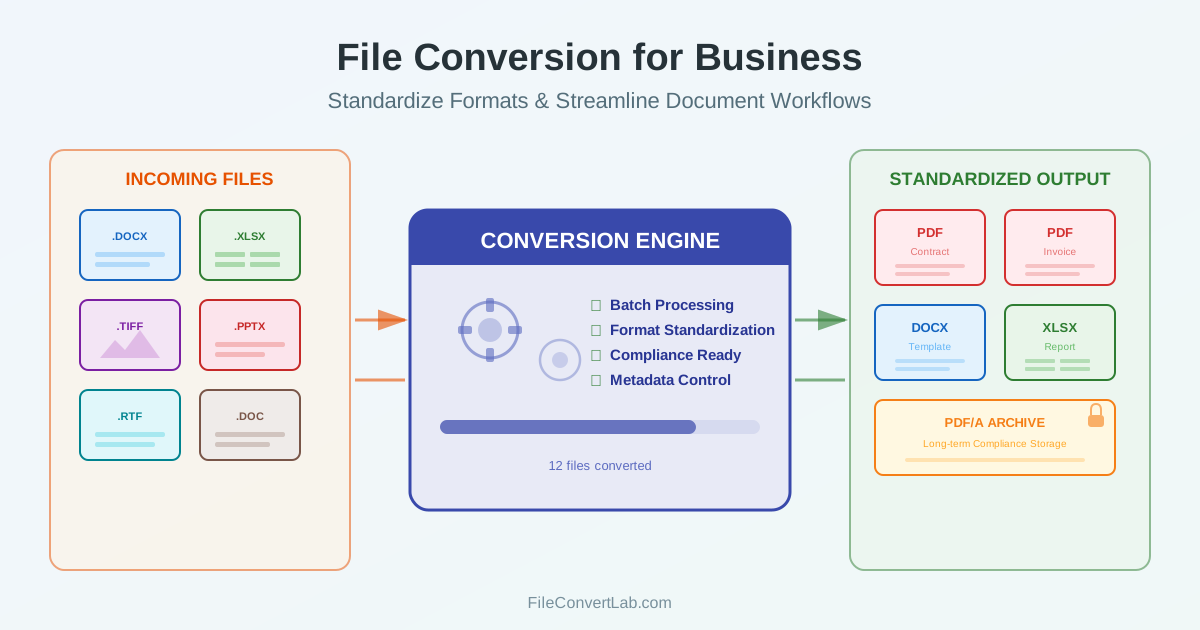
Every business runs on documents. Contracts arrive as Word files, invoices land as PDFs, financial reports live in spreadsheets, and presentations circulate as PowerPoint decks. When these formats do not align with your systems or your partners' expectations, work slows down. Business file conversion is not just a technical task — it is a workflow decision that affects efficiency, compliance, and document security across your entire organization.
This guide covers the practical side of document conversion for business: how to standardize formats, when to convert contracts to PDF, how to batch process files efficiently, and what compliance requirements like GDPR mean for your conversion workflow.
Why Document Format Standardization Matters
Format inconsistency is one of the most overlooked causes of lost time in business. When your team stores contracts as a mix of DOC, DOCX, and PDF files, finding and verifying documents takes longer than it should.
When a client sends a scanned invoice as a TIFF image and your accounting system expects PDF, someone has to manually convert it before processing can begin. Multiply this by hundreds of documents per month, and the cost of inconsistency becomes significant.
Standardizing document formats means defining a clear policy: which file format for business documents of each type. The goal is not to use one format for everything — that would be impractical — but to assign the right format to the right purpose and convert incoming files to match.
A Practical Format Policy
| Document Type | Recommended Format | Reason |
|---|---|---|
| Contracts and agreements | Prevents accidental edits, consistent appearance | |
| Invoices and receipts | Universal readability, archival stability | |
| Editable templates | DOCX | Easy editing in Word, Google Docs, LibreOffice |
| Financial reports | XLSX | Formulas, pivot tables, data analysis |
| Presentations | PPTX / PDF | PPTX for editing, PDF for distribution |
| Archived records | PDF/A | ISO standard for long-term preservation |
| Once you define your format policy, the next step is establishing a conversion workflow for incoming files that do not match. A client sends a contract as DOCX? |
Convert it to PDF before filing. Receive a PDF report that needs editing?
Convert PDF to Word for revisions, then back to PDF for the final version.
PDF for Contracts, Invoices, and Legal Documents
PDF is the standard file format for business documents that need to be final. Contracts, invoices, proposals, and compliance reports all benefit from PDF because the format guarantees that the document looks the same on every screen, printer, and operating system. Unlike Word documents, PDFs do not reflow text based on the viewer's installed fonts or page settings.
When you convert contracts to PDF, you lock the formatting in place. This prevents accidental changes — a misplaced cursor in a Word file can alter contract terms without anyone noticing. PDF also supports digital signatures, making it the preferred format for agreements that need formal sign-off.
For invoices, PDF ensures that your branding, layout, and numbers display correctly regardless of the recipient's software. Many accounting and ERP systems import PDF invoices directly, using OCR or structured data extraction to populate their records.
When to Convert Back from PDF
Not every document stays as PDF forever. When you need to update an older contract, extract data from a PDF report, or repurpose content from a finalized document, converting back to an editable format is the practical solution. Use a PDF to Word converter for text-heavy documents, or a PDF to Excel converter when you need to work with tabular data from financial statements and reports.
Batch Processing: Converting Files at Scale
Individual file conversion works for occasional needs, but businesses regularly face scenarios where dozens or hundreds of files need conversion at once. Month-end reporting, document migration projects, client onboarding packages, and archive digitization all involve batch conversion.
Batch convert business files by uploading multiple documents to a conversion platform and processing them in a single operation. This eliminates the repetitive cycle of upload-convert-download for each file and ensures consistent settings across the entire batch.
Common Batch Conversion Scenarios
- Month-end reporting: Convert all departmental Excel reports to PDF for distribution to stakeholders who need read-only access
- Document archive migration: Convert legacy DOC and RTF files to DOCX or PDF/A for long-term storage in a modern document management system
- Client deliverables: Convert a set of Word proposals and presentations to PDF before sending to clients
- Invoice processing: Convert scanned invoice images to searchable PDFs for your accounting system
- Regulatory submissions: Convert all supporting documents to a required format (usually PDF) before filing
Batch processing also reduces human error. When converting files one at a time, it is easy to miss a file, use the wrong settings, or accidentally overwrite an original. A batch workflow applies the same conversion parameters to every file, producing consistent results.
Document Conversion and Compliance
Document conversion compliance is a growing concern for businesses operating under regulations like GDPR, HIPAA, SOX, or industry-specific data handling requirements. When you convert documents online, the files temporarily leave your local environment and are processed on external servers. Understanding what happens during that process is essential for maintaining compliance.
GDPR and Data Privacy
Under GDPR, any document containing personal data — employee records, customer contracts, medical forms — must be handled according to data protection principles. When using an online conversion service, verify that the provider does not retain your files after conversion, does not use uploaded content for model training or analytics, and processes data within an appropriate jurisdiction.
For highly sensitive documents, consider whether server-side conversion with automatic file deletion meets your requirements, or whether desktop-based conversion is more appropriate. The decision depends on your data classification policy and your organization's risk tolerance.
Document Archiving Requirements
Many industries require businesses to retain documents for specific periods — seven years for financial records in most jurisdictions, longer for some regulated industries. The format you archive in matters because you need to guarantee that documents remain readable decades from now.
PDF/A (ISO 19005) is the standard for archival documents. Unlike regular PDF, PDF/A embeds all fonts, disables external references, and prohibits encryption that could make the file unreadable. Converting business documents to PDF/A before archiving ensures long-term accessibility regardless of software changes.
Audit Trails and Version Control
In regulated environments, you may need to demonstrate that a document was converted accurately and that no content was altered during conversion. Maintaining an audit trail — recording which files were converted, when, by whom, and with what settings — supports compliance during audits. Keep the original file alongside the converted version whenever regulations require it.
Document Security During Conversion
Security is a top concern when converting business documents online. Contracts contain deal terms, financial reports include revenue figures, and HR documents hold personal employee data. Choosing the right conversion approach depends on how sensitive the document is.
Security Checklist for Online Conversion
- Server-side processing: Files are converted on the server, not in the browser. This means the conversion handles complex documents reliably but requires trust in the service provider
- Published retention periods: the service states in writing how long uploads and results are kept, instead of leaving it to your imagination
- No account required: Services that do not require registration avoid storing your email and linking it to your documents
- HTTPS encryption: All file transfers should use TLS encryption to prevent interception during upload and download
- Metadata removal: Check whether the conversion strips sensitive metadata like author names, revision history, and comments from the output file
For documents classified as confidential or restricted, consider reducing file size with PDF compression after conversion to minimize the data exposed during transmission, and always verify the output before distributing.
Workflow Automation: Integrating Conversion into Business
Processes Manual file conversion does not scale. When your team converts documents daily — incoming client files, internal reports, compliance submissions — the conversion step should be part of the workflow, not an interruption to it.
Where Conversion Fits in Business Workflows
- Document intake: Convert incoming files to your standard format as soon as they arrive. A client sends a DOCX contract — convert to PDF immediately for the legal team
- Report generation: After creating reports in Excel, convert to PDF for distribution. Recipients get a clean, read-only document that cannot be accidentally modified
- Approval workflows: Convert draft documents to PDF before routing for approval. This prevents approvers from inadvertently editing the document during review
- Archival: At the end of a project or fiscal period, batch convert all working documents to PDF/A for long-term storage
- Client deliverables: Convert final deliverables to PDF before sending, ensuring the client sees exactly what you intended regardless of their software
Reducing Friction in the Conversion Step
The biggest barrier to consistent document conversion for business is friction. If converting a file requires opening a separate application, waiting for it to load, navigating menus, and saving the result — people will skip it when they are busy. The solution is making conversion as fast as possible: drag-and-drop interfaces, batch upload, and instant download without unnecessary steps.
A well-integrated business document workflow means that converting documents online takes seconds, not minutes.
The conversion tool should support the formats your organization actually uses and handle edge cases — multi-page documents, embedded images, complex tables — without manual intervention.
Choosing the Right Format for Each Business Need
The best file format for business documents depends on what happens to the document after conversion. A format that is perfect for one use case can be wrong for another.
PDF: The Final Document Format
Use PDF when the document is finished and should not be changed. Contracts, signed agreements, published reports, invoices, and compliance filings all belong in PDF. The format preserves exact layout, supports digital signatures, and works on every platform without special software.
DOCX: The Collaborative Editing Format
Use DOCX when the document needs editing by multiple people. Proposals in draft, policy documents under review, and templates that teams fill in regularly should stay in DOCX until they are finalized. Word's track changes and commenting features make DOCX the practical choice for collaborative work.
XLSX: The Data and Calculation Format
Use XLSX for any document that contains calculations, formulas, or data that needs filtering and sorting.
Financial statements, budgets, inventory lists, and project trackers belong in XLSX. When you need to share the data without allowing changes, convert the spreadsheet to PDF for distribution.
Common Business Conversion Workflows
Here are the most frequent conversion patterns in a typical business document workflow, along with when and why each one makes sense.
Word to PDF: Finalizing Documents
The most common business conversion. Every time a proposal, contract, or report reaches its final version, converting Word to PDF locks the content and ensures consistent presentation. This is the single conversion that every business performs daily, often dozens of times.
PDF to Word: Updating Existing Documents
When you receive a PDF document that needs changes — an outdated contract, a report that needs new data, or a template from a partner — converting PDF back to Word gives you an editable version. Make your changes in Word, then convert back to PDF for the updated final version.
PDF to Excel: Extracting Financial Data
Financial statements, bank reports, and supplier invoices often arrive as PDFs containing tables.
Converting PDF to Excel extracts these tables into a spreadsheet where you can run formulas, create pivot tables, and integrate the data into your financial systems.
PDF Compression: Reducing File Size for Email
Large PDF reports with images and charts can exceed email attachment limits.
PDF compression reduces file size while maintaining visual quality, making documents easier to share by email and faster to upload to document management systems.
Key Takeaways
- Standardize your formats — define which file format for business documents of each type and convert incoming files to match your policy
- Use PDF for final documents — contracts, invoices, and reports belong in PDF to preserve formatting and prevent accidental changes
- Batch process when possible — batch convert business files to save time during reporting periods, migrations, and regulatory submissions
- Consider compliance early — document conversion compliance requirements under GDPR and other regulations affect which services you can use and how files are handled
- Automate the workflow — integrate conversion into your business document workflow so it happens consistently rather than relying on manual effort
- Archive in PDF/A — use the ISO archival standard for documents that need to remain readable for years or decades
- Verify security practices — ensure your conversion service handles confidential documents with appropriate encryption, deletion policies, and privacy controls