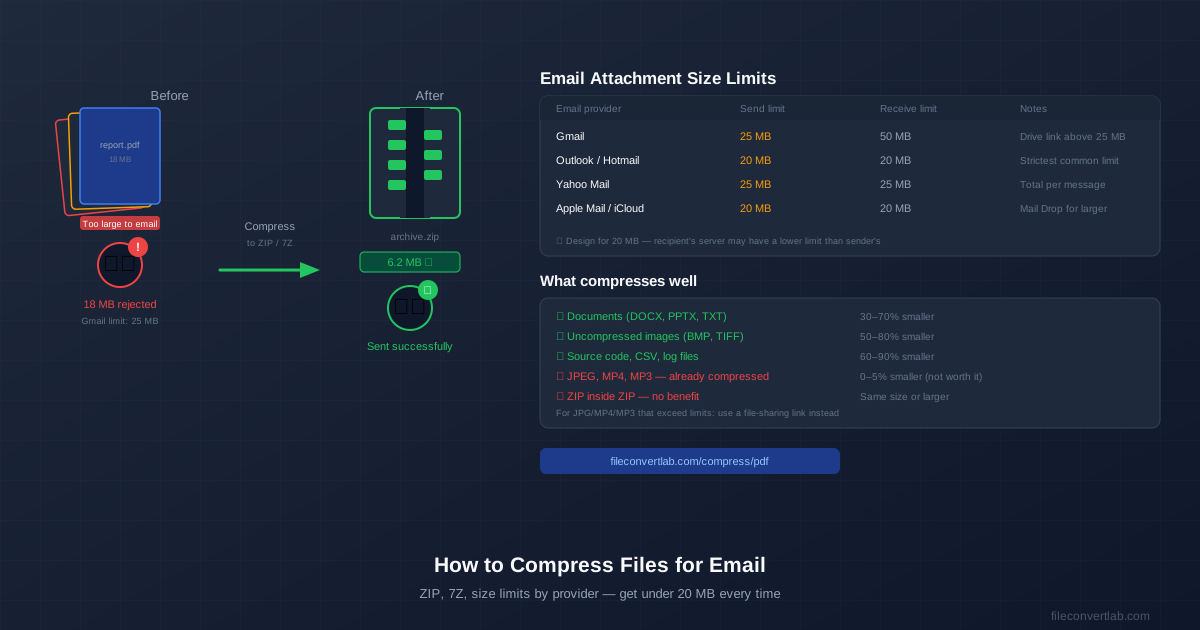
Email servers reject attachments above their size limit — usually 20–25 MB — without sending a useful error message. The fix is to compress your files into a ZIP archive before attaching. A folder of documents that totals 40 MB often compresses to under 10 MB. Here's when that works, and when it doesn't.
Email Attachment Size Limits by Provider
The size limit you need to stay under isn't just your provider's sending limit — it's also your recipient's receiving limit. Design for the strictest common limit: 20 MB.
| Provider | Send limit | Receive limit | Workaround |
|---|---|---|---|
| Gmail | 25 MB | 50 MB | Auto-converts to Google Drive link |
| Outlook / Hotmail | 20 MB | 20 MB | Use OneDrive link |
| Yahoo Mail | 25 MB | 25 MB | Dropbox link |
| Apple Mail / iCloud | 20 MB | 20 MB | Mail Drop (iCloud relay) |
| Corporate / custom | Varies (5–50 MB) | Varies | Ask your IT team |
| Safe target: 15 MB or less. This leaves headroom for email headers, encoding overhead (attachments are Base64-encoded which adds ~33% to file size in transit), and recipient server limits you can't control. |
What Compresses Well (and What Doesn't)
ZIP compression works by finding repetitive patterns in file data. Files with lots of repetition compress well; files that are already compressed have no patterns left to squeeze out.
| File type | Typical reduction | Notes |
|---|---|---|
| Text files, CSV, XML | 60–90% | Highly repetitive — compresses best |
| Word / PowerPoint (DOCX, PPTX) | 20–60% | Already ZIP internally, but outer ZIP helps |
| BMP, TIFF (uncompressed images) | 50–80% | Large files with compressible patterns |
| PDF documents | 5–30% | Use a PDF compressor instead of ZIP |
| JPEG, PNG photos | 0–5% | Already compressed — ZIP adds almost nothing |
| MP4, MOV, MP3, AAC | 0–2% | Use a file-sharing link instead |
| Special case — PDFs: Don't put a PDF in a ZIP and hope it shrinks significantly. Use a dedicated PDF compressor instead. It re-encodes images inside the PDF at lower resolution, which can reduce a 10 MB PDF to 1–2 MB — far better than ZIP can achieve. |
How to Create a ZIP on Windows
Built-in (no software needed)
- Select the files or folder you want to compress in File Explorer.
- Right-click the selection.
- Windows 11: Choose Compress to ZIP file. Windows 10: Choose Send to → Compressed (zipped) folder.
- A .zip file appears in the same folder. Rename it if needed, then attach it to your email.
With 7-Zip (better compression)
The built-in Windows ZIP uses a standard compression level. 7-Zip (free, from 7-zip.org) can compress the same files 20–30% smaller using a stronger algorithm.
Right-click your files → 7-Zip → Add to archive → choose ZIP as format and set compression level to Normal or Maximum.
For email attachments specifically, the difference between Normal and Maximum compression is usually small (a few percent) while Maximum takes significantly longer on large files. Normal is the right choice for most email use cases.
How to Create a ZIP on Mac
- Select the files or folder in Finder.
- Right-click (Control+click) the selection.
- Choose Compress.
- If you selected multiple files, macOS creates Archive.zip containing all of them. If you selected one folder, it creates a ZIP named after the folder.
- Rename the ZIP if needed, then attach it to your email. macOS's built-in compression is adequate for email purposes. If you need smaller archives, Keka (free download from keka.io) offers better compression with more format options.
When the ZIP Is Still Too Large
If your file is still over the size limit after compression — or if the file type doesn't compress (video, audio, already-compressed images) — use a file-sharing service instead of an attachment:
- Google Drive: Upload the file, right-click → Share → copy link. Paste the link in your email. Recipients click to download without needing a Google account (if you set it to "Anyone with the link").
- WeTransfer: Free service specifically designed for large file transfers. Upload up to 2 GB, enter the recipient's email, and WeTransfer sends them a download link. No account required for the sender.
- Dropbox / OneDrive: If you already use these, upload and share a link. Dropbox Basic is free up to 2 GB storage; OneDrive gives 5 GB free.
Compressing Multiple Files into One ZIP
One of ZIP's most useful features is bundling many files into one attachment.
Instead of attaching 15 separate files (which may individually hit limits and creates clutter), put them all in a folder, compress the folder, and send one ZIP.
This also makes things easier for the recipient — they download one file, extract it, and have everything organized in a folder rather than hunting through their Downloads folder for 15 separate files.
For context on choosing between ZIP and 7Z for different scenarios, see our ZIP vs 7Z vs RAR comparison . For email, ZIP wins every time due to compatibility.
Compressing Specific File Types for Email
Sending large PDFs
PDFs with embedded images (scanned documents, presentation exports) are often unnecessarily large. Compress the PDF directly rather than zipping it — a PDF compressor reduces image resolution inside the file, which a ZIP cannot do. Our PDF compressor handles this online without any software installation.
Sending photos
JPEG photos don't compress in ZIP — they're already compressed. If you need to send photos under a size limit, either reduce the image dimensions (resize to 1920×1080 for most use cases) or use a file-sharing link. Don't try to ZIP JPEGs; it's wasted effort.
Sending videos
Video files are almost always too large for email attachments regardless of compression. A one-minute MP4 at typical quality is 50–150 MB. Use WeTransfer, Google Drive, or YouTube (set to unlisted if you don't want it public). Email is not the right channel for video files.