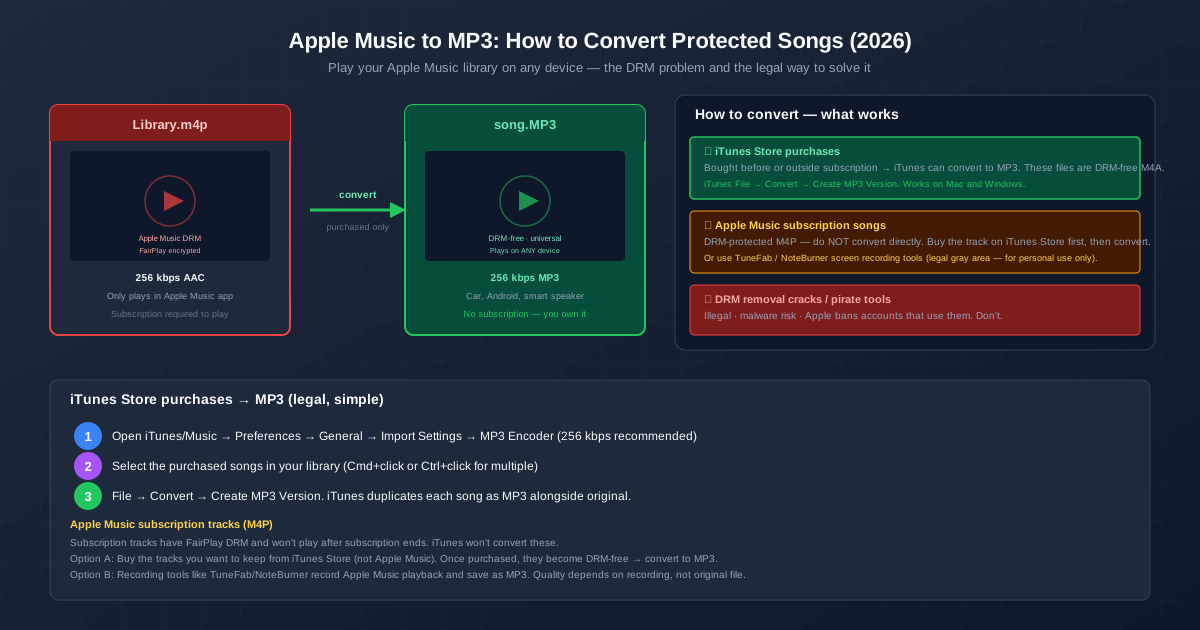
You have been building your Apple Music library for years. Hundreds of albums, carefully curated playlists. Now you want to put a few songs on a USB stick for your car, or transfer an album to an Android phone, or back up tracks you cannot lose. But the files are locked. Here is what you can and cannot do — and how to convert Apple Music songs to MP3 legally, for the music you have the right to keep.
The critical distinction: iTunes Store purchases convert to MP3 easily. Apple Music subscription tracks do not — they have DRM that blocks conversion. Knowing which you have is the first step.
iTunes Store Purchases vs Apple Music Subscription
| Characteristic | iTunes Store Purchase | Apple Music Subscription |
|---|---|---|
| How you get it | Buy individual songs/albums | Monthly subscription, full catalogue |
| File format | M4A (AAC, DRM-free since 2009) | M4P (AAC + FairPlay DRM) |
| Plays after you stop paying | Yes — you own it permanently | No — files become unplayable |
| Can convert to MP3 | Yes — iTunes built-in converter | No — DRM blocks conversion |
| Can copy to Android/USB/car | Yes — no restrictions | No — only Apple Music app |
| Cost | $0.99-$1.29 per song, once | $10.99/month for all access |
Method 1: Convert Purchased iTunes Songs to MP3 (Legal, Simple)
This method works for any song you bought from the iTunes Store — even if you also have an Apple Music subscription. Purchased tracks are DRM-free.
- Set MP3 as the import format. iTunes (Windows) or Music app (Mac): Preferences → General → Import Settings. Set Import Using to MP3 Encoder. For Setting, choose High Quality (160 kbps) for casual listening or Custom → 256 kbps to match the iTunes Store source quality.
- Select the purchased songs. In your library, Cmd+click (Mac) or Ctrl+click (Windows) to select multiple songs. To find only your purchased music, create a Smart Playlist: File → New → Smart Playlist, set rule to "Purchased is true" or "iCloud Status is Purchased".
- Convert. File → Convert → Create MP3 Version. iTunes reads the M4A file, decodes it, encodes to MP3 at your chosen bitrate, and saves the MP3 copy next to the original.
- Find the MP3 files. Right-click a converted song → Show in Finder (Mac) or Show in Windows Explorer. Copy these MP3 files anywhere — USB drive, Android phone, car stereo, Plex server.
Method 2: Apple Music Subscription Tracks — Your Options
Subscription tracks (the ones you stream, not the ones you bought) have FairPlay DRM. iTunes will not convert them. The "Create MP3 Version" option is greyed out for these tracks. Here are your options, from most to least recommended:
Option A: Buy the track from iTunes Store
The cleanest solution. Search for the song in the iTunes Store (not Apple Music), buy it ($0.99-$1.29), and it joins your library as a DRM-free M4A. Then convert to MP3 using Method 1 above. This costs money per track, but you own the file permanently. If you have 20 songs you cannot live without, buying them costs about $20 total — less than two months of Apple Music subscription.
Option B: Audio capture tools (TuneFab, NoteBurner, etc.)
Software like TuneFab Apple Music Converter and NoteBurner records the audio output while Apple Music plays the track. It is essentially a high-speed automated audio recorder — it does not crack the DRM, it captures the decoded audio signal. The quality depends on the recording settings, not the original file. Always configure these tools to output at 256 kbps MP3 or higher. These tools violate Apple's terms of service; use them only for personal backups of music you have paid to access.
Option C: Online converter after purchase
Buy the track from iTunes Store → get DRM-free M4A → use the M4A to MP3 converter instead of iTunes. This is useful if you are on a device without iTunes (work computer, Chromebook) — buy on your Apple device, transfer the M4A file to any browser, and convert online.
Why Apple Music Uses DRM (and iTunes Purchases Do Not)
When the iTunes Store launched in 2003, all songs had FairPlay DRM — you could only play them on authorised Apple devices. This was a requirement from record labels, who were terrified of piracy. In 2009, Apple negotiated with the major labels to remove DRM from purchased music. Since then, every iTunes Store purchase is a DRM-free M4A file. You can copy it, convert it, and play it on any device.
Apple Music (launched 2015) is a streaming service, not a store. The record labels agreed to streaming only under strict DRM — the same reason Spotify, Tidal, and Amazon Music all use encryption. Without DRM, someone could sign up for one month, download the entire Apple Music catalogue, cancel, and keep everything. The DRM ensures access ends when the subscription ends.
Quality Settings for iTunes to MP3 Conversion
| iTunes Import Setting | Bitrate | File per 4-min song | When to use |
|---|---|---|---|
| Good Quality | 128 kbps | ~3.8 MB | Audiobooks, spoken word, car stereo |
| High Quality | 160 kbps | ~4.7 MB | Casual listening on average equipment |
| Higher Quality (Custom) | 192-256 kbps | 5.6-7.5 MB | Music library, good headphones ★ recommended |
| Custom (320 kbps) | 320 kbps | ~9.4 MB | Critical listening, archiving favourites |
| Since iTunes Store source files are 256 kbps AAC, using 256 kbps MP3 preserves the same quality level. Going higher (320 kbps) wastes space — you are encoding information the source does not contain. |
Related Guides
For converting the DRM-free M4A files you get after purchase, use the M4A to MP3 converter . If you are on Windows specifically, read the M4A to MP3 on Windows guide for five methods including iTunes and FFmpeg. To understand the formats involved, see MP3 vs AAC — Apple Music uses AAC, and understanding the quality relationship helps when choosing your MP3 bitrate.
Quick Summary
- iTunes Store purchases (M4A) → MP3: File → Convert → Create MP3 Version. Simple, legal, built into iTunes.
- Apple Music subscription tracks (M4P) → MP3: Buy from iTunes Store first to get the DRM-free version, then convert. Or use audio recording tools.
- Set MP3 bitrate to 256 kbps to match iTunes Store quality (256 kbps AAC source).
- DRM removal cracks are illegal and dangerous. Do not install random software that claims to strip FairPlay — it is either malware or will get your Apple ID banned.
- If you want to own music permanently, buy it from iTunes Store. Subscription is for access; purchase is for ownership.
- Convert before you cancel your subscription. Once cancelled, DRM keys are revoked and subscription downloads stop working. Purchased tracks are unaffected.